 Installation guide
 Owner’s manual
 Error Codes






How many decibels is a Kenmore Elite dishwasher?
Kenmore Elite dishwashers vary by model and series, so the decibel rating is not the same across all “Kenmore Elite” units. For your Kenmore Elite 66513412K701 dishwasher, we recommend confirming the exact sound rating in the 66513412K701 owner's manual.
What to expect for dishwasher noise
Most built-in dishwashers fall into a few common noise bands. If you do not see a decibel number listed for your exact model, use these ranges to set expectations:
- 39 to 44 dBA: very quiet (often hard to hear in the next room)
- 45 to 50 dBA: quiet (normal conversation usually covers it)
- 51 to 55 dBA: noticeable (you will hear wash and drain periods)
- 56+ dBA: loud (often indicates an older design or a developing issue)
Quick comparison: what the numbers mean
| Approx. dBA | What it sounds like | Typical customer takeaway |
|---|---|---|
| 40 to 44 | very quiet | “I barely notice it running.” |
| 45 to 50 | quiet | “I can hear it, but it is not distracting.” |
| 51 to 55 | moderate | “I hear it clearly during wash and drain.” |
| 56+ | loud | “It competes with TV or conversation.” |
If your dishwasher suddenly seems louder
A change in noise level usually points to a maintenance or wash-system issue rather than a “higher dBA model.” Check these common causes first:
- Food debris in the filter area or sump
- Spray arm hitting tall dishes or a loose rack
- A restricted drain path (air gap or hose routing)
- A worn circulation component (growling or grinding during wash)
- A drain pump that is straining during drain
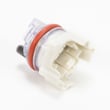
If the noise is strongest during draining, the dishwasher drain pump WPW10348269 is one of the key parts involved.
Why it matters
Decibel ratings help you compare models, but day-to-day noise is also affected by loading, water pressure, and wear in parts like the drain pump, wash motor, and racks.
Last updated: January 2026
What does red lock mean on a dishwasher?
On the Kenmore Elite dishwasher model 66513412K701, a red lock (often shown as a padlock or “LOCK ON” light) means Control Lock is turned on, so the buttons will not respond and the dishwasher will not run until you turn the lock off. See the 66513412K701 owner's manual for the exact button sequence.
What the lock does (and does not do)
When Control Lock is active, it is designed to prevent accidental button presses between cycles.
- Disables the control buttons so cycles and options cannot be changed
- Prevents the dishwasher from starting while locked
- Allows the door to open and close normally
- Typically flashes the lock light if you press a button while locked
How to turn Control Lock off on this model
For model 66513412K701, the manual procedure is:
- Press and hold HEATED DRY for 3 seconds
- Confirm the LOCK ON light turns off
- Select a cycle and press START/RESUME
If the dishwasher was mid-cycle and you need to reset it first, follow the reset steps in the 66513412K701 owner's manual.
Quick checks if the red lock keeps coming back
These steps help when the lock turns on unexpectedly or the panel seems “stuck.”
- Make sure no button is being held down by a wet cloth or stuck overlay
- Wipe the control panel dry and try the lock sequence again
- Close the door firmly; some models will not respond normally with the door unlatched
- If the panel is unresponsive even with lock off, check household power (breaker) and then inspect the dishwasher’s internal fuse
If you suspect a power issue inside the dishwasher, a failed fuse W10258275 can prevent normal control operation.
What you should see (normal behavior)
| Indicator on panel | What it means | What to do |
|---|---|---|
| Red padlock or “LOCK ON” lit | Controls are locked | Hold HEATED DRY 3 seconds |
| Lock light flashes when pressing buttons | Lock is still active | Repeat unlock steps |
| No lights at all | No power or internal power issue | Check breaker, then fuse |
Why it matters
Control Lock is a simple feature, but it is one of the most common reasons a Kenmore dishwasher “won’t start.” Unlocking it restores normal operation without replacing parts.
Last updated: January 2026
What is the code F2E2 on a Kenmore Elite dishwasher?
On the Kenmore Elite dishwasher model 66513412K701, error code F2E2 points to a communication problem between the user interface (control panel) and the main electronic control board. This commonly shows up as unresponsive buttons, beeping, or a cycle that will not start; it is usually tied to the control panel, wiring, or the main control.
What to check first (fast, no parts)
- Turn off power at the breaker for 1 minute, then restore power and try a normal cycle.
- Make sure the door fully latches; a poor latch can mimic control issues.
- If the keypad is acting “stuck” or random, wipe the control panel dry and try again.
- If the dishwasher starts and then errors, note when it happens (right away vs. mid-cycle).
- Review any model-specific diagnostics or reset steps in the 66513412K701 owner's manual.
Likely causes and what they mean
| What you notice | Most likely issue | What to do next |
|---|---|---|
| Buttons do not respond | User interface keypad/control panel problem | Inspect console area for moisture; consider control panel replacement |
| Intermittent operation | Loose connection or damaged wire harness | Check connectors between console and main control |
| Dead display or repeated beeping | Main control board not communicating | Test connections; consider main control replacement |
Parts that are commonly involved
If basic checks do not help, the failure is typically in the electronic controls or the wiring between them.
- For main-control related symptoms, the Dishwasher electronic control board is a common suspect: dishwasher electronic control board WPW10084141.
- If the dishwasher is completely dead after a surge or short, check the thermal protection device: fuse W10258275.
Why it matters
The user interface and main control have to “handshake” before the dishwasher can run. When that communication fails, the dishwasher may not start, may stop mid-cycle, or may ignore button presses, even if the motor and pumps are fine.
Last updated: January 2026
How to hard reset a Kenmore Elite dishwasher?
To hard reset (control reset) a Kenmore Elite dishwasher model 66513412K701, we cancel the current cycle and reset the control, then start a fresh cycle. The documented reset method uses CANCEL/DRAIN and START/RESUME; see the steps in the 66513412K701 owner's manual.
Hard reset steps (control reset)
- Open the door slightly to pause the cycle; wait for spraying to stop.
- Open the door fully.
- Press CANCEL/DRAIN twice to reset the control.
- Select a new cycle and any options.
- Close the door firmly and press START/RESUME.
If the controls seem unresponsive, check Control Lock
Control Lock disables the keypad, so the dishwasher may look like it will not start.
- Look for a LOCK ON indicator light.
- If LOCK ON is lit, press and hold HEATED DRY for 3 seconds to toggle Control Lock off.
- Try selecting a cycle and pressing START/RESUME again.
What to expect after CANCEL/DRAIN
| What you notice | What it means | What to do |
|---|---|---|
| Drain runs for about 2 minutes | The dishwasher is clearing water before it will accept a restart | Keep the door closed until draining stops |
| No drain sound | The tub is already empty or draining is not needed | Continue with cycle selection and START/RESUME |
Why it matters
A proper control reset safely ends the current cycle and clears a stuck control state so the electronic control can accept a new cycle selection. If the unit will not drain during reset, a drain restriction or a failed drain component can block normal restarting.
Last updated: January 2026









