


Are tiller tines universal?
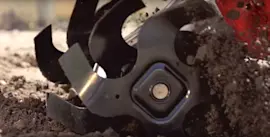
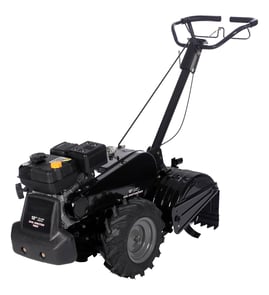
Tiller tines are not universal. On the Craftsman 917299661 rear-tine tiller, the tine must match the tine rotation style (counter-rotating), mounting pattern, and left-hand versus right-hand orientation, or it will not bolt on correctly and can cause poor tilling performance.
What has to match for a tine to fit
A “universal” tine usually means it fits a range of machines, not every tiller. For the best fit, we match these details:
- Mounting pattern: bolt-hole spacing and number of holes on the tine hub/flange
- Rotation and direction: counter-rotating tine sets often use specific shapes and angles
- Side and position: left-hand vs right-hand tines (and inner vs outer positions)
- Shaft size and hardware: shaft diameter, keyway/fastener style, and correct fasteners
- Tine length and curvature: affects depth, soil throw, and vibration
Craftsman 917299661 tine options (model-matched)
If you are replacing a damaged or worn tine, use a model-matched tine for proper bolt-up and tilling action.
| Part | What it is | When to replace |
|---|---|---|
| Tine 532101193 | Tine | Bent, cracked, missing, or worn thin |
| Tine 532101194 | Tine | Uneven tilling, excessive vibration, poor soil breakup |
Quick fit check before you buy
Use this checklist to confirm you are ordering the correct tine style for your Craftsman rear-tine tiller:
- Count the bolt holes and compare the bolt pattern to your old tine
- Confirm whether you need a left-hand or right-hand tine (they are not interchangeable)
- Compare the overall length and curvature to the original
- Replace tines in pairs on the same side when wear is uneven
- Inspect related hardware for damage (for example, a worn key or fastener can mimic a “bad tine”)
Why it matters
A mismatched tine can mount incorrectly or run at the wrong angle, which reduces digging depth, increases vibration, and can stress the tine shaft and bearings. Using the correct tine for the 917299661 keeps the counter-rotating tine system working as designed.
Last updated: January 2026
Where is the model number on a tiller?
On a Craftsman rear-tine tiller like model 917299661, the model number is printed on an ID label (sticker or metal tag) attached to the tiller frame. It’s most often found near the tine shield/guard area or around the engine and fuel tank area.
Common places to check on a rear-tine tiller
Look for a rectangular label that includes the model number and sometimes a serial number. Check these spots first:
- On the tine shield (tine guard) near the rear of the machine
- On the main frame rail, close to the tines or transmission housing
- Near the engine mounting area
- On or near the fuel tank support area
- On the front frame section (especially on larger rear-tine designs)
What the label usually looks like
Most Craftsman tiller ID labels include a few key fields. Use this quick guide when you find it:
| Label field | What it means | Example |
|---|---|---|
| Model number | Identifies the exact tiller version for parts lookup | 917299661 |
| Serial number | Identifies the production unit | Varies |
| Engine info | Engine model/type for engine parts | Varies |
Why it matters for parts and repairs
We use the model number to match the correct diagrams and parts for your exact tiller configuration (tines, wheels, transmission, and hardware). Even small model changes can affect which tine, bearing, or shaft fits.
If the label is missing or unreadable
Use these practical options to get back to the right parts list:
- Clean the frame and tine guard area; dirt and oil often hide the tag
- Look for two sets of numbers: one for the tiller (917...) and one for the engine
- Match wear parts visually (tines, wheels, and hardware) to confirm fit
- If you’re replacing damaged tines, compare left vs. right tine shapes and mounting holes
If you already know you need a tine for this model, start with a known match such as the tine 532101194 or tine 532101193.
Last updated: January 2026
What are the common problems with lawn tillers?
Common problems with a Craftsman rear-tine tiller like model 917299661 include hard starting, stalling under load, tines not turning, poor tilling performance, and excessive vibration. Most issues trace back to fuel quality, ignition, drive engagement, or worn tine and wheel components.
Most common symptoms and what usually causes them
- Won’t start or starts then dies: stale fuel, clogged fuel cap vent, dirty carburetor, fouled spark plug
- Runs rough or surges: partially clogged carburetor jets, air leak, dirty air filter
- Stalls when tines engage: drive belt slipping, clutch cable out of adjustment, tines binding in debris
- Tines won’t turn or turn weakly: worn drive parts, damaged shear/roll pin, worn tines
- Excessive vibration or hopping: bent or mismatched tines, loose hardware, worn bearings
Quick checks we recommend (fast, no special tools)
- Drain old gas and refill with fresh fuel; clean the tank screen if equipped.
- Inspect the spark plug; replace if fouled, cracked, or heavily worn.
- Check for wrapped weeds, twine, or roots around the tine shaft; clear debris before testing.
- Verify all external fasteners are tight, especially around the tine and wheel areas.
- Inspect the tines for rounding, cracks, or uneven wear; replace worn tines such as tine 532101194 or tine 532101193 when tilling performance drops.
Parts that commonly wear on rear-tine tillers
| Problem you notice | Common wear item | What it affects |
|---|---|---|
| Poor soil breakup | Tines | Bite into soil, depth control, smooth operation |
| Vibration or grinding | Bearings | Shaft support, smooth rotation |
| Poor traction | Tires | Forward drive and stability |
Why it matters
A tiller that is hard to start or vibrates excessively usually gets worse quickly; continuing to run it can accelerate wear on the tine shaft, bearings, and drive components. Catching fuel and tine issues early keeps the machine safer and easier to control.
Last updated: January 2026
What is the bar on the back of a tiller for?
On the Craftsman 917299661 rear-tine tiller, the bar at the back is the drag bar (also called a depth stake). We use it to control tilling depth and to steady the tiller so it does not lunge forward while the counter-rotating tines dig.
What the drag bar actually does
- Sets how deep the tines can bite into the soil
- Acts like a brake to slow forward travel so the tines can work the ground
- Helps keep the tiller stable and reduces bouncing in hard or rocky soil
- Improves control when starting a new pass or breaking sod
How to adjust it (typical setup)
Most rear-tine tillers adjust the drag bar by moving it up or down in a bracket and securing it with a pin.
- Shallower tilling: raise the drag bar (tiller moves forward easier)
- Deeper tilling: lower the drag bar (more resistance, more digging)
- Start shallow for the first pass, then go deeper on later passes
- If the tiller “runs away,” lower the drag bar to add resistance
Quick adjustment guide
| Soil condition | Drag bar position | What you’ll notice |
|---|---|---|
| Hard, dry, packed | Higher (shallow) | Less bouncing, easier control |
| Average garden soil | Middle | Balanced depth and speed |
| Soft or previously tilled | Lower (deeper) | More digging, slower travel |
Why it matters
Correct drag bar adjustment protects the drivetrain and tine shaft from shock loads, improves traction, and gives you straighter, more even rows. It also reduces operator fatigue because you are not fighting the tiller’s forward pull.
Parts that can affect drag bar control
If the tiller still feels unstable after adjustment, worn tines or traction issues can make depth control harder.
- Check tine condition and replace damaged or rounded tines such as tine 532101194 or tine 532101193
- Inspect wheels for grip and damage; a worn tire can reduce control
Last updated: January 2026