Owner’s manual
 Error Codes


Who manufactures RS265TDRS?
Samsung manufactures the RS265TDRS side-by-side refrigerator. This model is a Samsung-branded unit, and the use and care information for operation, features, and maintenance is covered in the RS265TDRS manual.
How we identify the manufacturer for this model
For RS265TDRS, the manufacturer is identified directly from the model’s brand and documentation.
- Brand listed for model RS265TDRS: Samsung
- Product type: side-by-side refrigerator
- Documentation is Samsung-branded and written for Samsung refrigerators
- Support references (like filter changes, control panel functions, and troubleshooting) are specific to Samsung design
What to do if your label shows extra letters (like /XAA-02)
It’s common for Samsung refrigerators to have a base model number (RS265TDRS) plus a suffix (such as /XAA-02) that indicates a specific production version, finish, or market.
| What you see on the tag | What it usually means | Manufacturer |
|---|---|---|
| RS265TDRS | Base model number | Samsung |
| RS265TDRS/XAA-02 | Version/suffix tied to the base model | Samsung |
Why it matters
Knowing the manufacturer helps you match the correct service information and replacement parts style for your refrigerator, especially for systems like the ice maker, water dispenser, and water filtration system.
Last updated: January 2026
What is the most common problem with Samsung refrigerators?
For the Samsung RS265TDRS side-by-side refrigerator, the most common issues we see are cooling problems (not chilling enough or warming up), followed closely by ice maker and dispenser problems. Many “no cool” complaints trace back to airflow, temperature settings, or water supply issues described in the RS265TDRS manual.
Most common problems (and what to check first)
- Not cooling or weak cooling: confirm the unit is not in “Cooling Off” mode; verify temperature settings and airflow clearance.
- Ice maker not making ice: confirm the water line is connected, the shut-off valve is open, and Ice Off is not enabled.
- Ice not dispensing: check for ice blockage in the bucket and confirm freezer temp is cold enough.
- Water dispenser not working: look for a kinked/crushed water tube and confirm the water tank is not frozen.
- Condensation on doors: Energy Saver can affect door condensation; adjust as needed.
Quick model-specific checks for RS265TDRS
The RS265TDRS control panel includes features that can look like a failure when they are simply enabled.
| Symptom | Fast check on RS265TDRS | What it means |
|---|---|---|
| Fridge seems “on” but not cooling | Cancel “Cooling Off” mode (Lighting + Freezer held together) | Unit will run but won’t cool in display mode |
| No ice production | Make sure Ice Off is not enabled (hold Ice Type) | Ice maker is intentionally disabled |
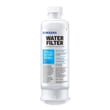
| Filter light is red | Replace filter and reset by holding Water | Filter timer needs reset after replacement |
Why it matters
Cooling and ice maker complaints often share the same root causes: restricted airflow, incorrect control settings, or water supply problems. Checking these basics first can prevent unnecessary part replacement and food spoilage.
When a repair is more likely
If temperatures won’t stabilize after settings and airflow checks, common repair paths on Samsung side-by-side units include diagnosing the evaporator fan, defrost system, thermistors, or electronic control. For ice and water issues, the water inlet valve, filter housing, or dispenser components may be involved.
For step-by-step filter help that applies well to this model style, use how to change the water filter in a Samsung refrigerator.
Last updated: January 2026
How to reset a Samsung refrigerator RS265TDRS?
To reset your Samsung refrigerator RS265TDRS, unplug it for about 1 minute, plug it back in, then use the control-panel button combination that matches what you are trying to reset (cooling-off mode, locked controls, or filter indicator). See the exact button functions in the RS265TDRS user manual.
Quick reset options for RS265TDRS
- Power reset (most common): Unplug for 1 minute, then plug back in.
- Cancel Cooling Off mode (demo mode): Press Lighting + Freezer together for 3 seconds until you hear a chime.
- Unlock controls (Child Lock): Press and hold Energy Saver for 3 seconds.
- Reset filter indicator (after changing water filter): Press and hold Water for 3 seconds.
Which “reset” do you need?
Use this guide to pick the right button sequence for your symptom.
| What you see / what’s happening | Likely mode | What to do on RS265TDRS |
|---|---|---|
| Temperature indicators “moving” and fridge not cooling | Cooling Off mode | Hold Lighting + Freezer for 3 seconds |
| Dispenser and buttons won’t respond | Child Lock on | Hold Energy Saver for 3 seconds |
| Filter light is red after filter change | Filter timer needs reset | Hold Water for 3 seconds |
| Random glitch after outage | Control needs reboot | Unplug 1 minute, then restore power |
Important tips after a reset
- Wait at least 5 minutes before plugging the refrigerator back in if it was just unplugged.
- After restoring power, allow several hours for temperatures to stabilize.
- If the unit was off for an extended time, minimize door openings while it pulls down to temperature.
Why it matters
Using the correct reset for the RS265TDRS prevents unnecessary part replacement and helps you quickly restore normal cooling, ice maker operation, and dispenser functions after a power outage or control-panel lockout.
Last updated: January 2026
What is the capacity of the Samsung RS265TDRS?
The Samsung RS265TDRS side-by-side refrigerator is listed in our model’s documentation at 25.5 cu. ft. total, with 15.8 cu. ft. for the refrigerator section and 9.7 cu. ft. for the freezer section. See the RS265TDRS use and care manual for the model-specific figures.
Capacity details for RS265TDRS
- Total capacity: 25.5 cu. ft.
- Refrigerator capacity: 15.8 cu. ft.
- Freezer capacity: 9.7 cu. ft.
- Configuration: side-by-side
- Brand: Samsung
Quick reference table
| Compartment | Capacity (cu. ft.) |
|---|---|
| Refrigerator | 15.8 |
| Freezer | 9.7 |
| Total | 25.5 |
Why you may also see “26 cu. ft.” listed
It’s common for some listings to round total capacity to the nearest whole number. For RS265TDRS, 25.5 cu. ft. rounds to 26 cu. ft., even though the compartment breakdown adds up to 25.5.
| How it’s shown | What it means |
|---|---|
| 25.5 cu. ft. | Exact total used with the compartment breakdown (15.8 + 9.7) |
| 26 cu. ft. | Rounded marketing shorthand for the same size class |
Why it matters
Capacity affects how much fresh and frozen food you can store, and it helps when comparing refrigerator sizes, planning shelf space, and keeping airflow clear around vents for consistent cooling.
Last updated: January 2026