- Kenmore refrigerator water filters
- Whirlpool refrigerator water filters
- Samsung refrigerator water filters
- GE refrigerator water filters
- LG refrigerator water filters
- Frigidaire refrigerator water filters
- KitchenAid refrigerator water filters
- Maytag refrigerator water filters
- Kenmore Elite refrigerator water filters
- Estate refrigerator water filters
- GE Profile refrigerator water filters
- Amana refrigerator water filters
- Bosch refrigerator water filters
- Dacor refrigerator water filters
- Electrolux refrigerator water filters
Top DIY repair help
View All Repair Categories
Appliances
Lawn & Garden
Power Tools
Home Improvement
Sports & Leisure
Heating & Cooling
How to change the water filter in a Samsung refrigerator
less than a minute readApr 01Lyle Weischwill
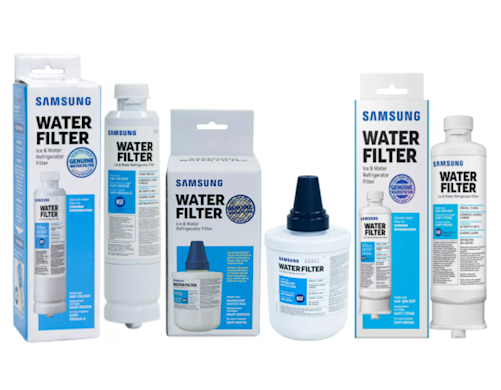
Although Samsung makes many different types of refrigerators, a particular model only uses one of these 3 water filters:
Samsung Refrigerator Water Filter HAF-CIN (also known as 9101). This filter replaces previous Samsung water filters DA29-00019A and DA29-00020B.
Samsung Refrigerator Water Filter HAF-QIN. This filter is for select side-by-side and French-door refrigerators.
Samsung Refrigerator Water Filter HAFCU1. This water filter fits in the top, right corner of the refrigerator compartment in certain Samsung side-by-side and French-door refrigerators.
Read on to find out how to remove the filter in your Samsung fridge.
How do I replace the water filter in my Samsung French-door refrigerator?
You’ll find the water filter in between the crisper drawers or in the top, right corner of the refrigerator section in a Samsung French-door fridge.
Replacing the Samsung water filter located between the crisper drawers
The HAF-CIN and HAF-QIN water filters fit in the housing located between the crisper drawers. Follow these steps to remove the filter in that location:
Shut off the water supply to make it easier to remove the water filter.
Twist the water filter ¼ turn to the left and pull it out of the filter housing.
Push the new filter into the housing and rotate it ¼ turn clockwise to lock it in place. The lock symbol should line up with the indicator line.
Reset the water filter indicator light.
Open the water supply cut-off valve to restore water to the refrigerator.
Run about 1 gallon of water through the water dispenser to flush carbon residue from the filter and purge air from the filter and water lines.
Watch our How to replace twist-to-remove water filters video for more details and advice for removing the Samsung HAF-CIN and HAF-QIN water filters.
Replacing the Samsung water filter located in the top, right corner of the refrigerator section
You’ll find the HAFCU1 filter installed in the Samsung French-door fridge when the filter housing is located in the top, right corner of the refrigerator section. Follow these steps to remove the HAFCU1 filter:
Rotate the filter counterclockwise to release it and remove it from the filter housing.
Insert the new filter in the housing and rotate it clockwise to lock it in place.
Reset the water filter reminder light.
Purge 2 gallons of water through the dispenser to remove carbon residue and air from the water filter and refrigerator water lines.
How do I replace the water filter in my Samsung side-by-side refrigerator?
The water filter is located in the bottom, right corner or the top, right corner of a Samsung side-by-side fridge.
Replacing the water filter in the bottom, right corner
You’ll find the HAF-CIN or HAF-QIN water filter in the bottom, right corner of a Samsung side-by-side refrigerator. To remove the filter, follow these steps:
Shut off the refrigerator’s water supply to make it easier to remove the water filter.
Rotate the water filter ¼ turn to the left and pull it out of the filter housing.
Push the new filter into the housing and rotate it ¼ turn to the right to lock the filter in place.
Reset the water filter indicator light.
Open the water supply cut-off valve to restore water to the refrigerator.
Run about 1 gallon of water through the water dispenser to flush carbon residue from the filter and purge air from the filter and water lines.
Replacing the water filter in the top, right corner
The HAFCU1 filter is located in the top, right corner of a Samsung side-by-side refrigerator. Use this procedure to replace the HAFCU1 filter:
Shut off the water supply going to the refrigerator.
Rotate the filter to the left to release it and remove it from the filter housing.
Insert the new filter in the housing and rotate it to the right to lock it in place.
Reset the water filter reminder light.
Open the refrigerator’s water supply cut-off valve.
Purge 2 gallons of water through the dispenser to remove carbon residue and air from the water filter and refrigerator water lines.
If you’re having problems removing your old Samsung water filter, check out our 5 tips for removing a stuck refrigerator water filter article/video.
To ensure the Samsung refrigerator’s ice and water is contaminant and odor free, replace your fridge’s water filter every 6 months; replace it more frequently if you notice the water flow slowing.
We can automatically send you your Samsung water filter replacement, so you don’t have to remember to reorder. Simply subscribe during checkout to get a new Samsung water filter every 6 or 12 months (you can skip any shipment and can cancel at any time).