Installation guide
 Owner’s manual








Where to find part number on GE dryer?
On a GE GFDS350EL0WW electric dryer, we find the identification label (model and serial tag) most often inside the dryer door opening, on the door frame or just inside the front panel area. Once you have the model number, we can match the correct replacement parts for your exact dryer.
What to look for on the label
The tag typically includes several numbers; here is what each one is used for:
- Model number (example: GFDS350EL0WW) identifies the exact dryer design
- Serial number helps date the unit and confirm production details
- Electrical ratings (volts/amps) help confirm power requirements
- Sometimes a manufacturing code used for service reference
Quick steps to find it
- Open the dryer door.
- Check the door frame (left and right sides) and the front lip of the opening.
- If you do not see it, look just inside the cabinet near the front panel edge.
- Write the model number exactly as shown (letters and numbers).
Why it matters
GE dryers can use different drum belts, door switches, or heating components that look similar but fit differently. Using the exact model number helps us select the right part the first time and avoid returns.
Common examples of parts you might match after you find the model
| Part type | Example part for GFDS350EL0WW | What it affects |
|---|---|---|
| Drum belt | Dryer drum belt WE03X29897 | Drum tumbling |
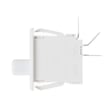
| Door switch | Dryer door switch WE4M415 | Starts only with door closed |
| Idler pulley | Idler pulley WE12X83 | Belt tension, squealing |
Helpful reference
For additional model-specific identification and service info locations, use the GFDS350EL0WW installation guide.
Last updated: February 2026
What is the most common problem with a GE electric dryer?
For the GE GFDS350EL0WW electric dryer, the most common problems are no heat/long dry times (airflow restriction or a failed heating component) and the drum not tumbling (a worn belt or idler system). Lint buildup and crushed venting often trigger both symptoms.
Most common symptoms and what usually causes them
- Dryer runs but no heat: heating element, thermistor, wiring, or restricted airflow
- Dryer takes too long to dry: clogged lint screen, blocked vent, crushed or improper ducting
- Drum will not spin: broken belt, failed idler pulley, motor issue
- Squealing or scraping noise: worn drum glides/pads or bearing surfaces
- Stops mid-cycle or overheats: poor venting, internal duct joint separation, heat-sensing component issues
Quick checks we recommend first (fast, high-impact)
- Clean the lint screen and confirm strong airflow at the outside exhaust hood.
- Inspect the vent run for kinks, crushing, or lint blockage.
- Confirm you are using UL-listed metal ducting, not flexible plastic; flexible venting can collapse and trap lint.
- Verify the dryer is on a proper 120/240V (or 120/208V), 30-amp circuit and the cord is correctly installed.
Parts that commonly fix “won’t tumble” complaints
| Symptom | Common wear item | Example part for GFDS350EL0WW |
|---|---|---|
| Drum not turning | Drum belt | Dryer drum belt WE03X29897 |
| Thumping/squeal, poor drum support | Glide surfaces | Dryer drum glide bearing (green) WE03X37317 |
| Squeal or belt slack | Idler pulley | Idler pulley WE12X83 |
Why venting and installation details matter
Restricted airflow is a top root cause of “no heat” and “takes too long.” The installation instructions call out safe venting practices (metal ducting, proper connections, and avoiding materials that crush and trap lint) because poor airflow can overheat the dryer and lead to repeated failures.
Where to confirm the exact setup for this model
Use the GE GFDS350EL0WW documentation for the correct electrical connection method, venting requirements, and safety notes: GFDS350EL0WW installation guide.
Last updated: February 2026
How to remove front panel of GE front load dryer?
To remove the front panel on your GE GFDS350EL0WW electric dryer, we unplug the dryer first, lift the top, remove the screws that secure the front panel, then support the panel while disconnecting any wiring (such as the door switch) before lifting the panel off.
Before you start (safety and prep)
- Unplug the dryer from the wall receptacle.
- If hardwired, turn off the 30-amp breaker and verify the dryer is off.
- Wear work gloves; cabinet edges can be sharp.
- Pull the dryer forward enough to work comfortably.
- Keep a small container for screws so nothing gets lost.
Front panel removal steps (typical for this GE platform)
- Disconnect power and confirm the drum light and controls are off.
- Lift the top panel: remove the screws at the back edge of the top (if present), then slide the top back slightly and lift.
- Remove front panel mounting screws: look for screws along the inside top corners (under the lifted top) and sometimes along the lower edge.
- Support the front panel with one hand as the last screws come out.
- Disconnect wiring attached to the front panel (commonly the door switch harness). Do not pull on wires; release the connector.
- Lift the front panel up and off the lower retaining tabs/clips, then set it aside.
What to check while the front is off
If you opened the dryer because of noise, poor tumbling, or a burning-rubber smell, these parts are common culprits:
- Drum belt condition and tension
- Idler pulley spin and alignment
- Drum glides and front bearing wear
- Lint buildup around the blower housing and ducting
| Symptom | Most common area to inspect | Related part (if needed) |
|---|---|---|
| Drum will not tumble | Belt or idler system | Dryer drum belt WE03X29897, idler pulley WE12X83 |
| Squealing or scraping | Glides or front bearing | Dryer drum glide bearing (green) WE03X37317, dryer drum front bearing WE01X25434 |
| Door must be slammed to start | Door switch | Dryer door switch WE4M415 |
Why it matters
Removing the front panel correctly prevents broken plastic tabs, pinched wires, and door alignment issues. It also gives you safe access to the belt, idler, drum support points, and lint pathways that affect drying performance.
For model-specific panel fastener locations and wire routing, follow the GFDS350EL0WW installation guide and keep the GFDS350EL0WW owner’s manual with your appliance records.
Last updated: February 2026
How to reset GE dryer heating element?
On the GE GFDS350EL0WW electric dryer, there is no manual “reset” button for the heating element; the practical reset is to fully power-cycle the dryer by turning the 30-amp breaker off, then back on, and retesting heat. Use the GFDS350EL0WW installation guide for the correct power-supply safety steps.
Safe reset steps (power-cycle)
- Turn off the dryer’s 30-amp circuit breaker (or remove the dryer circuit fuse).
- Confirm the dryer is unplugged from the wall receptacle.
- Wait 2 to 5 minutes to clear the control.
- Restore power (plug in, then turn the breaker on).
- Run a timed dry, high heat cycle for 3 to 5 minutes and check for warm air at the exhaust.
If it still will not heat
Most “no heat” complaints on an electric dryer come from power supply or airflow problems, not the heater itself. Check these in order:
- Airflow: clean the lint screen, verify the vent is not crushed, and confirm strong airflow outside.
- Power supply: electric dryers can run on 120V but need full 240V to heat; a tripped breaker on one leg can stop heat.
- Door switch: if the dryer stops or acts erratic, test/inspect the dryer door switch WE4M415.
- Heating circuit parts: if airflow and power are correct, the heater circuit may need diagnosis; common suspects include the heating element and temperature sensing parts.
Common heat-related parts for this model
| Symptom | Common check | Example part for GFDS350EL0WW |
|---|---|---|
| Runs, no heat | Heating element circuit | Mica unit WE11M10001 |
| Overheats or cycles heat oddly | Temperature sensing | Inlet control WE4M398 |
| Long dry times | Venting restriction | Ducting and outside hood (inspect/clean) |
Why it matters
A power-cycle can clear a control glitch, but repeated no-heat issues usually point to restricted venting or incorrect power at the terminal block. Fixing airflow and power first prevents repeat failures and helps protect the heater housing and controls.
For error displays during a no-heat problem, use GE gfd model series error codes to match the code to the most likely cause.
Last updated: February 2026