Owner’s manual
 Error Codes





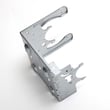
How to find part number for Samsung dryer?
For your Samsung dryer model DV484ETHASU, we find the correct part number by matching the dryer’s model number and (when needed) serial number from the rating label, then using the parts diagram/list in the DV484ETHASU user manual to confirm the exact component.
Where to find the model and serial number label
On most Samsung dryers like DV484ETHASU, the rating label is typically located:
- On the front frame behind the dryer door (open the door and check the cabinet opening)
- On the rear panel of the dryer (a secondary label is common)
- Occasionally on the side panel near the back edge
Write the model number exactly as shown (letters and numbers) before searching parts.
How we match the right part number (step-by-step)
Use this process to avoid ordering the wrong Samsung dryer part:
- Confirm the full model number: DV484ETHASU
- Note the serial number (helps when parts change by production run)
- Identify the failed system: heat, drum turning, airflow, or controls
- Use the exploded-view parts list to match the part name to the correct manufacturer part number
- Compare your old part’s markings (if readable) to the listing before ordering
Common examples of “part name” vs “part number”
These are examples of how Samsung dryer parts are identified for DV484ETHASU.
| What you search for | What you order by | Example from this model |
|---|---|---|
| Symptom or location (ex: “no heat”) | Manufacturer part number | Heating element: DC47-00019A |
| Part name (ex: “belt”) | Manufacturer part number | Drum belt: 6602-001655 |
| Part name (ex: “door switch”) | Manufacturer part number | Door switch: DC64-00828B |
Why it matters
Samsung often uses similar-looking parts across DV476 and DV484 series dryers, but wiring, mounting, and revisions can differ. Matching by DV484ETHASU (and serial when needed) prevents fit issues and repeat repairs.
Last updated: February 2026
Is it worth replacing a heating element in a Samsung dryer?
Yes, it’s usually worth replacing the heating element in a Samsung DV484ETHASU dryer when the dryer tumbles normally but won’t heat, because the repair cost is typically far less than replacing the whole dryer. We recommend confirming the failure first since a thermal cut-off or thermostat can stop heat too.
Quick decision checklist
- The drum turns and airflow feels strong, but clothes stay cold or damp.
- The dryer is otherwise in good shape (no major noise, no burning smell, no repeated shutdowns).
- You can test parts with a multimeter (or you plan to have a technician test).
- You have already cleaned the lint screen and checked the vent for restrictions.
- You are prepared to replace heat-safety parts if they test open.
What to test before you buy parts
On DV484-series dryers, “no heat” is commonly caused by a failed heater or a safety device opening due to overheating or restricted airflow. Use the troubleshooting and access steps in the DV484ETHASU owner's manual.
Typical no-heat suspects:
- Heating element
- Thermal cut-off thermostat
- High-limit thermostat
- Thermistor (temperature sensor)
Common parts involved (and what they do)
| Part | What it affects | When it’s a likely culprit |
|---|---|---|
| Samsung dryer heating element DC47-00019A | Creates heat | Dryer runs but never heats |
| Dryer thermal cut-off thermostat DC47-00016A | Cuts power to heater if overheated | No heat after vent restriction or overheating |
| Dryer high-limit thermostat DC47-00018A | Limits heater temperature | Heat cuts out early or no heat |
| Dryer thermistor DC32-00007A | Senses temperature for control | Erratic heat or temperature-related errors |
Why it matters
A heating element can fail on its own, but overheating from a clogged lint screen, blocked vent, or poor airflow can also open a thermal cut-off and shorten the life of the new element. The manual notes it’s normal to hear the heating element cycle on and off during operation, so “clicking” alone is not a failure sign.
Last updated: February 2026
How to tell if a Samsung dryer heating element is bad?
A bad heating element in our Samsung DV484ETHASU dryer usually shows up as “runs but no heat” or very weak heat. We confirm it by safely testing the element for continuity and checking that it is not shorted to the metal heater housing; a failed test means replacement is needed.
Quick checks before testing parts
- Make sure you are not using an unheated cycle like Air Fluff.
- Check the home breakers or fuses (electric dryers often use a 2-pole breaker).
- Clean the lint filter and inspect the exhaust duct for restriction (restricted venting can cause heating problems).
- Verify the outside vent hood opens freely.
- If the dryer is in cool-down, heat will cycle off normally.
How we test the heating element (DV484ETHASU)
- Unplug the dryer (or switch off the breaker) before accessing internal parts.
- Access the heater terminals using the disassembly steps in the DV484ETHASU owner’s manual.
- Set a multimeter to ohms (Ω) or continuity.
- Continuity test (element coil): place one probe on each heater terminal.
- Good: continuity present (a beep in continuity mode or a stable resistance reading).
- Bad: no continuity (open circuit).
- Ground test (short to chassis): place one probe on a heater terminal and the other on the metal heater housing.
- Good: no continuity to the housing.
- Bad: continuity to the housing (shorted element).
What symptoms point to a bad element vs. airflow or controls?
| Symptom | Most common cause | What to check next |
|---|---|---|
| Dryer runs, no heat | Heating circuit issue | Element, thermal cut-off, high-limit thermostat |
| Long dry times, heat seems weak | Vent restriction | Lint filter, duct, outside hood |
| Heat shuts off quickly | Overheating from poor airflow | Ducting, blower wheel, lint buildup |
| Error code related to heating/venting | Venting or temperature sensing | Vent path, thermistor, heater circuit |
Parts that commonly fail with “no heat”
On this model, these are frequent suspects in the heating circuit:
- Samsung dryer heating element DC47-00019A
- Dryer thermal cut-off thermostat DC47-00016A
- Dryer high-limit thermostat DC47-00018A
- Dryer thermistor DC32-00007A
Why it matters
A failed heating element stops proper drying, but restricted venting can also prevent heating and can overheat the dryer. The manual’s troubleshooting guidance for “doesn’t heat” and “doesn’t dry” points to checking breakers, cycle selection, and cleaning the lint filter and exhaust duct first.
Last updated: February 2026
What is the average lifespan of a Samsung dryer?
A Samsung dryer typically lasts 10 to 15 years. For your Samsung DV484ETHASU dryer, the biggest lifespan drivers are airflow (lint and venting) and avoiding chronic overheating; follow the cleaning and safety routines in the DV484ETHASU user manual.
What most affects dryer lifespan
- Restricted venting causes long dry times and higher internal temperatures.
- Lint buildup around the lint screen area and blower path increases strain on the motor.
- Overloading stresses the drum support system and drive components.
- Heat cycling issues (thermostats and thermal cut-offs) happen more often when airflow is poor.
- Skipping routine cleaning leads to faster wear and more shutdowns.
Maintenance checklist to reach the 10 to 15 year range
- Clean the lint screen every load; wash it occasionally to remove fabric softener film.
- Check the vent hood outside; confirm strong airflow while the dryer runs.
- Keep the exhaust duct run short, smooth, and free of kinks.
- Do not pack the drum tight; dry similar fabrics together for shorter cycles.
- Address new noises early (thumping, squealing, scraping) before they damage other parts.
Common symptoms and what they usually point to
| Symptom | Most common area | Why it shortens life |
|---|---|---|
| Long dry times | Venting/airflow | Overheats heater and motor, increases run time |
| Thumping/rumbling | Drum support system | Adds drag, stresses belt and motor |
| Squealing | Drum support system | Increases friction and cycle time |
| No heat or overheating | Heat control system | Can trip thermal cut-offs and stop drying |
Why it matters
A dryer can keep tumbling even when it is running inefficiently; extra run time and excess heat are what wear out high-cost components first. Strong airflow and prompt attention to noises protect performance and extend service life.
Last updated: February 2026