 Owner’s manual
 Error Codes





How do you reset a Kenmore electric stove?
To reset a Kenmore electric range like model 91194485790, we recommend doing a power reset: turn the range OFF, cut power at the breaker (or unplug if accessible) for about 1 minute, then restore power and retest heating and controls.
Quick reset steps (power cycle)
- Turn all surface element knobs to OFF.
- Turn the oven control knob to OFF.
- Switch the range circuit breaker OFF (or unplug the cord if your outlet is reachable).
- Wait 60 seconds.
- Restore power.
- Set BAKE and confirm the OVEN ON light comes on; allow preheat and confirm the PREHEATED light turns on.
If the oven seems “stuck” after self-clean
This model uses a door latch handle for self-clean. If a clean cycle was interrupted, the door can stay locked until the oven cools.
- Turn the oven control knob to OFF.
- Wait for the oven to cool below the lock temperature (typically about 1 hour).
- Once cooled, slide the latch handle to unlock (do not force it).
What a reset fixes (and what it does not)
| Symptom | Reset may help | Likely needs troubleshooting/parts |
|---|---|---|
| Display or controls acting odd after a power flicker | Yes | Sometimes |
| Oven will not heat at all | Sometimes | Often |
| Door won’t unlock right after self-clean | No (cool-down is required) | Rarely |
| One surface burner not heating | No | Yes |
Why it matters
A power reset clears minor control glitches and restores normal operation after a brief outage. If heating still fails after the reset, the issue is usually in a heating circuit component (element, sensor, switch, wiring) rather than the control “needing” a reset.
Helpful model-specific references
- Use the 91194485790 owner's manual for control functions, indicator lights, and self-clean latch operation.
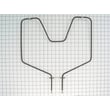
- If the oven is not baking after a reset, a failed bake element is a common cause; see the g.e. range bake element WB44K5012.
Last updated: February 2026
What causes a Kenmore oven to stop working?
On the Kenmore 91194485790 electric range, an oven that “stops working” is usually caused by a power problem (breaker, cord connection), a control shutdown (12-hour safety shutoff or an “F” error), or a failed heating or sensing component such as the bake element or temperature sensor. See the 91194485790 owner's manual for the model’s error-code and reset steps.
Quick checks we recommend first
- Check the household circuit breaker or fuse box; this range needs proper power to run.
- Confirm the range is plugged in securely.
- If the display shows an “F” code and beeps, turn the oven control to OFF, let it cool about 1 hour, then retry.
- If the oven was left on a long time, the 12-hour automatic shutoff may have turned it off.
- Make sure the oven vent (under the right rear element) is not blocked.
Most common causes (and what they look like)
| Symptom | Likely cause | What to do next |
|---|---|---|
| Range totally inoperative | No power to range | Reset breaker, check plug, verify outlet power |
| Cooktop works, oven does not heat | Failed bake/broil circuit or control issue | Test elements and wiring; inspect connections |
| Beeping with “F” + number | Function error code | Cool 1 hour, retry; service if it repeats |
| Poor or no heat, uneven baking | Vent blocked, foil misuse, calibration issue | Clear vent; never cover oven bottom/rack with foil |
Parts that commonly fail on electric ovens
If the oven has power but will not heat, these parts are frequent culprits:
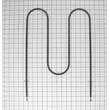
- Bake element: can blister, crack, or stop heating; a common replacement is the g.e. range bake element WB44K5012.
- Oven temperature sensor: a bent or damaged sensor tube can cause bad temperature control.
- Wiring/terminal connections: loose or burned connections can interrupt power to the oven.
Why it matters
An oven that shuts down from an error code, overheating condition, or poor airflow can protect the appliance, but repeated shutdowns usually point to a component or wiring problem that needs correction to restore safe, consistent heating.
Last updated: February 2026
What does F30 mean on a Kenmore stove?
On the Kenmore range model 91194485790, the F30 error code points to a problem in the oven temperature sensing circuit. In most cases, the oven temperature sensor probe is unplugged, failed, or the sensor wiring connection is damaged, so the control cannot read oven temperature correctly.
What to check first (fast, safe steps)
- Turn the range off at the breaker for 1 minute, then restore power and see if the code returns.
- Confirm the oven is not in a self-clean cycle or still hot from recent use.
- If the code returns, stop using Bake and Broil until the sensor circuit is checked.
- Use the troubleshooting section in the 91194485790 owner's manual to match the code to the recommended checks.
Common causes of an F30 code
- Loose or corroded connector at the oven temperature sensor
- Damaged sensor harness (pinched, burned, or broken wires)
- Failed oven temperature sensor (out of range resistance)
- Control board input issue (less common)
What you can test (with power OFF)
If you are comfortable using a meter, you can test the sensor circuit.
- Shut off power at the breaker.
- Access the sensor connector (typically inside the oven cavity or from the rear, depending on design).
- Check the sensor resistance at room temperature; most ranges use a sensor that reads about 1,080 ohms at 70°F (a moderate deviation is normal, but an open circuit or very low reading indicates a problem).
- Inspect the harness for heat damage and tight pin fit.
| Test result | What it usually means | Next step |
|---|---|---|
| Open circuit (OL) | Sensor or wiring is broken/unplugged | Reseat connector; repair wiring; replace sensor if needed |
| Very low resistance | Shorted sensor or wiring | Inspect harness; replace sensor if wiring is OK |
| Normal resistance but code persists | Intermittent connection or control issue | Recheck connectors; consider control diagnosis |
Why it matters
When the control cannot read the oven temperature sensor, it cannot regulate heat accurately. That can cause undercooking, overheating, or the oven shutting down to protect the appliance.
Last updated: February 2026
Where can I find my Kenmore electric range model number?
On Kenmore electric range model 91194485790, the model and serial number are on the appliance identification label; for this model, the label is located behind the storage drawer. Pull the drawer out and look on the frame behind the drawer opening for a tag that lists MODEL NUMBER and SERIAL NUMBER.
Quick steps to locate the label
- Turn the range off and make sure the oven and cooktop are cool.
- Pull the storage drawer out until it stops.
- Lift the front slightly to clear the stops, then slide the drawer out.
- Look on the metal frame behind the drawer opening for the rating label.
- Write the model number and serial number exactly as printed.
If you do not see it behind the drawer
Some ranges also place the ID label in other easy-to-check spots:
| Alternate location | What to look for | When it’s common |
|---|---|---|
| Oven door frame (door jamb) | Sticker/plate with model and serial | Many freestanding ranges |
| Back panel | Rating plate near the cord/terminal area | If the front label is damaged |
| Under the cooktop (lift-up top) | Small tag on the frame | Some coil-element designs |
Why it matters
We use the exact 91194485790 model number to match the correct Kenmore range parts and diagrams; even one digit can change fit and wiring for items like a bake element or surface element control switch.
For additional confirmation and other identification details, check the 91194485790 manual.
Last updated: February 2026




