Installation guide
 Owner’s manual
 Error Codes




Where is the model number on a Frigidaire PLHS67EGSB1 refrigerator?
The model number for your Frigidaire PLHS67EGSB1 is printed on the serial plate located inside the refrigerator (fresh food) compartment. Open the refrigerator door and look for a label on the interior walls or along the door opening.
Where to look first (fastest checks)
- Inside the fresh food compartment on a side wall (upper area)
- On the door frame (the cabinet face around the opening)
- Behind or near the crisper drawers (you may need to slide drawers out)
- On a label that also lists the serial number
What the label looks like
The serial plate typically includes:
- Model number (PLHS67EGSB1)
- Serial number
- Sometimes the purchase date is recorded separately in the manual
| What you need | What to write down | Why it helps |
|---|---|---|
| Model number | PLHS67EGSB1 | Ensures you get the correct parts and diagrams |
| Serial number | From the same label | Helps match production details for some parts |
Why it matters
Using the exact model number prevents ordering the wrong Frigidaire refrigerator parts (like a water filter, door gasket, or ice maker components) and helps us match the correct parts list and repair instructions.
Helpful tip from our documentation
Your Use & Care information instructs you to record the model and serial numbers because they are found on the serial plate inside the refrigerator compartment. For more label-location details and diagrams, check the owner's manual.
Last updated: February 2026
How to get a Frigidaire refrigerator out of demo mode?
To take a Frigidaire PLHS67EGSB1 refrigerator out of demo mode, use the control panel shortcut: press and hold Energy Saver and Lock together for about 3 to 5 seconds until the display resets and cooling resumes. Confirm the temperature display returns to normal operation.
Quick steps (most common method)
- Press and hold Energy Saver + Lock at the same time.
- Keep holding for 3 to 5 seconds.
- Watch for the display to reset (lights or indicators change).
- Wait a few minutes and confirm the unit starts cooling.
- If the display shows "OF", turn cooling back on (see below).
If the display shows "OF" (cooling system is off)
This model lets you turn the cooling system on and off from the temperature control panel.
- Press and hold the On/Off button for 3 seconds to turn cooling ON.
- When cooling is off, the display can show "OF".
Reference the exact button locations and panel layout in the owner's manual.
What to check after exiting demo mode
Demo mode can look like the refrigerator is running (lights and display work) but it will not cool correctly. After you exit demo mode, verify these basics:
- Freezer temperature begins trending colder within a few hours
- Fresh food section begins trending colder within a few hours
- Doors seal fully and close without bouncing
- Controls respond normally (no continuous flashing)
Common symptoms and what they usually mean
| Symptom | What it usually indicates | What to do |
|---|---|---|
| Lights and display work, but no cooling | Demo mode or cooling turned off | Exit demo mode; then turn cooling ON if "OF" shows |
| Temperature display continuously flashes | Control detected a performance issue | Follow troubleshooting guidance in the manual |
| Runs a lot after reset | Normal recovery after being off | Allow 24 hours to stabilize |
Why it matters
Demo mode is designed for showroom display. Exiting demo mode (and making sure cooling is turned on) restores normal compressor and fan operation so the freezer and fresh food compartments can reach safe temperatures.
Last updated: February 2026
Can I look up Frigidaire parts by model number?
Yes. For your Frigidaire refrigerator model PLHS67EGSB1, we look up compatible replacement parts by using the full model number to match the correct parts list and diagrams, then selecting the exact part you need (such as a water filter, inlet valve, or door gasket) for that model.
How to find the model number on the refrigerator
The model and serial number are listed on the serial plate inside the refrigerator compartment. We recommend copying the model number exactly as shown (including all letters and numbers). See the owner's manual for the location details and recording fields.
How we recommend searching parts by model number
- Enter the full model number PLHS67EGSB1 exactly (no spaces).
- Use the model parts list to narrow by system (ice maker, water, doors, cooling).
- Match the part by description and identifier, not just by appearance.
- If multiple similar parts show, compare your existing part markings and mounting style.
- Order the part that is listed for your exact model to avoid fit and connection issues.
Common PLHS67EGSB1 parts customers replace
| Symptom or need | Common part to check | Example part for this model |
|---|---|---|
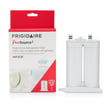
| Bad taste, slow water flow | Water filter | Frigidaire puresource2 refrigerator water filter WF2CB |
| No water to dispenser or ice maker | Water inlet valve | Refrigerator water inlet valve assembly 242252702 |
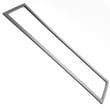
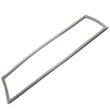
| Warm temps, long run time, air leaks | Door seal | Refrigerator freezer gasket 241786014 |
Why it matters
Using the exact model number ensures the part fits your refrigerator’s wiring, water connections, and door configuration. That saves time and prevents repeat repairs caused by ordering a similar looking but incompatible part.
Last updated: February 2026
How do you defrost a Frigidaire side by side?
On the Frigidaire PLHS67EGSB1 side-by-side refrigerator, defrosting is automatic; the unit runs a periodic defrost cycle (about 30 minutes) to clear frost from the evaporator. If you have heavy frost buildup, we focus on fixing the airflow or door-seal issue causing it.
What to do if you see frost or ice buildup
- Make sure both doors fully close and are not blocked by bins or food packages.
- Inspect the door gaskets for gaps, tears, or areas that are not sealing.
- Clean the gasket sealing surfaces with mild soap and water; dry thoroughly.
- Reduce long or frequent door openings (warm, humid air creates frost).
- Confirm the temperature settings are not set colder than needed; allow 24 hours after changes.
- If frost is thick on the freezer back wall, move items away from vents to restore airflow.
Quick checks that often solve “won’t defrost” symptoms
| Symptom you notice | Most common cause | What we recommend first |
|---|---|---|
| Frost on freezer back panel | Airflow restriction or defrost system issue | Clear vents, check door seal, then inspect defrost components |
| Refrigerator runs a lot | Warm air leaks or dirty condenser | Check gaskets and door closure; clean condenser |
| Door won’t seal evenly | Warped/dirty gasket | Clean and reshape gasket; replace if torn |
Parts that commonly affect frost and defrost performance
If the gasket is worn, cracked, or poorly fitted, it can leak warm air and create constant frost. For this model, common replacements include:
- Refrigerator freezer gasket 241786014 (freezer door seal)
- Refrigerator gasket 241786013 (fresh food door seal)
If you suspect a defrost control problem (persistent heavy frost, weak airflow, warming temps), a failed defrost thermostat is also a common cause:
Why it matters
A side-by-side like the PLHS67EGSB1 depends on clear airflow across the evaporator coil. When frost builds up, airflow drops, temperatures rise, and the refrigerator can run longer and struggle to keep food safe.
For model-specific operating details and temperature control guidance, use the owner's manual.
Last updated: February 2026
What does di sp mean on a Frigidaire refrigerator?
On a Frigidaire PLHS67EGSB1 side-by-side refrigerator, DI SP (sometimes shown as DISP) indicates an ice jam in the dispenser chute. Clear any stuck cubes, then remove the ice bin and thaw and empty it so the dispenser can operate normally.
What to do right away
- Press the dispenser lever briefly to confirm ice is not continuing to bind in the chute.
- Open the freezer door and check the dispenser chute for a cube wedged at the opening.
- Remove the ice container and dump out clumped ice.
- Let the chute area thaw; warm room air usually clears a light jam.
- Dry the bin and chute area before reinstalling the bin to reduce re-freezing.
Quick checks that prevent repeat jams
Ice jams usually come from clumping, partial melting, or crushed ice packing in the chute.
- Make sure the ice container seats fully and slides in smoothly.
- Break up large clumps in the bin; discard “snowy” ice.
- Avoid overfilling the bin; packed ice bridges and jams more easily.
- If cubes look wet or fused, check that the freezer is holding temperature and the door is sealing.
Parts that commonly relate to dispenser and ice issues
If jams keep happening after clearing the chute, inspect the bin and ice-making components for damage or heavy frost.
| Symptom | What it points to | Example part to inspect |
|---|---|---|
| Ice clumps and refreezes | Temperature swings, door not sealing | Refrigerator freezer gasket 241786014 |
| Misshapen cubes or slow ice production | Ice maker issues | Ice maker mold 241798231 |
| Water leaks or odd ice texture | Water supply/valve problems | Refrigerator water inlet valve assembly 242252702 |
Why it matters
A DI SP message is a dispenser protection alert; clearing the jam quickly helps prevent the dispenser motor and chute area from straining, and it restores normal ice delivery.
Helpful reference
For control and dispenser operation details specific to PLHS67EGSB1, use the owner's manual.
Last updated: February 2026