Owner’s manual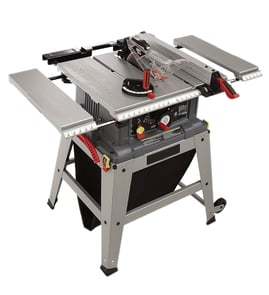

Where is the reset button on a Craftsman table saw?
On the Craftsman table saw model 137218300, the reset is the overload reset switch (reset button) on the saw, used to restart the motor after an overload or overheat. Turn the saw OFF, let the motor cool about 5 minutes, then press the reset button and restart. See the 137218300 owner's manual for the exact control location and labeling.
- Turn the ON/OFF switch to OFF.
- Remove the switch key (prevents accidental restart).
- Wait about 5 minutes for the motor to cool.
- Press the overload reset switch (reset button).
- Reinsert the switch key and turn the saw ON.
An overload trip is the saw protecting the drive motor from overheating or drawing too much current. Common causes include:
- Feeding the workpiece too fast (especially in thick hardwood)
- A dull, dirty, or incorrect blade for the cut
- Blade height set too high for the material
- Fence or blade misalignment causing binding
- Sawdust buildup increasing friction and load
These steps reduce repeat trips and help you get cleaner cuts:
- Unplug the saw and confirm the blade spins freely by hand
- Clean pitch and resin off the blade; replace if teeth are damaged
- Verify the rip fence is parallel to the blade
- Use proper support for long stock (outfeed support)
- Clear sawdust and use dust collection when possible
| Control | What it does | When you use it |
|---|---|---|
| ON/OFF switch with key | Starts and stops the saw; key prevents unauthorized use | Every time you operate the saw |
| Overload reset switch | Resets the motor after overload/overheat shutdown | Only after the motor stops from overload |
Using the overload reset correctly helps protect the motor and wiring, and it also points you to the real issue (binding, dull blade, or feed rate) so the saw does not keep shutting off mid-cut.
If you need replacement parts for the Craftsman 137218300, use the parts list for this model or search by model number on Sears PartsDirect.
Last updated: February 2026
What not to do with a table saw?
For the Craftsman 137218300 table saw, do not make unsafe cuts or bypass safety steps that prevent blade contact and kickback. We follow the operator guidance: keep guards in place, keep hands out of the blade path, and use the correct setup for ripping and crosscutting (see the owner's manual).
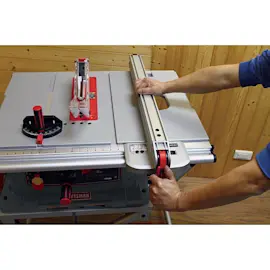
- Do not cut freehand; always use the rip fence for ripping or the miter gauge for crosscuts.
- Do not use the miter gauge when ripping.
- Do not rip warped, twisted, or bowed lumber; it increases binding and kickback risk.
- Do not rip pieces narrower than 1/2 inch.
- Do not reach near the blade path; keep both hands clear and use push sticks when needed.
- Do not leave the saw running unattended.
The manual calls out quick checks that prevent most “surprise” problems:
- Confirm the blade is tight on the arbor.
- Tighten the bevel angle lock knob.
- Lock the rip fence and verify it is parallel to the miter gauge groove (for ripping).
- Verify the blade guard is installed and working.
- Wear safety glasses.
| Cut type | Use this guide | What not to do |
|---|---|---|
| Ripping (with the grain) | Rip fence | Do not use the miter gauge when ripping |
| Crosscutting (across the grain) | Miter gauge | Do not use the rip fence as a length stop without proper technique |
| Bevel ripping/crosscutting | Same guide as above, with blade tilted | Do not loosen the bevel lock during the cut |
Most table saw injuries and damaged workpieces come from two preventable issues: blade contact and kickback. Using the correct guide (fence or miter gauge), avoiding warped stock, and using push sticks on narrow rips keeps the workpiece controlled and your hands out of the danger zone.
For model-specific safety features, adjustments, and operating limits (including dado guidance and maintenance steps), use the owner's manual. If you need replacement parts for the Craftsman 137218300, start with the model parts list, or search by model on Sears PartsDirect.
Last updated: February 2026
Does Craftsman make a good table saw?
Yes; Craftsman table saws like model 137218300 are a solid choice for DIYers and homeowners who want a capable, budget-friendly saw for common rip cuts and crosscuts. For daily professional production work, most users prefer heavier-duty saws with higher-end fence systems and tighter tolerances.
This model is a 10-inch job site table saw designed for portability and everyday project work. The owner's manual highlights core job site features such as a rip fence, miter gauge, blade guard, overload reset, and 0° to 45° bevel capability.
Common strengths:
- Good value for occasional to regular DIY use
- Portable job site format with a 10-inch blade
- Straightforward controls (ON/OFF switch with key, blade elevation and tilt handwheels)
- Built-in overload reset to help protect the motor
Common limitations (typical for job site saws):
- Fence alignment can require periodic tuning
- More vibration and less mass than contractor or cabinet saws
- Accuracy depends heavily on setup, blade choice, and technique
Use these checks to decide whether your saw is meeting your needs:
- Verify the blade is square to the table at 90° and accurate at 45°
- Confirm the rip fence stays parallel to the blade through its travel
- Inspect the blade for dull teeth, pitch buildup, or wobble
- Make sure the splitter and anti-kickback pawls are aligned and not binding
- Test cut quality in plywood and hardwood; burning or wandering usually points to alignment or blade issues
| Use case | Craftsman job site saw fit | What matters most |
|---|---|---|
| Weekend projects | Strong fit | Setup, sharp blade, safe technique |
| Remodeling and punch-list work | Good fit | Portability, repeatable fence settings |
| Fine furniture joinery | Mixed | Fence precision, miter slot consistency |
| Daily production ripping | Limited | Duty cycle, stability, premium fence |
A table saw can feel “bad” when it is simply out of alignment or using the wrong blade. Basic tune-ups and maintenance often restore accuracy and cut quality without major upgrades.
For replacement parts and diagrams for Craftsman 137218300, start with the parts list for your model, or search by model number on Sears PartsDirect.
Last updated: February 2026
What are the parts of a table saw?
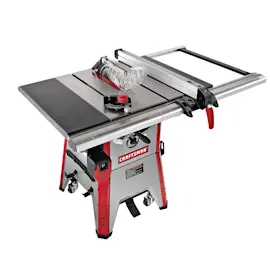
A table saw is built around a flat table and a spinning blade on an arbor; on the Craftsman model 137218300, key parts include the rip fence and miter gauge for guiding cuts, plus safety parts like the blade guard, splitter, and anti-kickback pawls (all detailed in the owner's manual).
- Table (top): Supports the workpiece and provides a flat reference surface.
- Blade and arbor: The blade mounts to the arbor (shaft) that drives the cut.
- Rip fence: Guides straight rip cuts parallel to the blade.
- Miter gauge: Guides crosscuts and miter cuts using the table slots.
- Blade insert (throat plate): The removable insert around the blade opening; this model also includes a dado table insert for dado setups.
- Blade elevation handwheel: Raises and lowers blade height.
- Blade tilting handwheel and bevel scale: Tilts the blade (typically 0° to 45°) and shows the bevel angle.
- Table scale: Helps set fence-to-blade distance for faster setups.
- Blade guard and splitter: Covers the blade and helps keep the kerf open to reduce binding.
- Anti-kickback pawls: Help prevent the workpiece from being thrown back toward you.
- Overload reset switch: Lets you restart the motor after an overheat or overload trip.
- Push stick: Helps keep hands safely away from the blade during narrow rips.
| Part | Used for | Typical sign it needs attention |
|---|---|---|
| Rip fence | Straight rip cuts | Cuts drift, fence won’t lock square |
| Miter gauge | Crosscuts and miters | Inaccurate angles, slop in the bar |
| Splitter/pawls/guard | Kickback reduction | Binding, missing hardware, won’t align |
| Handwheels (height/tilt) | Blade setup | Hard to turn, won’t hold setting |
Knowing these parts helps you set up accurate 90° and 45° cuts, reduce kickback risk, and troubleshoot issues like binding, slow blade speed, or height adjustment problems.
For more how-to and troubleshooting, we recommend starting with table saw common question and ordering model-matched replacements through Sears PartsDirect.
Last updated: February 2026