Owner’s manual
 Error Codes
How to reset a dehumidifier?
To reset your Kenmore dehumidifier model 25150501012, turn the unit OFF, unplug it for 1 minute, then plug it back in and press POWER. This clears most control glitches after a power interruption or a bucket-full shutdown; then reselect your humidity setting.
Quick reset steps (recommended)
- Press POWER ON/OFF to turn the dehumidifier OFF.
- Unplug the power cord from a grounded 3-prong outlet.
- Wait 60 seconds.
- Plug the unit back in (do not use an extension cord).
- Press POWER ON/OFF to turn it ON.
- Re-set your mode and target humidity (values typically adjust in 5% increments).
If it still will not run after a reset
A “reset” will not override normal safety and operating conditions. Check these common items:
- Bucket full indicator is on: empty and reinstall the bucket fully.
- Float switch is stuck: make sure it moves freely and is not obstructed.
- Room temperature is below 65°F: the unit may enter defrost (fan runs, compressor stops).
- Airflow is restricted: clean the front grill and air filter.
- Unit is not level: place it on a level floor that can support a full bucket.
What a reset does (and does not do)
| Situation | What to expect after reset | What to do next |
|---|---|---|
| Power flicker or control glitch | Unit powers back on normally | Re-select settings |
| Bucket full shutdown | Unit stays off until bucket is seated | Empty bucket, check float |
| Defrost operation | Compressor may stay off temporarily | Wait for automatic return |
| Poor moisture removal | Reset rarely fixes it | Improve airflow, check temperature |
Why it matters
Resetting restores normal operation after a power event, but dehumidifiers still follow built-in protections (bucket-full and defrost). Fixing bucket seating, airflow, and room temperature prevents repeat shutdowns.
For control panel details and operating modes (Auto, Humidity, Delay Start), use the owner's manual.
Last updated: February 2026
How to clean the filter on a Kenmore dehumidifier?
To clean the air filter on your Kenmore dehumidifier model 25150501012, unplug the unit, remove the bucket, slide the filter out from behind the front grill, then wash it with mild detergent, rinse, and air-dry completely before reinstalling (keep it out of direct sunlight). See the steps in the owner's manual.
Step-by-step: cleaning the front grill and air filter
- Disconnect power (unplug the dehumidifier) before any cleaning.
- Pull out the water bucket to access the filter area.
- Locate the air filter behind the front grill.
- Pull the filter down and away from the unit until it slides out.
- Wash the filter with mild detergent; rinse thoroughly.
- Air-dry the filter fully away from direct sunlight.
- Reinstall the filter into the front grill, then reinstall the bucket.
Quick do and do not list
- Do let the filter dry completely before reinstalling.
- Do clean dust from the front grill with a vacuum or soft brush.
- Do check that the bucket is seated correctly afterward (the unit will not run if the bucket is not in place).
- Do not spray water directly on the dehumidifier exterior.
- Do not operate the unit with the filter removed.
Cleaning method comparison
| Method | Best for | Notes |
|---|---|---|
| Vacuum or soft brush (front grill) | Light dust and lint | Fast routine cleaning |
| Wash filter with mild detergent | Heavy dust buildup | Rinse well; air-dry fully |
| Wipe exterior with dry towel | Cabinet cleanup | Do not spray water on the unit |
Why it matters
A clean filter and front grill keep airflow strong, which helps your Kenmore 25150501012 remove moisture efficiently and reduces strain on the fan and coil.
For deeper maintenance steps, use our guide: how to clean a dehumidifier.
Last updated: February 2026
What are the most common problems with dehumidifiers?
The most common dehumidifier problems are no power or no run condition, poor moisture removal, water not draining or leaking, frost on the evaporator coil, and excessive noise or vibration. On Kenmore model 25150501012, many issues trace back to airflow, bucket/float switch position, room temperature, or drain setup (see the owner's manual).
Most common symptoms and what usually causes them
- Won’t turn on: power cord not fully plugged into a grounded 3-prong outlet, or a control not set correctly.
- Runs but doesn’t collect water: dirty air filter or blocked inlet/outlet; doors/windows open; unit too small for the space.
- Shuts off and “bucket full” light is on: bucket not seated correctly or float switch stuck.
- Frost on the coil: room temperature below about 65°F; the unit may enter automatic defrost (fan runs, compressor stops).
- Water won’t drain through hose: drain connector installed incorrectly or hose kinked.
- Loud noise or vibration: unit not on a level floor, or airflow restrictions causing the fan to work harder.
Quick checks we recommend first (fast, no tools)
- Confirm the unit is on a level floor and has 12 to 18 inches of clearance on all sides.
- Make sure the bucket is installed properly; the unit will auto shut off if it is full or mispositioned.
- Clean and reinstall the air filter (operate without a filter can cause failure); clean about every two weeks.
- Keep the room enclosed (close doors and windows) so humidity can reach the set point.
- Avoid extension cords; plug directly into a grounded outlet.
Symptom-to-fix guide
| Symptom | Most likely cause | Best first action |
|---|---|---|
| Not running | Power or bucket/float switch issue | Reseat bucket; check outlet and cord |
| Not removing moisture | Airflow or room conditions | Clean filter; close openings; verify sizing |
| Not draining | Drain setup problem | Check drain connector; straighten hose |
| Frost on coil | Low room temperature | Move to warmer area; allow defrost cycle |
Why it matters
Dehumidifiers depend on steady airflow across the evaporator coil and correct water handling (bucket/float switch or drain hose). When airflow is restricted or the bucket or drain is mis-set, Kenmore 25150501012 can shut down, ice up, leak, or run without lowering humidity.
Helpful DIY resources
- How to clean a dehumidifier
- Dehumidifier doesn't remove moisture
- Dehumidifier not draining
- Dehumidifier leaks water
- Dehumidifier error codes landing page
Last updated: February 2026
How big of a dehumidifier do I need for a 2000 sq ft house?
A single portable dehumidifier like Kenmore model 25150501012 is designed to dehumidify an enclosed area (one room or zone), not an entire 2,000 sq ft house. For a whole house, we size by moisture level and often use multiple units or a whole-home system; use our owner's manual guidance to match capacity to the space you will actually close off.
How to size for 2,000 sq ft (practical approach)
Because humidity varies a lot by climate, season, and basement conditions, start by deciding whether you need whole-house coverage or targeted zones.
- Best results: dehumidify one enclosed level or problem area at a time (basement, laundry room, etc.)
- If you want whole-house control: plan on multiple portable units placed by zone, or a dedicated whole-home dehumidifier tied into HVAC
- If there is a basement: size for the basement first; it usually drives the moisture load
- Keep doors and windows closed in the area being treated (humid outdoor air increases workload)
- Allow airflow clearance around the unit (the manual calls for about 12 to 18 inches on all sides)
Typical capacity ranges (rule-of-thumb)
These are common sizing ranges people use for a 2,000 sq ft home; choose the higher end when the space is damp, musty, or has frequent condensation.
| Home condition | Common approach for ~2,000 sq ft | What you may need |
|---|---|---|
| Light humidity (seasonal) | Zone control | 1 to 2 portable units |
| Moderate humidity (basement + main level) | Multi-zone | 2 portable units or whole-home |
| Heavy humidity (wet basement, frequent condensation) | Whole-home focus | Whole-home unit or multiple portables |
Setup tips that matter for performance
These steps directly affect how much water a dehumidifier can remove per day.
- Place the unit on a level floor
- Run it in an enclosed area (close doors, windows, and openings)
- Keep the filter installed and clean it every two weeks (operation without the filter can lead to failure)
- Avoid cold locations; many units perform best when the area stays above about 65°F
- Do not use an extension cord; plug into a grounded 3-prong outlet
Why it matters
If the unit is oversized for a small room, it can short-cycle and control humidity poorly. If it is undersized for a large, open 2,000 sq ft layout, it will run constantly, use more energy, and still leave rooms damp.
For more sizing guidance, see what size dehumidifier do i need.
Last updated: February 2026
Is it worth repairing a dehumidifier?
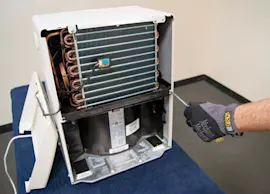
For a Kenmore 25150501012 dehumidifier, repair is worth it when the problem is a maintenance item (dirty filter/grille, bucket switch, drain setup) or an electrical/control issue. If the sealed refrigerant system or compressor is failing, replacement is typically the better value.
Quick way to decide (cost vs. likely fix)
Use this checklist first; it matches common causes in the troubleshooting section of the owner's manual.
- Do this first: clean the air filter and front grille; restricted airflow can make the unit run but collect little or no water.
- Confirm bucket operation: the unit shuts off if the bucket is full or not seated; the Bucket Full light stays on until the bucket is positioned correctly.
- Check room conditions: for best performance, keep the space 65°F or warmer; colder air can reduce water removal and trigger defrost behavior.
- Level the unit: vibration and noise often come from an uneven surface.
- Drain setup: if using a hose, check the drain connector installation and remove hose kinks.
What’s usually worth repairing vs. not
| Symptom | Common cause | Usually worth repairing? |
|---|---|---|
| Runs but doesn’t collect water | Dirty filter/grille, low room temp, bucket not seated | Yes (often DIY) |
| Won’t start | Power supply issue, bucket switch/float issue | Yes (often moderate) |
| Loud noise/vibration | Not level, loose panels, fan interference | Yes (often DIY) |
| Fan runs but little moisture removal over time | Refrigeration system or compressor issue | No (typically replace) |
Why it matters
A dehumidifier is basically a small refrigeration system. Airflow, temperature, and the bucket safety switch are the most common, low-cost reasons performance drops. Compressor or sealed-system problems are high-cost repairs and rarely pay off.
Safety notes before you open anything
- Unplug the unit before cleaning or service.
- Do not clean the dehumidifier with water.
- If the unit makes strange sounds, smells, or smoke, turn it off and unplug it.
If you want a step-by-step maintenance routine that prevents many “not collecting water” complaints, follow how to clean a dehumidifier.
Last updated: February 2026