Owner’s manual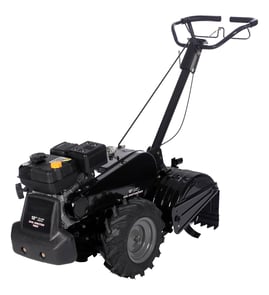



Where is the model number on a Craftsman rear tine tiller?
On a Craftsman rear-tine tiller, the model number is printed on the product identification label. For model 917293301, use the label information to match the correct parts list and diagrams in the 917293301 owner's manual.
We typically see the model/serial label in one of these spots:
- On the tine shield or tine guard area (near the tines)
- On or near the engine area (often close to the muffler or recoil starter)
- On the frame near the front of the tiller (especially on larger units)
- Near the handle support or control panel area
The label usually includes a model number and sometimes a serial number. For parts lookup, the model number is the key.
| What you see on the label | What it means | What to do with it |
|---|---|---|
| Model No. 917.293301 | Your tiller model identifier | Use it to select exact Craftsman 917293301 parts |
| Serial number | Production identifier | Keep it for service records and ordering |
Craftsman tillers can look similar across model families, but parts like the drive belt, clutch cable, and transmission components vary by model. Using the exact model number helps ensure you get the right diagrams and the right replacement parts the first time.
- Wipe the area with a damp rag and mild detergent
- Use a flashlight at an angle to make faded printing easier to see
- Take a close-up photo and zoom in to read the numbers
Last updated: February 2026
What is the best tiller for rocky ground?
A rear-tine tiller like the Craftsman 917293301 is the best choice for rocky ground because it’s built to bite into hard soil and maintain traction while the tines work. For safer control in rocky areas, we recommend shallow passes (about 4 to 6 inches) and a moderate throttle.
- Rear-tine design for better stability and control in hard ground
- Adjustable tilling depth so you can start shallow and work deeper gradually
- Strong tine engagement and consistent drive to reduce bouncing
- Good traction at the wheels; avoid leaning on the handle, which reduces traction
- A machine you can operate at controlled speed (not high speed on slippery surfaces)
Rocky soil increases the chance the tines will catch and the tiller can lurch forward. Use these operating habits from the start:
- Start with throttle at a slower, mid-range setting until you’re comfortable
- Make multiple shallow passes instead of one deep pass
- If the tines catch and the tiller surges forward, let go of the handlebars and do not restrain the machine
- Keep bystanders, kids, and pets away from the work area
- Review the safety and operating steps in the 917293301 owner’s manual
| Soil condition | Best approach | Why it helps |
|---|---|---|
| Hard, dry, rocky | Lightly moisten soil, then shallow passes | Helps tines penetrate and reduces bounce |
| Rocky with roots | Slow speed, clear debris between passes | Prevents sudden grabbing and wrapping |
| Mixed soil, scattered rocks | Till in lanes, leave an untilled row between passes | Easier turns and steadier control |
Rocky ground can overload a tiller if you try to go too deep too fast. A rear-tine tiller and a 4 to 6 inch working depth help protect the drivetrain, improve handling, and produce better seedbed results.
Last updated: February 2026
How to grease a tiller?
For the Craftsman rear-tine tiller model 917293301, we grease the unit at the service points called out in the 917293301 owner's manual, focusing on moving joints and any gearcase-related contact surfaces; correct lubrication reduces wear, improves shifting and tine engagement, and helps prevent overheating.
Use the lubrication chart and service section in the 917293301 owner's manual to match locations and intervals. Typical grease points include:
- Handle height and handle lock contact surfaces (the manual notes applying grease to the smooth side of the handle lock during assembly)
- Pivot points and linkages for the drive control and shift mechanism
- Depth stake pin and pivot (helps prevent binding when adjusting tilling depth)
- Wheel hubs or axle points (if your configuration has greaseable hubs)
- Any exposed sliding surfaces where metal contacts metal (light coat only)
- Shut the engine off and let it cool.
- Disconnect the spark plug wire before servicing.
- Brush off dirt first; grease over dirt accelerates wear.
- Apply a small amount of grease to the point; cycle the control or move the part to spread it.
- Wipe off excess so it does not attract grit.
| Location | Use | Why |
|---|---|---|
| Pivot points, pins, sliding plates | Multi-purpose lithium grease | Stays in place under load |
| Cables | Cable lube (light oil) | Reduces drag without gumming |
| Chains inside a case | Grease specified in manual | Protects under higher load |
Greasing helps when controls feel stiff, adjustments bind, or parts squeak. If the tines or wheels still do not drive correctly after lubrication, inspect wear items such as the husqvarna rear-tine tiller drive belt 591372401 and the tiller clutch cable 532110675.
A rear-tine tiller works in abrasive soil; correct lubrication forms a barrier that reduces metal-to-metal wear and helps keep adjustments (like handle height and depth stake position) working smoothly.
Last updated: February 2026
Why are the tines on my tiller not turning?
On Craftsman rear-tine tiller model 917293301, the tines usually stop turning because the unit is in a transport/forward setting (where tines are designed not to turn) or because the drive system is not transferring power (belt, cable, or internal drive parts). Use the 917293301 owner's manual to confirm the correct shift lever and drive control bar operation.
- Shift lever position: For transporting/turning, the manual notes the shift lever in “F” (forward) and the tines will not turn.
- Drive control bar: Squeeze and hold the drive control bar against the handle; if it is released, the drive disengages.
- Wrapped debris: Vines, long grass, and string can wrap the tine shaft and stop rotation.
- Depth stake setting: An overly aggressive depth setting can load the tines; reduce depth and try again.
- Soil conditions: Very dry, hard soil can prevent penetration and make the tiller bounce; lightly moisten soil before tilling.
These are the most likely mechanical causes on a rear-tine tiller:
- Worn or broken drive belt (common when the tiller moves poorly under load)
- Misadjusted, stretched, or broken clutch cable
- Damaged pulley, chain, or gearcase components
| Symptom | What to check | Model-matched part to consider |
|---|---|---|
| No tine movement, belt looks glazed/cracked | Belt condition and tension | Husqvarna rear-tine tiller drive belt 591372401 |
| Drive control feels loose, no engagement | Cable stretch/break, adjustment | Tiller clutch cable 532110675 |
| Grinding/noise from drive area | Chain/gearcase wear | Tiller chain, #25-50 532102134 |
When the tines are not turning, the tiller cannot dig to the typical working depth (about 4 to 6 inches for tilling, and 1 to 3 inches for cultivating). Fixing the control setting or restoring proper belt and cable engagement prevents premature wear on pulleys, chains, and the gearcase.
Last updated: February 2026
What tiller is made in the USA?
Some tillers are made in the USA, but it depends on the exact brand, model, and production run. For your Craftsman rear-tine tiller model 917293301, the most accurate way to confirm country of origin is to check the product identification label on the machine and compare it to the documentation in the 917293301 owner's manual.
Use the tiller’s ID label first; that label is the source used for “Made in” or “Assembled in” statements.
- Find the product ID plate or decal on the frame (commonly near the handle support or engine mount)
- Write down the model number 917293301 and the serial number exactly
- Look for “Made in …” or “Assembled in …” wording on the label
- Check the identification and specifications sections in the 917293301 owner's manual
- Check the engine label separately; engine origin can differ from the tiller’s origin
| Label wording | What it tells you | What it applies to |
|---|---|---|
| Made in USA | Manufactured in the U.S. | The product named on that label |
| Assembled in USA | Final assembly in the U.S. | The product named on that label |
| Engine made in … | Engine origin only | Engine, not the full tiller |
Country of origin is useful for service and parts matching. When you order wear items like a drive belt or clutch cable, confirming the exact model and serial helps ensure the replacement fits your Craftsman 917293301 correctly.
Last updated: February 2026
Are Craftsman rear tine tillers any good?
Yes. Craftsman rear-tine tillers like model 917293301 are a solid choice for breaking new ground and working tougher soil because the counter-rotating tines bite in and pull the machine forward. Long-term satisfaction mainly depends on routine maintenance and keeping wear items (belt, cable, tines) in good shape per the 917293301 owner's manual.
A rear-tine, counter-rotating design is typically considered “good” when it:
- Digs consistently without bouncing or skating on hard soil
- Maintains tine speed under load (no slipping)
- Tracks straight with manageable handlebar effort
- Lets you control depth without fighting the machine
- Holds up when fasteners and wear parts are checked regularly
Some frustrations people report (like awkward control feel, fast wear, or poor performance) are often tied to adjustment or wear, not the basic design.
| Symptom | Most common cause | What to check first |
|---|---|---|
| Tines or wheels slip under load | Worn or loose drive belt | Belt condition and tension; consider husqvarna rear-tine tiller drive belt 591372401 |
| Drive engagement feels inconsistent | Cable out of adjustment or stretched | Cable routing and adjustment; consider tiller clutch cable 532110675 |
| Poor tilling depth or “skipping” | Worn/bent tines or wrong technique | Tine wear and tine gap; slow down and reduce depth per pass |
| Tiller lunges forward in hard ground | Normal tine bite in hard soil | Use a shallower first pass; let go of handlebars if it surges |
The manual emphasizes keeping the machine safe and effective with frequent checks.
- Check shear pins and mounting bolts for tightness
- Keep guards and protective devices in place
- Avoid trying to till too deep too fast
- Inspect tines for wear and bending; replace when worn
- Disconnect the spark plug wire before adjustments or repairs
A rear-tine tiller’s performance is mostly about traction and power transfer. When the belt, clutch cable, and tines are in spec, the machine feels strong and controlled; when they are worn or misadjusted, it can feel underpowered or “flimsy” even if the engine is fine.
Last updated: February 2026
What would cause a tiller to not start?
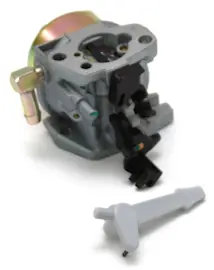
On the Craftsman 917293301 rear-tine tiller, a no-start is usually caused by stale fuel, incorrect choke/throttle settings, a fouled or mis-gapped spark plug, or restricted airflow. Start with the basic fuel, spark, and air checks, then move to ignition and carburetor adjustments using the 917293301 owner's manual.
- Confirm the throttle control is not in STOP and use the choke control for a cold start (then move choke toward RUN as the engine warms).
- Drain old gasoline and refill with fresh unleaded regular fuel (the tank capacity is 4 quarts).
- Check engine oil level and condition; low or dirty oil can contribute to hard starting and poor running.
- Inspect the air filter and engine air screen; clean or replace if dirty.
- Remove and inspect the spark plug (Champion RJ19LM, gap .030 in); replace if fouled.
- Verify spark at the plug; if there is no spark, the ignition coil and kill switch wiring are common suspects.
| What you see | Likely cause | What we recommend |
|---|---|---|
| Starts only with choke, then dies | Lean fuel mix, dirty carburetor, air leak | Clean carburetor, check fuel flow, adjust carburetor if needed |
| Cranks but never fires | No spark, bad plug, kill circuit grounding | Test spark, replace plug, inspect stop switch wiring |
| Starts after sitting, then surges | Stale fuel or varnish in carburetor | Drain fuel, clean carburetor, refill with fresh gas |
| Pull cord feels normal, still no start | Fuel not reaching carburetor | Check fuel line and tank for blockage |
If the engine runs but the tiller will not move, the manual points to the tine control not engaged or a V-belt issue (misadjusted, off pulleys). A worn belt is a common fix; match your replacement to the model-specific husqvarna rear-tine tiller drive belt 591372401.
A systematic fuel-spark-air approach prevents unnecessary parts replacement and gets your Craftsman tiller running safely. The manual also emphasizes disconnecting the spark plug wire before cleaning, inspecting, or repairing to prevent accidental starting.
Last updated: February 2026
What are the common problems with lawn tillers?
Common lawn tiller problems on a Craftsman rear-tine tiller like model 917293301 are hard starting, rough running, overheating, excessive bouncing or poor handling, soil clumping, and the engine running while the tiller will not move. Most issues trace to fuel, ignition, air flow, or drive engagement and adjustment.
- Engine will not start: stale fuel, dirty carburetor, fouled spark plug
- Engine runs rough or misfires: fuel restriction, dirty air screen, carburetor adjustment
- Engine overheats: low or dirty oil, dirty engine air screen, debris around cooling fins, muffler restriction
- Excessive bounce or difficult handling: ground too dry and hard, wheel or depth stake adjustment
- Soil balls up or clumps: ground too wet
- Engine runs but tiller will not move: tine control not engaged, belt off pulleys, belt out of adjustment
- Verify the tine control is fully engaged before assuming a drive failure.
- Check oil level and condition; overheating is commonly tied to low or dirty oil.
- Inspect for packed dirt and debris around the engine air screen and cooling areas.
- Match tilling depth to conditions; best tilling depth is typically 4 to 6 inches.
- Adjust technique for soil moisture: moisten very hard soil; wait if soil is wet and clumping.
| Symptom | Most likely cause | What to do next |
|---|---|---|
| Engine runs, tines do not | Belt off or loose, control not engaged | Check engagement and belt routing/tension |
| Jerky movement or poor pull | Worn belt, linkage out of adjustment | Inspect belt and clutch cable adjustment |
| Bouncing in hard ground | Depth stake set too deep, soil too dry | Reduce depth; moisten soil before tilling |
If the tiller is not moving or the tines are not driving, the drive belt and clutch linkage are common wear points; the husqvarna rear-tine tiller drive belt 591372401 and tiller clutch cable 532110675 are model-matched options for 917293301.
Catching these problems early prevents unnecessary wear on the belt, pulleys, and gearcase, and it also improves control. In hard ground, the tines can catch and propel the tiller forward; using the right depth and technique reduces that risk.
For operating tips, safe handling, and adjustment guidance (including tilling depth and storage practices), follow the 917293301 owner's manual.
Last updated: February 2026