 Owner’s manual
 Error Codes










How to find part number for Samsung dryer?
To find the correct part number for your Samsung dryer, we match parts to the model number first. For model DVE45N5300V, the model and serial tag is typically on the front frame behind the door; if it’s unreadable, check for a second tag on the back of the dryer. Use the DVE45N5300V owner's manual to confirm the exact model labeling and basic component locations.
- Open the dryer door and inspect the front frame area behind the door opening
- Look for a sticker or metal tag with MODEL and SERIAL
- If the front tag is missing or worn, check the rear panel for a second label
- Write the model number exactly as shown (letters, numbers, and any dashes)
- Take a clear photo of the tag before it fades further
Once you have DVE45N5300V, you can identify the part you need by name and function (heating, airflow, drum drive, controls), then match it to the correct manufacturer part number.
| What you know | What to search by | Example for this model |
|---|---|---|
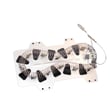
| Symptom (no heat, long dry times) | Heating and safety parts | Samsung dryer heating element DC47-00019A |
| Overheating or shuts off | Thermostats and fuses | Dryer high-limit thermostat DC47-00018A |
| Poor temperature sensing | Sensor parts | Dryer thermistor DC32-00007A |
Samsung dryers often have similar-looking parts across model families, but connectors, brackets, and temperature ratings can differ. Using the exact DVE45N5300V model number prevents ordering the wrong heating element, thermostat, belt, or control component.
- Match by model number first, then by part name and part number
- If your dryer has an error or information code, use Samsung dryer error codes to narrow the failing system
- For heat problems, also check venting and lint buildup before replacing parts
Last updated: February 2026
Is it worth replacing a heating element in a Samsung dryer?
Yes. For Samsung dryer model DVE45N5300V, replacing the heating element is usually worth it when the dryer runs but does not heat, because the part cost is typically far less than replacing the entire dryer. The key is confirming the no-heat cause first, since thermostats, fuses, or airflow problems can mimic a failed element.
- The drum tumbles normally but clothes stay cold or damp.
- You have proper power (electric dryers need full 240V supply).
- The venting is clear and airflow is strong.
- You can test parts with a multimeter (or have a technician test).
- The dryer is otherwise in good shape (no major noise, burning smell, or repeated shutdowns).
On this Samsung platform, these parts often fail and can look like a bad heater:
| Symptom | Common culprit | What it does |
|---|---|---|
| Runs but no heat | Thermal cut-off thermostat | Opens the heater circuit if overheating occurs |
| Runs but no heat after vent restriction | Thermal cut-off fuse | Blows to stop heat when temps get unsafe |
| Heat is weak or cycles oddly | Thermistor | Helps the control regulate temperature |
| Overheats then stops heating | High-limit thermostat | Limits heater temperature |
Model-matched examples include dryer heating element DC47-00019A, dryer thermal cut-off thermostat DC47-00016A, and dryer thermistor DC32-00007A.
A heating element can fail, but overheating from a clogged vent can also take out a thermal fuse or cut-off. If you replace the element without fixing airflow, the new part can fail again. Our best practice is to clean the lint filter, confirm the exhaust duct is not crushed or blocked, and then test the heater circuit components.
Use the DVE45N5300V owner's manual for model-specific troubleshooting checkpoints, information codes, and maintenance guidance (including cleaning and airflow basics).
A dryer that does not heat is often a single-part repair. Replacing the correct part restores drying performance, reduces cycle time, and helps prevent repeat overheating issues caused by restricted venting.
Last updated: February 2026
What is the average lifespan of a Samsung dryer?
Most Samsung dryers last 10 to 15 years with normal household use. For your Samsung DVE45N5300V, consistent airflow and basic maintenance (especially lint and vent cleaning) are what most often push life toward the higher end; see the DVE45N5300V owner's manual for the recommended care schedule.
A dryer’s service life is mainly driven by heat stress, airflow restriction, and mechanical wear.
- Usage volume: multiple loads daily shortens life faster than a few loads weekly
- Vent condition: long, crushed, or clogged vents overheat components
- Lint control: a dirty lint screen reduces airflow every cycle
- Load size: chronic overloading strains the drum, belt, and motor
- Installation clearances: tight closets can limit make-up air and raise temperatures
These are the highest-impact habits for the DVE45N5300V:
- Clean the lint screen before every load
- Inspect and clean the vent duct regularly; keep it short and smooth where possible
- Confirm strong airflow at the outside vent hood while the dryer runs
- Avoid overloading; dry similar fabrics together for shorter run times
- Keep the area around the dryer free of dust and lint buildup
When airflow is restricted, heat-related parts tend to fail sooner.
| Symptom | Common area involved | Why it matters |
|---|---|---|
| Long dry times | Venting/airflow | Extra run time increases wear and energy use |
| No heat or shuts off on heat | Heating circuit safety parts | Overheating protection can trip or fail |
| Thumping/squealing | Drum support/belt/idler | Mechanical wear can damage the drum over time |
A dryer that runs hot or runs too long ages faster and can start a chain reaction of failures (heating system, motor load, and drum support). Keeping airflow strong is the simplest way to protect performance and lifespan.
Last updated: February 2026
What is the error code dE on a Samsung dryer?
On the Samsung DVE45N5300V dryer, the dE (often shown as dC/DC on some displays) is a door-related code. It means the dryer is detecting the door as open or not fully latched, so the cycle may not start or may stop until the door signal is correct.
- Open and firmly re-close the door; press near the latch side until you feel it click.
- Check for laundry caught between the door and front panel.
- Make sure the door isn’t sagging; lift slightly on the door while closing to see if it latches better.
- Power the dryer off, wait 30 seconds, then power it back on and try a cycle again.
- If you see the code during a diagnostic or airflow test, close the door and restart the test.
If the door closes normally but the code returns, the door switch circuit is the most common cause.
| Symptom | Most likely cause | What we recommend |
|---|---|---|
| Door shuts, but dryer won’t run | Door switch not signaling “closed” | Inspect/replace the dryer door switch DC64-00828B |
| Code comes and goes when you move the door | Loose latch alignment or worn switch | Check hinge alignment; test switch operation |
| Code appears during Vent Blockage Test | Door opened or not fully latched | Close door; rerun test per the DVE45N5300V owner’s manual |
The dryer uses the door switch as a safety interlock. If the control doesn’t see a solid “door closed” signal, it prevents tumbling and heating to protect you and the appliance.
Last updated: February 2026
Why is the 60 min light blinking on my Samsung dryer?
On the Samsung DVE45N5300V dryer, a blinking 60 min light typically means the dryer is detecting an overheating or restricted-airflow condition. In most cases, the fix is to clean the lint screen and clear the entire exhaust vent path so heat can escape normally; see the DVE45N5300V owner's manual.
- Clean the lint screen completely (wash off any fabric softener film, dry it, then reinstall).
- Check the exhaust hood outside; make sure the flap opens strongly while the dryer runs.
- Inspect the vent duct behind the dryer for kinks, crushing, or heavy lint buildup.
- Confirm the duct run is not excessively long and does not have multiple sharp bends.
- Make sure the dryer has adequate clearance so the vent is not being pinched.
Many Samsung dryers use a duct status indicator that can be off, on, or blinking. A blinking state indicates severe restriction and the dryer may keep the indicator blinking for hours after the cycle ends.
| Indicator behavior | What it usually means | What we do next |
|---|---|---|
| Off | Airflow is normal | No vent action needed |
| On (solid) | Partial restriction | Clean lint screen and venting |
| Blinking | Severe restriction | Clear ducting, shorten/straighten run |
Restricted airflow is the most common cause, but overheating can also happen when a temperature-sensing or safety device is failing.
Common parts involved include:
- Dryer thermistor DC32-00007A (monitors temperature)
- Dryer high-limit thermostat DC47-00018A (opens if temperature gets too high)
- Dryer thermal cut-off thermostat DC47-00016A (safety cut-off)
Overheating and poor venting can cause long dry times, repeated shutdowns, and premature failure of the heating system. Fixing airflow first protects the heating element, thermostats, and wiring.
Last updated: February 2026









