Owner’s manual



What is the life expectancy of a Kenmore dryer?
Most Kenmore dryers, including model 41783042300, typically last 10 to 13 years with normal household use. With consistent lint and vent maintenance and avoiding overloads, it’s common for a well-cared-for dryer to run 15 years or longer; check the 41783042300 owner's manual for the care routine.
A dryer’s life is mostly determined by heat stress, airflow restriction, and wear on moving parts.
- Airflow and lint control (biggest factor for heat and run time)
- Load size (overloading strains the drum support and belt)
- Cycle selection (high heat all the time shortens component life)
- Vent length and restrictions (long runs and crushed ducts increase heat)
- Wear parts condition (belt, drum glides, bearings)
The manual calls out lint and exhaust-duct cleaning as key safety and performance steps; keeping airflow strong reduces overheating and long dry times.
- Clean the lint screen every load
- Keep the area around the exhaust outlet free of lint and dust
- Have the interior, lint housing, and exhaust duct cleaned about every 18 months by qualified service personnel
- Avoid drying with a blocked, damaged, or missing lint screen
- Do not block ventilation by pushing items against the dryer front or back
| Part | What it affects | Common symptom when worn |
|---|---|---|
| Drum belt | Drum rotation | Drum won’t turn, squealing, thumping |
| Drum bearing/glides | Drum support | Rumbling, scraping, uneven drum movement |
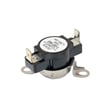
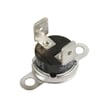
| Thermal limiter/thermostat | Overheat protection | No heat, shuts off early, overheating |
If your dryer is noisy or the drum stops turning, replacing the belt 134503600 is a common first repair on this platform.
A dryer that runs longer to dry clothes uses more energy and runs hotter; that extra heat accelerates wear on the heating system, thermostats, and drum support parts. Good airflow maintenance is the simplest way to protect performance and lifespan.
Last updated: February 2026
Where to find model number for Kenmore dryer?
On Kenmore dryer model 41783042300, the model and serial number are printed on an identification plate located on the left side of the door opening (inside the door area). Confirm the exact location and how to record it in the 41783042300 owner's manual.
We recommend checking these spots in order:
- Left side of the door opening (most common for this Kenmore 417-series style)
- Inside the door on the cabinet frame
- Back of the dryer cabinet near the top
- Behind the lower toe grille area (if your unit has a removable grille)
Use these tips so you capture the full model number and serial number:
- Copy every digit exactly; model numbers are often long (example: 41783042300)
- Record both Model No. and Serial No. from the same label
- Take a clear photo of the label before ordering parts like a belt or thermostat
- If the label is worn, use a flashlight and view from an angle to make the print stand out
| What you need | Why we ask for it | Example format |
|---|---|---|
| Model number | Matches parts diagrams and compatible parts | 41783042300 |
| Serial number | Helps identify production changes | Letters and numbers |
The model number is what we use to match the correct Kenmore dryer parts (for example, a drum belt, heating element assembly, or high-limit thermostat). One missing digit can pull up the wrong parts list and lead to fit or wiring issues.
Last updated: February 2026
How much does it cost to replace a bearing on a dryer?
Replacing a drum bearing on a Kenmore dryer model 41783042300 typically costs $150 to $350 total when you pay for service (parts plus labor). If you do it yourself, the parts cost is usually $10 to $60, depending on whether you replace only the bearing or a full bearing kit; see the 41783042300 owner's manual for safety steps before servicing.
- DIY parts only: $10 to $60 (bearing or bearing kit)
- Service labor: $120 to $250 (varies by local rates and access)
- Common add-ons: belt, glides, or felt seals if they are worn
| Repair approach | What you pay for | Typical total |
|---|---|---|
| DIY bearing only | Part(s) and your time | $10 to $60 |
| DIY kit style repair | Kit plus any wear items | $30 to $120 |
| Professional repair | Parts plus labor | $150 to $350 |
A noisy drum often involves more than one wear surface. For this model, these parts are commonly paired with a bearing repair:
- Dryer drum bearing 131825900 (the bearing itself)
- Dryer drum bearing kit 5303281153 (kit option when you want related pieces together)
- Belt 134503600 (often replaced if it is glazed, cracked, or stretched)
- Dryer drum glide 137513300 (front support wear can mimic bearing noise)
- Lower felt 5303937183 (worn felt can cause scraping and drag)
- How far the dryer must be disassembled to reach the drum support
- Whether the drum support hardware is worn (glides, felt, bracket)
- Any heat or airflow issues that caused overheating and accelerated wear (lint buildup, restricted venting)
A worn bearing can make the drum drag, squeal, or rumble; that extra friction can shorten the life of the belt and other drum supports. Addressing it early usually keeps the repair smaller and helps the dryer run more efficiently.
Last updated: February 2026
How to hard reset a Kenmore dryer?
To hard reset your Kenmore dryer model 41783042300, we unplug the dryer (or switch off the breaker) for at least 1 minute, then restore power and try starting a cycle again. This clears many control glitches and is a smart first step before checking parts like the thermal limiter or start switch.
- Turn the cycle selector to OFF.
- Unplug the dryer from the wall outlet (or turn OFF the dedicated breaker).
- Wait 1 to 5 minutes.
- Restore power.
- Close the door firmly.
- Turn the cycle selector clockwise to a setting.
- Turn and hold the start knob to ON for 1 to 2 seconds, then release (normal start method in the 41783042300 owner's manual).
These checks match the most common “no start” causes for this style of Kenmore dryer:
- Confirm the outlet has power; reset the house breaker or replace a blown fuse.
- Make sure the plug fits tightly in the outlet.
- Try a different cycle setting; then start again.
- Check the door closes and latches consistently (a bad catch can prevent starting).
- If the dryer has power but will not run, test the start switch.
- If the dryer is completely dead or stops quickly, check for an overheated safety device such as the thermal limiter.
| What you see | What to check next | Common part involved |
|---|---|---|
| No lights, no response | Power supply, breaker/fuses, cord connection | Home power issue |
| Has power, will not start | Door latch engagement, start circuit | Start switch 134398300 |
| Starts then stops, or dead after overheating | Airflow restriction, safety cutout | Dryer thermal limiter 134120900 |
A hard reset restores the control to a clean state, but it does not fix airflow problems or failed components. If lint buildup or a blocked vent caused overheating, the dryer can trip a limiter and stop until the failed safety part is replaced and the venting is corrected.
Last updated: February 2026
How to remove Kenmore dryer panel?
To remove panels on your Kenmore dryer model 41783042300, we typically start by disconnecting power, then releasing the top and front panel fasteners so the cabinet can open safely for service (belt, drum, or blower access). Use the 41783042300 owner's manual for model-specific safety notes.
- Unplug the dryer from the wall outlet.
- Let the dryer cool completely if it was recently running.
- Wear cut-resistant gloves; cabinet edges can be sharp.
- Keep a small container for screws so none get lost.
- Take a quick photo of wire routing before disconnecting anything.
These steps match how most Kenmore 417-style cabinets are built.
- Remove the control panel screws (often at the back or inside the end caps, depending on console style), then rotate the control panel up and back.
- Remove the main top screws, then slide the top panel back and lift it off.
- Release the front panel clips: insert a flat-blade screwdriver between the upper and lower front panels to pop the retaining clips.
- Remove front panel mounting screws, then lift the front panel up and off the lower tabs.
| What you need to service | Panel(s) usually removed | Related part for this model |
|---|---|---|
| Drum belt or drum removal | Top + front | Belt 134503600 |
| Drum support noise (squeal, rumble) | Top + front | Dryer drum bearing 131825900 |
| No heat troubleshooting access | Front (and sometimes rear) | Dryer thermal limiter 134120900 |
Removing the correct panel the correct way prevents broken clips, bent cabinet panels, and pinched wiring. It also makes repairs like belt replacement and drum support service faster and safer.
Last updated: February 2026
How do I know if my dryer bearing is bad?
A bad drum bearing in your Kenmore dryer model 41783042300 usually shows up as loud squealing or grinding while the drum turns, plus a drum that feels rough, wobbly, or hard to spin by hand (with power disconnected). Catching it early helps prevent belt and motor strain.
- Unplug the dryer first before touching any internal parts (this is a key safety step in the 41783042300 owner's manual).
- Open the door and spin the drum by hand; listen for scraping, grinding, or a “dry” squeal.
- Lift up on the drum at the front; noticeable up-and-down play often points to worn support parts.
- Check for black dust or fine metal shavings near the front or rear drum support area.
- If the noise changes with load size (quiet empty, loud with clothes), the bearing or glides are commonly involved.
| Symptom | Most common cause | What to inspect next |
|---|---|---|
| High-pitched squeal | Dry/worn bearing surface | Drum bearing and bracket area |
| Grinding/rumble | Bearing worn through or debris | Drum bearing, drum contact points |
| Thumping plus wobble | Support wear causing drum misalignment | Bearing plus belt path and idler |
On model 41783042300, these model-matched parts are common solutions depending on what you find during inspection:
- Dryer drum bearing 131825900 (worn bearing surface, squeal or grind)
- Dryer drum bearing bracket 131724301 (bearing mount wear or damage)
- Dryer drum bearing kit 5303281153 (when you want a complete bearing repair set)
A worn bearing increases friction, which makes the drum harder to turn. That extra drag can shorten the life of the belt, idler system, and motor, and it can also contribute to overheating if airflow maintenance is neglected.
The 41783042300 owner's manual also calls out airflow and lint maintenance; keeping the lint screen and exhaust path clean reduces heat stress on internal components.
Last updated: February 2026
What does F1 mean on Kenmore dryer?
On Kenmore dryer model 41783042300, the F1 (or F01) code points to a temperature-sensing problem, most often the thermistor circuit (sensor, wiring, or control input) reading out of range. The dryer may stop mid-cycle and beep to prevent overheating or unsafe operation.
- Unplug the dryer (or switch off the breaker) for 2 minutes, then restore power and try a timed dry cycle.
- Clean the lint screen and confirm strong airflow at the outside vent hood.
- Check that the exhaust duct is 4-inch metal and not crushed, kinked, or packed with lint.
- Avoid running the dryer with the vent disconnected; overheating can trigger repeat faults.
- If the code returns immediately, plan on inspecting the sensor circuit and heat safety devices.
| Likely cause | What you may notice | Typical fix |
|---|---|---|
| Thermistor (temperature sensor) out of range | Stops early, beeps, inconsistent heat | Test resistance, replace sensor if failed |
| Loose/burnt wiring at sensor or control | Intermittent code, works sometimes | Repair connector, replace damaged harness |
| Restricted venting causing overheating | Long dry times, cabinet feels hot | Clear venting, correct ducting |
| Heat safety device opened from overheating | No heat or shuts down | Replace failed safety part and correct airflow |
If overheating or heat shutdown is part of the symptom, these model-compatible parts are commonly checked during diagnosis:
- Dryer thermal limiter 134120900 (opens if temperatures get unsafe)
- Kelvinator dryer high-limit thermostat 3204267 (limits heater temperature)
- Electrolux dryer operating thermostat 134048800 (regulates normal operating heat)
An F1/F01 code is the dryer telling us it cannot trust the temperature feedback. Fixing airflow issues and correcting the sensor or safety circuit helps prevent repeat shutdowns, poor drying performance, and heat-related damage.
For model-specific error code behavior and reset guidance, use the 41783042300 owner’s manual and compare symptoms to the Kenmore 417 model dryer error codes reference.
Last updated: February 2026