 Error Codes



How to read Speed Queen model numbers?
Speed Queen model numbers identify the product type and feature set, but they do not reliably encode the manufacturing date by themselves. For your Speed Queen dryer model AEM427W2-PAEM427W2, use the serial number (not the model number) to determine the build month and year.
On most Speed Queen dryers, the model and serial tag is on the door opening, door frame, or rear panel. Once you have the serial number, use these steps:
- Write down the full serial number exactly as shown
- Look for the first 4 digits (common format)
- Interpret YYMM (year, then month) when that format applies
- If the date code looks like MMYY, treat it as month first (seen on some older units)
- If the tag includes a separate “MFG DATE” or similar field, use that date as the primary reference
These examples show the most common ways the first four digits are used.
| Serial starts with | Read as | Meaning |
|---|---|---|
| 2407xxxx | YYMM | July 2024 |
| 0724xxxx | MMYY | July 2024 |
| 9912xxxx | YYMM | December 1999 |
Using the correct build date helps us match the right replacement parts and revisions for your AEM427W2-PAEM427W2, especially for heat and safety components such as a high-limit thermostat or limit switch. If you are troubleshooting heating or cycling issues, a common related part is the thermostat D515873.
Last updated: February 2026
What is the life expectancy of a Speed Queen dryer?
A Speed Queen dryer typically lasts about 20 to 25 years with normal residential use and proper venting and maintenance. For your Speed Queen AEM427W2-PAEM427W2, keeping airflow strong and heat controlled does the most to extend drum, motor, and heater life.
Most premium, heavy-duty dryers like Speed Queen fall into this range when they are not run with a restricted vent:
- 20 to 25 years: common for well-maintained, heavy-duty dryers
- 15 to 20 years: common when loads are heavy, cycles are frequent, or venting is marginal
- 10 to 15 years: common when venting is restricted, lint builds up, or overheating occurs
These are the most common causes of early failure in a dryer like the AEM427W2-PAEM427W2:
- Clogged lint screen or lint buildup in the blower housing and ducting
- Long vent runs, crushed flex duct, or a stuck exterior vent flap
- Overheating that repeatedly trips a high-limit thermostat or limit switch
- Running consistently overloaded loads (extra strain on drum support and motor)
- Worn drum support parts that create drag and vibration
A dryer usually gets replaced when a major component fails or multiple wear items stack up at once. These are common decision points:
| Component | What you notice | Example part on this model page |
|---|---|---|
| Heat control safety | No heat, overheating, or cycling issues | Thermostat D515873 |
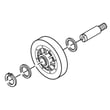
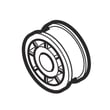
| Drum support | Thumping, rumbling, uneven drum rotation | Cylinder roller D510708P |
| Drive system | Humming, no tumble, slow start | Motor D511629P |
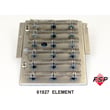
| Heating system | No heat (electric models) | Dryer heating element 61928 |
Dryer lifespan is mostly an airflow and temperature story. When venting is restricted, the dryer runs hotter and longer; that accelerates wear on the heating circuit (thermostats, limit switch, heater) and increases strain on the motor and drum support.
- Clean the lint screen every load; wash it occasionally to remove residue
- Inspect and clean the full vent path periodically (dryer outlet to exterior hood)
- Keep the dryer level to reduce roller and drum wear
- Stop using the dryer if you smell overheating; check airflow before running again
- If dry times increase, address venting first before replacing parts
For step-by-step upkeep tips, use how to clean and maintain your clothes dryer.
Last updated: February 2026
What is the load capacity of a Speed Queen washer?
This page is for Speed Queen dryer model AEM427W2-PAEM427W2, so it does not list washer load capacity. For a Speed Queen washer, load capacity is typically given as drum volume (cubic feet) or a recommended load size; use the washer’s exact model number to match the correct spec.
Use the washer’s model and serial tag (not the dryer model) to look up the published capacity.
- Check the washer’s data tag on the lid frame, door opening, or rear panel
- Write down the full model number exactly as shown
- Look for capacity listed as “cu. ft.” or “tub volume”
- If only load guidance is provided, follow the manufacturer’s “loose fill” recommendation
- Compare by washer type (top-load vs front-load) to set expectations
These ranges help you estimate what “full load” means while you confirm the exact spec for your washer model.
| Washer type | Typical capacity (cu. ft.) | Common load examples |
|---|---|---|
| Compact washer | 2.0 to 3.0 | Small mixed loads, fewer towels |
| Full-size top-load | 3.3 to 4.0 | Everyday family loads |
| Full-size front-load | 4.0 to 5.0 | Larger mixed loads, more bulky items |
Loading to the right capacity improves cleaning and rinsing, reduces out-of-balance spinning, and helps prevent premature wear on the drive system and suspension.
If you are pairing that washer with this Speed Queen dryer, good airflow and lint control help drying performance. Use our guide how to keep a dryer clean and economical for simple maintenance habits.
Last updated: February 2026
What are the common problems with Speed Queen washers?
This page is for the Speed Queen dryer model AEM427W2-PAEM427W2, so the most useful “common problems” to cover here are dryer issues: no heat, long dry times, no start, no tumble, and loud rumbling or squealing. These symptoms usually trace to airflow restrictions, heating components, or drum support parts.
- Dryer runs but won’t heat: failed heating component, thermostat/limit switch issue, or gas ignition problem.
- Takes too long to dry: clogged lint screen or venting restriction, weak airflow, or heater cycling off early.
- Won’t start: door switch problem, failed start circuit component, or motor issue.
- Runs but won’t tumble: worn drum support parts or a motor problem.
- Loud thumping/rumbling: worn drum rollers such as the cylinder roller D510708P.
- Clean the lint screen every load; inspect the lint screen housing for buildup.
- Confirm strong airflow at the outside vent hood.
- Avoid overloading; heavy loads restrict tumbling and airflow.
- Try a timed dry cycle to compare performance.
- If you smell overheating, stop the cycle and check venting before running again.
| Symptom | What to check first | Parts that often relate |
|---|---|---|
| No heat | Airflow and heat source | Thermostat D515873, limit switch D510702 |
| Long dry time | Venting and lint path | Lint screen and ducting (cleaning) |
| Loud rumble | Drum support | Cylinder roller D510708P |
| Won’t start | Door switch and motor | Switch D512973, motor D511629P |
Dryer airflow and temperature control protect clothing and prevent overheating. Catching roller noise early also helps prevent drum wear and more expensive repairs.
For step-by-step maintenance that improves drying performance, use our how to clean and maintain your clothes dryer guide.
Last updated: February 2026





