Installation guide
 Owner’s manual
 Error Codes


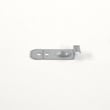
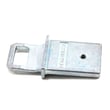
Is the DW80J7550UG a good dishwasher?
Yes. The Samsung DW80J7550UG is a solid built-in dishwasher for most homes because it offers full-size capacity (15 place settings) and a practical set of cycles for everyday loads, quick washes, and heavier soil. Overall performance depends most on loading, cycle choice, and keeping the wash system clean (see the DW80J7550UG user manual).
A “good” DW80J7550UG is one that consistently cleans and drains well, runs without unusual noise, and finishes cycles without standing water.
- Cleans normally soiled dishes well on Normal (the energy label is based on this cycle)
- Handles heavier messes on Heavy
- Offers a faster option with Express 60' (about 1 hour)
- Shows cycle progress on the display (wash, rinse, dry)
- Supports typical built-in installation sizing and hookups (see the DW80J7550UG installation guide)
Most “not cleaning” complaints come from loading and spray obstruction, not the dishwasher itself.
- Scrape off bones, seeds, toothpicks, and paper before loading
- Do not block spray movement; after loading, spin the upper nozzles to confirm they rotate freely
- Make sure dishes do not prevent the detergent dispenser from opening
- Match the cycle to soil level (Normal for everyday, Heavy for baked-on)
- Use the correct amount of detergent and rinse aid
| Cycle | Best for | Notes |
|---|---|---|
| Auto | Mixed loads | Adjusts after a few minutes based on soil |
| Normal | Everyday dishes | Energy label is based on this cycle |
| Heavy | Pots and heavy soil | Stronger wash action |
| Express 60' | Quick turnaround | About 1 hour |
This model’s results are highly sensitive to spray coverage. If racks are overloaded or the spray path is blocked, you can see leftover soil even when the dishwasher is working correctly.
Last updated: February 2026
What is the most common problem with Samsung dishwashers?
The most common Samsung dishwasher complaints are poor cleaning and draining problems. On the Samsung DW80J7550UG, these symptoms usually trace back to water supply issues, a clogged drain path, or a wash system problem (spray movement, pump operation, or filters). See the DW80J7550UG user manual for model-specific checks and information codes.
- Not cleaning well: food left on dishes, gritty residue, cloudy glassware
- Not draining: standing water in the bottom after the cycle
- Not filling correctly: cycle starts but little or no water enters
- Leaking: water under the unit or at hose connections
- Stops mid-cycle or shows a code: control panel displays an information code
- Confirm water supply is on: the manual notes to check whether the water supply valve is closed or the inlet line is clogged or frozen.
- Check the drain hose routing: look for kinks, folds, or a clog; also check the sump drain area for debris.
- Run a functional check: with the dishwasher empty, add detergent and run a cycle (a common manual-recommended step for heating and functional checks).
- Look for leaks at connections: during a test cycle, check both ends of the water supply line and drain hose.
| Symptom | Common cause | Part that often relates (if replacement is needed) |
|---|---|---|
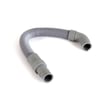
| Won’t drain, water left in tub | Clogged hose, blocked sump, failed drain pump | Dishwasher drain pump DD31-00016A or dishwasher drain hose DD67-00115A |
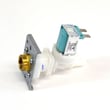
| Not filling or fills slowly | Supply valve closed, inlet screen clogged, inlet valve issue | Dishwasher water inlet valve DD33-01001A |
| Poor cleaning, weak spray | Spray system not moving correctly, circulation issue | Samsung dishwasher waterwall spray arm motor and nozzle assembly DD97-00216A |
Cleaning and draining problems are more than an inconvenience. Poor wash performance can come from low water flow or weak spray action, and a restricted drain can leave dirty water in the sump, causing odors and repeat performance issues.
The DW80J7550UG control panel can display information codes for conditions like water supply check, drain check, leakage check, and pump operation check. For code meanings and the exact steps Samsung recommends, use the Samsung waterwall dishwasher error codes guide along with your manual.
Last updated: February 2026
How to hard reset a Samsung dishwasher?
For the Samsung DW80J7550UG dishwasher, the most reliable hard reset is a power cycle: turn the dishwasher off at the breaker (or unplug it) for 5 to 10 minutes, then restore power and start a new cycle. For canceling a running cycle, use the built-in reset by holding Start for 3 seconds.
- Power cycle (hard reset): Turn off power at the circuit breaker for 5 to 10 minutes, then turn it back on.
- Cancel and drain (control reset): Press and hold Start for 3 seconds to cancel the current cycle and drain.
- Restart after reset: Select a cycle and options, press Start, then close the door to begin.
- Touchpad acting odd: Clean the touch surface with a soft, damp cloth and press the center of each key with one finger.
- Press and hold Start for 3 seconds.
- Let the dishwasher drain completely.
- Select your desired cycle and options.
- Press Start, then close the door.
This procedure is the correct “reset” method described in the DW80J7550UG user manual.
| Situation | Best reset to use | What it typically fixes |
|---|---|---|
| Control panel glitch, frozen keys | Power cycle | Temporary software lockups |
| Need to stop a cycle mid-wash | Hold Start 3 seconds | Cancels cycle and drains |
| Dishwasher has power but will not run | Power cycle, then reselect cycle | Mode or logic hang-ups |
| Error code showing | Follow code guidance | Underlying fill, drain, leak, heat issues |
A power cycle clears the control’s temporary memory, while the Start 3-second reset safely cancels a cycle and drains the tub. Using the right reset prevents repeat stoppages and helps you diagnose real issues like water supply or drain restrictions.
Use the code to guide next steps (water supply valve, drain hose routing, sump area). For WaterWall models, we recommend checking the Samsung waterwall dishwasher error codes reference for the most relevant code list and fixes.
Last updated: February 2026
How tall is a Samsung dishwasher?
Most Samsung built-in dishwashers are about 34 to 35 inches tall once installed. For the Samsung DW80J7550UG, the installation opening should be at least 34 1/8 inches high, and the unit itself is about 33 7/8 inches tall (varies slightly by leveling). See the installation guide for the exact enclosure requirements.
Samsung lists two related measurements for this dishwasher family:
- Minimum enclosure height: 34 1/8 in. (the cabinet opening you need)
- Dishwasher height: about 33 7/8 in. (the appliance body)
- Leveling adjustment: the leveling legs fine-tune final installed height
- Flush fit note: a countertop depth of at least 25 in. helps the door sit flush
| Measurement | Typical value for DW80J7550UG | Used for |
|---|---|---|
| Cabinet opening height (minimum) | 34 1/8 in. | Making sure it fits under the counter |
| Dishwasher height (body) | 33 7/8 in. | What the unit measures before leveling |
| Standard dishwasher height range | 34 to 35 in. | Comparing across most built-in models |
Use these steps before ordering parts or planning an install:
- Measure the opening height at the front and back of the cutout
- Check for tile, flooring, or a lip that reduces clearance
- Confirm the opening is at least 24 in. wide and 24 in. deep
- Make sure the countertop is 25 in. deep if you want a flush door front
- Plan for routing the drain hose, water line, and power cable behind and under the unit
Dishwasher height is tied to installation fit and door alignment. If the opening is too short, the dishwasher can bind under the counter, sit out of level, or have a door that does not seal correctly.
Last updated: February 2026
What is the difference between AquaBlast and StormWash?
On the Samsung DW80J7550UG dishwasher, AquaBlast is a linear wash feature that moves a spray bar to create a sweeping “wall” of water across dishes, while StormWash adds a dedicated rotating spray zone that blasts water in multiple directions for tougher, stuck-on soils.
- AquaBlast (linear wash): A sliding spray bar travels during the cycle to cover a wide area with a consistent sheet of water.
- StormWash (power zone): A separate rotating nozzle targets a specific area with higher-intensity spray.
- Used together: AquaBlast helps overall coverage; StormWash helps with heavy soil on items placed in the StormWash zone.
| If your main issue is... | Use this feature | Loading tip |
|---|---|---|
| Food left on multiple dishes across the racks | AquaBlast | Avoid blocking the moving spray path with oversized pans |
| Baked-on or dried-on mess on a few items | StormWash | Place the dirtiest items facing the StormWash jets |
| Mixed loads (everyday + a few very dirty items) | Both (if your cycle allows) | Put heavily soiled cookware in the StormWash area, lighter soils elsewhere |
We see these issues most often when customers think a wash feature is not working:
- Water temperature is too low; best results come from a hot water supply (typically 120 °F to 149 °F).
- Spray nozzles are clogged or blocked by tall dishes.
- The filter has food buildup.
- Too many dishes are loaded, or items are nested.
- Detergent or rinse aid use is inconsistent.
For cycle and option details (including loading guidance and cleaning tips), use the DW80J7550UG user manual.
Choosing the right wash action and loading the rack to match it is the fastest way to improve cleaning without changing parts. If you are troubleshooting a specific error or wash issue on a WaterWall-style system, our Samsung waterwall dishwasher error codes guide helps narrow down what to check next.
Last updated: February 2026
Does the DW80J7550UG have a food disposer?
The Samsung DW80J7550UG dishwasher does not use a traditional hard food disposer (grinder). Instead, it relies on a filter-based wash system, so we recommend scraping off bones, fruit seeds, toothpicks, and other hard debris before loading to prevent noise, clogs, and wash performance issues (see the DW80J7550UG owner's manual).
A disposer-style dishwasher typically has a grinding chamber and is designed to pulverize small food particles. Filter-based systems trap debris so it can be rinsed away or cleaned out.
Common signs you have a filter-based system:
- You can see or access a filter area in the bottom of the tub
- You notice performance drops when debris builds up
- Hard items (seeds, bones) can cause rattling or damage if left on dishes
- Cleaning improves after you remove trapped debris
Use these habits with the DW80J7550UG to keep the pump and drain path clear:
- Scrape plates into the trash; do not load toothpicks, paper, or labels
- Avoid washing items that shed (like small foil pieces) that can lodge in the filter
- Make sure dishes do not block spray movement (especially in the lower rack)
- Use the correct amount of detergent and rinse aid for your water hardness
- If you see standing water, check the drain path and consider the dishwasher not draining video
A “won’t drain” symptom is usually a restriction or a failed drain component.
| Symptom | Most common cause | What to check first |
|---|---|---|
| Water left in bottom | Clogged filter or drain path | Remove debris, verify sink/disposal inlet is clear |
| Hums but no drain | Drain pump issue | Inspect for blockage; test pump operation |
| Slow drain | Kinked or restricted hose | Check routing and high loop/air gap setup |
If you confirm the drain pump is not moving water, the model-specific replacement is the dishwasher drain pump DD31-00016A.
A disposer grinds food; a filter system traps it. Scraping hard debris first protects the wash pump, reduces drain clogs, and keeps cleaning performance consistent.
Last updated: February 2026