 Owner’s manual


How to hard reset a Kenmore Elite washer?
To hard reset a Kenmore Elite washer model 11024942301, unplug the washer (or switch off the breaker) for about 1 minute, then restore power and restart a cycle. On this timer-style model, stopping and restarting is typically done with the Cycle Selector (Timer) knob as described in the 11024942301 owner's manual.
- Turn the Cycle Selector (Timer) knob to Off.
- Unplug the washer (or turn the breaker off).
- Wait 60 seconds.
- Plug back in (or turn the breaker on).
- Set a cycle and pull out the Cycle Selector (Timer) knob to start.
These checks solve the most common “looks dead” or “won’t run” complaints on top-load Kenmore 110-style washers.
- Confirm the lid is fully closed; a failed lid switch can prevent agitation and spin.
- If you suspect the lid switch, test or replace the washer lid switch assembly WP8318084.
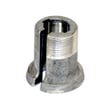
- If the motor runs but the washer will not agitate or spin, inspect the washer motor coupling 285753A.
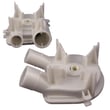
- If the washer will not drain or stops full of water, check the washer drain pump WP3363394 and the drain hose for clogs.
- If the basket is crooked or banging, rebalance the load and verify the washer is level.
Model 11024942301 uses a mechanical timer; a reset mainly clears a temporary power glitch and returns the controls to a known starting point.
| Situation | Best action | What to expect |
|---|---|---|
| Washer stuck mid-cycle | Push in timer knob to stop, then pull out to restart | Cycle resumes if the lid is closed |
| Control seems unresponsive | Unplug 60 seconds | Restores power to the timer circuit |
| Won’t spin or agitate | Check lid switch and motor coupling | Often a part issue, not a “reset” issue |
A hard reset is a fast first step that can save time before parts testing. If the problem returns immediately, the washer is usually signaling a mechanical or safety-interlock issue (lid switch, drain pump, coupling) rather than a control problem.
Last updated: February 2026
How to open front panel of Kenmore front load washer for an F21 error?
On Kenmore Elite washer model 11024942301, you typically remove the lower front access panel (toe panel) by taking out the screws along the bottom edge, then pulling the panel down and out. This gives access to the drain pump area often involved in long-drain errors like F21.
- Unplug the washer to prevent electric shock.
- Turn off both water faucets.
- Have towels and a shallow pan ready; some water can spill when you access the pump area.
- Pull the washer forward enough to work comfortably.
- Review the panel removal and service access notes in the 11024942301 owner's manual.
- Locate the screws along the very bottom of the front panel (usually 3 screws).
- Remove the screws (a 1/4-in nut driver is common on Kenmore-built platforms).
- Pull the bottom of the panel slightly toward you.
- Drop the panel down to disengage the top tabs, then remove it.
- Check for hidden screws at the corners.
- Make sure the panel is dropping down (not trying to pull straight out first).
- If the washer is tight to the floor, tip it back slightly (with help) to reach the screws safely.
F21 is commonly tied to a slow or failed drain. After opening the toe panel, focus on the drain path.
- Check the drain hose for kinks or crushing behind the washer.
- Inspect the pump area for lint, coins, socks, or debris.
- Verify the standpipe or laundry sink is not clogged.
- Listen for the pump running during drain; a loud hum with no draining points to a blockage.
- If the pump is leaking or not moving water, replacement is often the fix.
| Symptom | Most likely area | Example part for this model |
|---|---|---|
| Won’t drain, water stays in tub | Drain pump or blockage | Washer drain pump WP3363394 |
| Stops mid-cycle, won’t spin with lid open | Lid switch circuit | Washer lid switch assembly WP8318084 |
Opening the lower front panel lets you reach the drain pump and drain path quickly; clearing a blockage can restore normal draining and prevent repeat shutdowns during the cycle.
Last updated: February 2026
How to unclog drain hose on Kenmore washer?
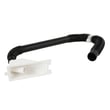
To unclog the drain hose on a Kenmore Elite washer model 11024942301, we unplug the washer, remove as much water as possible, then clear blockages from the drain hose and pump path. After clearing the clog, we reinstall the hose correctly so it drains without kinks or backflow (see the 11024942301 owner's manual).
- Unplug the washer (or switch off the breaker).
- Turn off both water faucets.
- Protect the floor with towels or a shallow pan.
- Keep a bucket ready; hoses and the pump can release water fast.
- Remove standing water: Scoop into a bucket, or use a wet/dry shop vac at the standpipe/laundry tub end of the drain hose.
- Check the external hose first:
- Pull the hose end out of the standpipe or laundry tub.
- Straighten kinks and feel for a blockage near the hooked end.
- Flush the hose with hot tap water (outdoors or in a tub).
- Inspect the pump area for the real clog (most common):
- Access the drain pump and the hose connections.
- Remove the hose from the pump and check for socks, lint, coins, or debris.
- Spin the pump impeller by hand; it should turn with slight resistance and no grinding.
- Reinstall the drain hose correctly:
- Push the straight end fully onto the washer drain connector until it hits the cabinet stop.
- Position the clamp where marked for clamping.
- At the standpipe/tub, keep the hooked end shape and leave an air gap to prevent backflow.
If the pump is jammed, leaking, or noisy after clearing debris, replacement is often the fix; use the exact washer drain pump WP3363394 for this model.
| Symptom | Most likely cause | What we check first |
|---|---|---|
| Won’t drain, motor hums | Pump jam or blockage | Pump inlet and impeller |
| Drains slowly | Partial clog or kink | External hose and standpipe |
| Drains, then water returns | Hose pushed too far in standpipe | Hooked end and air gap |
| No drain and no pump sound | Lid switch not sensing closed lid | Lid switch operation |
A restricted drain hose can cause long cycle times, poor spin performance, and water backing up into the tub. Correct hose routing (no kinks, no forced excess into the standpipe) prevents repeat clogs and siphoning.
Last updated: February 2026
What is the average lifespan of a Kenmore washer?
A Kenmore washer typically lasts 10 to 15 years with normal household use. For the Kenmore Elite 11024942301, consistent care (proper loading, leveling, and periodic cleaning) helps you reach the upper end of that range; heavy loads and chronic vibration shorten it.
- Overloading (stresses the drive system, clutch, and basket support)
- Out-of-balance loads and vibration (wears suspension and drive components)
- Poor draining (standing water strains the pump and can cause odors)
- Hot water and harsh detergents used constantly (accelerates hose and seal wear)
- Skipping basic maintenance like cleaning and hose checks
We recommend following the care steps in the 11024942301 owner's manual. Focus on these habits:
- Keep loads evenly distributed; wash bulky items with similar items
- Use the right amount of detergent; too much can cause residue and extra wear
- Periodically run a cleaning routine (hot cycle with washer cleaner or approved method)
- Inspect inlet hoses for bulges or cracking; replace if worn
- Make sure the washer is level so the spin cycle stays smooth
| What you notice | Likely area | Typical fix level |
|---|---|---|
| Won’t drain or drains slowly | Drain system | Often a pump or hose issue |
| Won’t spin, loud clunking | Drive system | Coupling, clutch, or drive block |
| Agitator not moving correctly | Agitator drive | Dogs, bolt, or agitator parts |
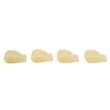
If your washer is not agitating well, the agitator dog 80040 is a common wear item on many Kenmore top-load designs and is often replaced before larger drive components.
Knowing the typical 10 to 15 year lifespan helps you decide whether to maintain and repair (common wear parts) or plan for replacement when multiple major symptoms show up at once.
Last updated: February 2026
What is the capacity of the Kenmore Elite 11024942301?
The Kenmore Elite washer model 11024942301 uses a full-size top-load basket; the washer’s official capacity is listed in the specifications section of the 11024942301 owner's manual. For this style of Kenmore top-load washer, capacity is typically about 3.2 to 4.6 cu ft.
Use the manual’s specs listing so you get the correct number for your exact basket and tub.
- Open the 11024942301 owner's manual
- Find “Specifications” or “Product dimensions”
- Look for “basket capacity”, “tub capacity”, or “capacity”
- If capacity is shown in liters, convert using 1 cu ft = 28.3 L
These ranges help you estimate load size while you confirm the exact spec in the manual.
| Washer style | Typical capacity (cu ft) | Common load examples |
|---|---|---|
| Standard top-load with agitator | 3.2 to 4.0 | Mixed everyday loads, towels |
| Large-capacity top-load with agitator | 4.1 to 4.6 | Comforters, larger family loads |
Capacity affects how much you can load without reducing wash action. Overloading increases strain on drive components and can contribute to issues such as poor agitation or spin problems involving parts like the washer motor coupling 285753A.
Last updated: February 2026
What model is my Kenmore Elite washer?
Your Kenmore Elite washer’s model number is printed on a rating label on the cabinet. On Kenmore Elite model 11024942301, the label is typically on the top edge of the main cabinet (under the lid), on the back of the control panel, or on the cabinet side near the bottom.
Check these common spots in this order:
- Under the lid along the top rim of the cabinet opening
- On the back of the control console/control panel
- On the left or right side of the main cabinet near the bottom front edge
- Behind the lower front panel area (if your design has a removable panel)
For model-specific identification details and wording used on the label, use the 11024942301 owner's manual.
Kenmore model numbers usually start with 110 for many Whirlpool-built top-load washers. Your full model number will look like a longer string of digits (example: 11024942301), and it is the key to matching the correct parts and diagrams.
| Item on label | What it does | Used for |
|---|---|---|
| Model number | Identifies the exact washer design | Correct parts lookup, manuals |
| Serial number | Identifies your specific unit | Warranty and service history |
- Write the model number exactly as shown (all digits, no spaces)
- If there’s a “series” or “type” line, record that too
- Take a clear photo; it helps prevent ordering the wrong Kenmore parts
Kenmore Elite washers can look similar across multiple model families, but parts like a lid switch, drain pump, or agitator components can vary by model. Using the exact model number helps us match items like the washer lid switch assembly WP8318084 or washer drain pump WP3363394 correctly.
Last updated: February 2026








