 Owner’s manual




What model is my Kenmore Elite washer?
For Kenmore Elite washer model 79641483410, the model number is printed on the identification plate located inside the washer door. Open the door and look around the door opening (door jamb area) for the label that lists both the model and serial number; our 79641483410 owner's manual points to this exact location.
Where to look first (fastest checks)
- Open the washer door and inspect the door opening for the identification plate
- Check the door jamb area on the cabinet (near the latch side)
- Wipe the label gently; detergent residue can make it hard to read
- Write down both the model number and serial number for parts lookup and service
What the label typically includes
| Label item | What it’s used for | Why you should record it |
|---|---|---|
| Model number | Matching parts and diagrams | Ensures the part fits your exact washer |
| Serial number | Production details | Helps confirm version changes within a model |
| Electrical ratings | Power requirements | Useful for troubleshooting and safe servicing |
Why it matters
Kenmore Elite washers can look similar across multiple model families. Using the exact model number (like 79641483410) prevents ordering the wrong door lock, drain pump, or water inlet valve and saves time during troubleshooting.
Last updated: January 2026
Where is the drain filter on a Kenmore Elite washing machine?
On the Kenmore Elite 79641483410 washer, the drain pump filter is behind the small drain pump filter access panel on the lower front of the washer. Open that panel to reach the short drain hose (for draining water) and the twist-out pump filter.
How to access and clean the drain pump filter
- Unplug the washer.
- Open the lower front access panel.
- Pull out the small drain hose, remove the plug, and drain water into a shallow pan.
- Twist the pump filter counterclockwise to remove it.
- Remove lint and debris (coins, buttons, etc.), then rinse the filter.
- Reinstall the filter (twist clockwise to secure), re-cap the hose, and close the access panel.
For the exact panel location and the step-by-step sequence for this model, follow the maintenance section in the 79641483410 owner's manual.
What you will see behind the access panel
| Item | What it does | What to do first |
|---|---|---|
| Small drain hose with plug | Lets you drain the tub before removing the filter | Drain into a pan or floor drain |
| Pump filter (twist-out) | Catches lint and small objects to protect the pump | Remove debris and reinstall snugly |
Why it matters
A clogged drain pump filter is one of the most common reasons a front-load washer drains slowly or not at all. Cleaning it helps prevent drain errors, standing water, and pump damage.
When a part may be needed
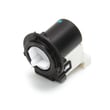
If the washer still will not drain after cleaning the filter and checking the drain hose for kinks, the drain pump itself can be the issue. For this model, a common replacement is the drain pump motor (4681EA2001T) - washer part by lg electronics 4681EA2001T.
Last updated: January 2026
What is the average lifespan of a Kenmore washer?
Most Kenmore washers average 10 to 15 years of service life with normal household use. For the Kenmore Elite 79641483410, consistent cleaning and avoiding overloads are the biggest factors that help you reach the upper end of that range; see the maintenance schedule in the 79641483410 owner's manual.
Typical lifespan and what changes it
A washer’s lifespan is mainly driven by load size, cycle frequency, water quality, and routine care.
- Light use (few loads/week): often closer to 15 years
- Heavy use (daily loads): often closer to 10 years
- Hard water and heavy detergent use: can shorten life by causing buildup
- Frequent overloading: increases wear on the drive system and suspension
- Skipped maintenance: raises the chance of drain and fill problems
Maintenance that helps this model last longer
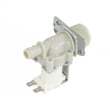
Your 79641483410 manual includes specific cleaning steps such as cleaning the water inlet filters and cleaning the drain pump filter. These tasks help prevent common “no drain” and “no fill” symptoms.
- Clean the drain pump filter on a regular schedule
- Clean the water inlet filters if fill slows down
- Use the correct amount of HE detergent to reduce residue
- Leave the door slightly open between loads to reduce odor and mildew
- Level the washer to reduce vibration and suspension wear
Common wear items over time
When a washer approaches the 10+ year mark, these parts are often involved in performance issues.
| Symptom | Common area involved | Example part for 79641483410 |
|---|---|---|
| Won’t drain, drains slowly | Drain pump or pump motor | Drain pump motor (4681EA2001T) - washer part by lg electronics 4681EA2001T |
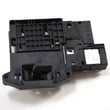
| Won’t start or won’t lock | Door lock/strike | Lg washer door lock EBF61315802 |
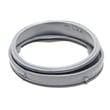
| Leaks at the door | Door boot | Washer door boot by lg MDS47123605 |
Why it matters
Knowing the typical 10 to 15 year lifespan helps you decide when routine maintenance is enough versus when a repair (like a drain pump motor or door lock) is the most cost-effective way to keep your Kenmore Elite washer running reliably.
Last updated: January 2026
How to force a Kenmore Elite washer to drain?
On Kenmore Elite washer model 79641483410, the quickest way to force a drain is to run the Drain & Spin cycle; for drain-only, select No Spin and press Start/Pause. If it still will not drain, check the drain hose for kinks or an installation issue.
Fastest way: use Drain & Spin (drain-only option)
- Press Power to turn the washer on.
- Select Drain & Spin.
- Press Spin speed until No Spin is selected (this forces drain-only).
- Press Start/Pause.
For the exact button sequence and cycle behavior, follow the steps in the 79641483410 owner's manual.
If it will not drain: what to check first
Poor draining is often caused by a hose routing problem or a restriction. Check these items in order:
- Make sure the drain hose is not stretched, pinched, crushed, or kinked.
- Confirm the standpipe setup: the hose should extend no more than 4 inches past the elbow bracket.
- Verify insertion depth: the drain hose should be inserted about 8 to 12 inches into the standpipe.
- Confirm standpipe height: the hose end height should not exceed 96 inches from the bottom of the washer.
- If you use an extension, do not extend the drain hose more than 6 feet total (extensions can cause poor draining).
When a drain pump problem is likely
If the hose routing is correct but the washer hums, drains very slowly, or stops with water left in the tub, the drain pump system is a common suspect.
| Symptom | Most common cause | What we recommend |
|---|---|---|
| Hums but no water leaves | Pump jam or failed motor | Inspect pump area; replace pump motor if needed |
| Drains slowly | Partial blockage in hose or pump | Clear restriction; recheck hose routing |
| Intermittent draining | Loose connection or failing pump | Check wiring and pump condition |
If you determine the pump motor has failed, match your replacement to the model using the drain pump motor (4681EA2001T) - washer part by lg electronics 4681EA2001T.
Why it matters
Forcing a proper drain protects the washer from poor spin performance and helps prevent water from remaining in the tub, which can lead to odors and repeat drain errors.
Last updated: January 2026
How to hard reset a Kenmore Elite washer?
To hard reset your Kenmore Elite washer model 79641483410, unplug it for 60 seconds, then plug it back in and power it on. This clears many temporary control glitches after a power interruption or a stalled cycle; use the steps in the 79641483410 owner's manual for model-specific guidance.
Hard reset steps (safe, quick)
- Press POWER to turn the washer off.
- Unplug the washer from the wall outlet.
- Wait 60 seconds.
- Plug the washer back in.
- Press POWER, then start a cycle to confirm normal operation.
If the washer still will not run
These checks fix the most common “it powers on but won’t start” situations on front-load washers.
- Confirm the door is fully closed and locked (the washer will not operate unless the door locks).
- If you see a PF (power failure) message, select any cycle to clear it, then run the washer.
- If the washer stopped during spin, redistribute the load; add 1 to 2 similar items to help balance.
- If an error returns immediately after the reset, unplug for 60 seconds again and retry once.
What a reset can and cannot fix
| Situation | Reset helps? | What to do next |
|---|---|---|
| Control glitch, frozen buttons | Yes | Do the 60-second unplug reset |
| PF after an outage | Yes | Clear PF by selecting any cycle |
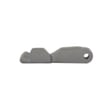
| Door will not lock | Sometimes | Inspect latch/strike; consider lg washer door lock EBF61315802 or lg washer door lock strike MFG63099101 |
| LE or repeated motor-related errors | No (usually) | Follow troubleshooting in the manual; service may be needed |
Why it matters
A proper hard reset restores power to the main control and clears many temporary faults without replacing parts. It is also the first step we recommend before deeper troubleshooting of drain, door lock, or motor symptoms.
Last updated: January 2026
What size is a Kenmore Elite washer?
For Kenmore Elite washer model 79641483410, the cabinet measures 27 in. (W) x 29 3/4 in. (D) x 38 11/16 in. (H); with the door fully open, total depth is 51 in. These specifications come from the 79641483410 owner's manual.
Key dimensions and installation space
Use these measurements to confirm fit in a laundry closet, alcove, or side-by-side setup:
- Width: 27 in.
- Depth (door closed): 29 3/4 in.
- Height: 38 11/16 in.
- Depth (door open): 51 in.
- Front clearance for door swing: at least 27 in.
| Measurement | Size |
|---|---|
| Cabinet width | 27 in. |
| Cabinet depth (door closed) | 29 3/4 in. |
| Cabinet height | 38 11/16 in. |
| Depth with door open | 51 in. |
Minimum clearances we use for planning
These clearances help protect water hoses, allow airflow, and reduce vibration during high-speed spin:
- Sides: at least 1 in.
- Back: at least 4 in.
- Front: at least 27 in. (door opening space)
Why it matters
Correct sizing prevents door interference, kinked inlet hoses, and installation problems in tight laundry spaces. Planning for the 51 in. door-open depth is especially important when the washer faces a hallway, door, or cabinet.
Last updated: January 2026
What does F35 mean on a Kenmore Elite washer?
On the Kenmore Elite washer model 79641483410, the F35 error code means the washer is not getting a correct signal from the water level (pressure) sensing circuit, so it cannot reliably detect the tub’s water level and may stop the cycle to prevent overfilling or draining issues.
What to do first (quick reset and checks)
- Unplug the washer (or switch off the breaker) for 2 minutes, then restore power and try a rinse and spin.
- Make sure the drain hose is not shoved too far down the standpipe (a siphon can confuse water level sensing).
- Check for heavy suds; too much HE detergent can cause pressure sensing problems and repeated draining.
- Run a tub clean cycle (or hot wash with no laundry) to clear residue that can affect sensing.
- If the washer also struggles to drain, clean the pump filter using the steps in the owner's manual.
Likely causes of F35 on this model
F35 is usually tied to the pressure sensor system, but other conditions can trigger the same symptom.
| What’s happening | Common cause | What you can check |
|---|---|---|
| Water level reading is erratic | Pressure sensor or wiring issue | Inspect harness connections (with power off) |
| Washer drains repeatedly or won’t fill correctly | Siphoning or drain restriction | Verify drain hose setup; clean pump filter |
| Cycle stops with water still inside | Drain pump not moving water | Listen for pump; check for clogs |
Parts that are commonly involved
If troubleshooting points to a drain problem (slow drain, standing water, repeated draining), these model-matched parts are often involved:
- Drain pump motor (4681EA2001T) - washer part by lg electronics 4681EA2001T
- Lg washer drain pump AHA72973309
Why it matters
The washer uses water level feedback to control filling, washing, and draining. When that signal is unreliable, the control can pause or stop to protect the washer from overflow, poor cleaning, or pump damage.
Last updated: January 2026


