Installation guide
 Owner’s manual
 Error Codes









How do I reset my Kenmore electric range?
To reset your Kenmore electric range model 79094143310, we recommend doing a full power reset: turn the range off, shut off power at the circuit breaker for 1 to 5 minutes, then restore power and reset the clock. This clears many control glitches after a power interruption.
Quick reset steps (most common)
- Turn all surface element knobs to OFF.
- If the oven is running, press Cancel/Off.
- Switch the range circuit breaker OFF (or remove the fuse).
- Wait 1 to 5 minutes.
- Switch the breaker ON.
- Set the clock and reselect any cooking settings.
For control and clock behavior after a power failure, follow the guidance in the 79094143310 use and care guide.
If the reset does not fix the problem
A reset helps when the electronic control is “confused”, but it will not correct a failed part or wiring issue. These checks narrow it down:
- Display is blank: confirm the breaker is fully on (some breakers trip “halfway”).
- Oven will not heat: test Bake and Broil; a failed element is common.
- Error code returns immediately: use the model-family error code info for Kenmore 790 ranges.
- Burner stays on or will not regulate: a surface element control switch can be stuck.
- Burner will not heat: check the coil element and the receptacle for heat damage.
Common parts related to “won’t heat” symptoms
| Symptom | Likely area | Example part for this model |
|---|---|---|
| Oven not baking evenly or not heating | Bake circuit | Range bake element 316075103 |
| Oven temperature seems inaccurate | Sensor circuit | Frigidaire range oven temperature sensor 316490000 |
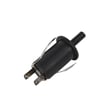
| Surface burner won’t cycle correctly | Infinite switch | Frigidaire range surface element control switch 316436001 |
Why it matters
A proper power reset is the safest first step after a power failure because the range can resume operation when power returns; resetting the clock and oven function helps restore normal, predictable control operation.
Last updated: February 2026
What is the F1 code on a Kenmore range?
On the Kenmore electric range model 79094143310, an F1 (sometimes shown as F10) error typically points to a problem in the oven’s electronic control system, most often the electronic oven control (clock/control board). It can also be triggered by a temperature sensor or wiring issue that makes the control think there’s a fault.
What to do first (safe, quick checks)
- Press Cancel/Off to clear the code; wait 30 to 60 seconds and see if it returns.
- Power reset: turn the range off at the breaker for 1 minute, then restore power.
- If the code returns quickly, avoid using Bake/Broil until the cause is found.
- If the code appears after cleaning or heavy use, let the oven cool completely and retry.
- Check for obvious issues like a loose connector if you are comfortable accessing the rear panel.
Common causes and likely fixes
| Likely cause | What you may notice | Typical fix |
|---|---|---|
| Electronic oven control fault | F1/F10 returns after reset, beeping | Replace the control/clock assembly (model-specific part varies) |
| Oven temperature sensor problem | Oven overheats, underheats, or code appears during preheat | Test/replace the sensor; for this model see oven temperature sensor 316490000 |
| Wiring/connector issue | Code is intermittent, happens when door is moved or oven heats | Inspect and repair wiring/connectors between sensor and control |
Why it matters
When the control detects an unsafe or invalid signal (from the control itself, the sensor circuit, or wiring), it may stop heating to prevent temperature runaway. Fixing the root cause restores accurate temperature control and reliable baking.
Helpful model-specific references
- Use the troubleshooting and error-code guidance in the 79094143310 owner’s manual.
- If you need to access wiring at the back of the range, follow the safety and connection notes in the 79094143310 installation guide (especially around the terminal block and power connections).
Last updated: February 2026
Where to find model number on Kenmore Electric Range?
On Kenmore electric range model 79094143310, the model and serial number label (serial plate) is typically on the lower right front frame of the range. You can usually see it when you open the oven door; on some units, an alternate location is under the cooktop. See the 79094143310 installation guide for the exact label locations.
Common label locations to check
- Lower right front frame (most common; check with the oven door open)
- Front frame area behind the storage drawer or broiler drawer opening
- Under the cooktop (alternate location noted for this model family)
- Back panel near the vent area (less common, but worth checking)
Quick steps to find it fast
- Turn the oven light on and open the oven door.
- Look along the front frame, especially the lower right side.
- If you do not see it, pull the bottom drawer out and check the frame behind it.
- If still not found, lift the cooktop (if your version allows) and look underneath.
- Write down the full model number and serial number exactly as shown.
What the label looks like
| Item on label | Why you need it |
|---|---|
| Model number (example: 79094143310) | Ensures you get the correct Kenmore parts and diagrams |
| Serial number | Helps match production changes and correct replacement parts |
| Electrical ratings | Useful for safe installation and troubleshooting |
Why it matters
We use the model number to match the correct parts for your exact Kenmore range configuration (surface elements, oven controls, wiring, and door components). A single digit difference can point to different parts lists and installation requirements.
Last updated: February 2026
Who makes Kenmore 79094143310?
Kenmore model 79094143310 is a Kenmore-branded electric range built on the 790.9414* platform; that 790 model prefix indicates the range was manufactured by Frigidaire (Electrolux family) for Kenmore. For confirmation details, we reference the identification and model information in the 79094143310 owner's manual.
How to confirm using the model tag
You can verify the manufacturer clue by checking the model number format on the appliance identification tag.
- Locate the identification tag (commonly on the oven frame behind the storage drawer or along the door frame area).
- Confirm the full model number reads 79094143310.
- Note the 790 prefix; this prefix is the key indicator.
- Match it to the manual’s model family listing (790.9414*).
What the 790 prefix means (quick reference)
| What you see on the model number | What it typically indicates | Why it helps |
|---|---|---|
| 790.9414* family (example: 79094143310) | Frigidaire-built design for Kenmore | Points you to the right style of parts and service info |
Why it matters when ordering parts
Knowing the manufacturer family helps us narrow down compatible components and troubleshooting steps for your Kenmore electric range.
Common examples of Frigidaire-style parts used on this platform include:
- Range bake element 316075103 for oven heating issues
- Frigidaire range oven temperature sensor 316490000 for temperature accuracy problems
- Appliance light bulb, 40-watt 316538904 if the oven light is out
Related troubleshooting info
If your range is showing an error code, we use the manufacturer family to choose the right code list and reset steps. A good starting point is Kenmore 790 range 4-digit error codes.
Why it matters
Kenmore is a brand name; the model prefix helps identify the actual manufacturer design, which improves parts matching and repair accuracy.
Last updated: February 2026