Owner’s manual
 Error Codes



How to get the bottom shelf out of a Samsung refrigerator?
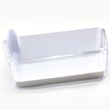
To remove the bottom shelf in your Samsung RF4267HARS refrigerator, slide the shelf forward, press the release tabs on both sides at the same time, then lift the shelf frame up and out. For model-specific shelf handling and safety notes, use the RF4267HARS manual.
Step-by-step: removing the bottom glass shelf
- Remove food items from the shelf and the shelf below it.
- Slide the shelf assembly straight forward until it stops.
- Locate the left and right release tabs (or locking clips) near the shelf rails.
- Press both tabs inward simultaneously to unlock the shelf.
- Lift the front edge up, then angle the shelf slightly and pull it out.
- If the shelf has a separate glass insert, lift the glass out after the frame is removed.
If the shelf feels stuck
A shelf can bind if it is not centered on the rails or if the door bins are contacting it.
- Open both French doors fully so the shelf clears the door seals.
- Push the shelf back in, level it, then try sliding it forward again.
- Check for ice buildup on the rails; let it thaw, then wipe dry.
- Do not force the glass; use two hands and keep it level.
Quick reference
| What you see | What to do |
|---|---|
| Shelf stops but will not lift | Press both release tabs at the same time, then lift |
| Shelf tilts or binds on one side | Re-center on rails, slide back, then forward again |
| Ice or frost on rails | Thaw, dry rails, then remove shelf |
Why it matters
Removing the bottom shelf the right way prevents cracked glass, broken shelf rails, and door alignment issues. It also makes cleaning spills easier and helps keep airflow consistent for even cooling.
Last updated: January 2026
What is the most common problem with Samsung refrigerators?
For the Samsung RF4267HARS, the most common issues we see are cooling problems (warm fridge or freezer, temperature swings) and ice maker problems (no ice, slow ice, clumping). Many symptoms trace back to airflow restrictions, dirty condenser coils, or a failing sealed-system component.
What “most common” usually looks like
- Fridge section warm but freezer still cold (airflow or defrost-related)
- Both sections warm or not cooling at all (sealed system or compressor-related)
- Ice maker stops producing or makes small/hollow cubes
- Frost buildup on the back wall or around vents
- Unit runs constantly or gets louder than normal
Quick checks we recommend first (no parts swapping)
- Confirm temperature settings; typical targets are 37°F for fresh food and 0°F for freezer.
- Make sure vents are not blocked by food packages.
- Clean dust from condenser coils and the condenser fan area.
- Check door gaskets for gaps; a poor seal causes long run times and icing.
- Power reset: unplug for 5 minutes, then restore power and allow 24 hours to stabilize.
Symptom-to-cause guide
| Symptom | Most likely area | What to check first |
|---|---|---|
| Fridge warm, freezer OK | Airflow/defrost | Frost on rear panel, vents blocked |
| Both warm | Sealed system | Listen for compressor, check condenser cleanliness |
| No ice | Ice maker/water supply | Water line, filter status, ice maker jam |
| Runs all the time | Coils/door seal/temps | Dirty coils, gasket leaks, warm room |
When a part is a likely suspect
If both compartments are warm and the unit runs but cannot pull temperatures down, the sealed system may be struggling. On this model, a key component is the refrigerator compressor MKV190CL2BASH. Compressor diagnosis and sealed-system repairs typically require a qualified technician.
Why it matters
Cooling and ice maker issues can lead to food spoilage, excessive frost, higher energy use, and premature wear on components like the compressor and fans.
For model-specific operating tips and control features, use the RF4267HARS manual.
Last updated: January 2026
What is the ice off symbol on Samsung?
On the Samsung RF4267HARS refrigerator, the Ice Off symbol means the ice maker and dispenser are turned off. When that icon is lit on the control panel, the refrigerator will not produce or dispense ice until you turn Ice Off back off (typically by pressing and holding the Ice Off/Child Lock-related button).
What the Ice Off icon looks like
On many Samsung bottom-mount and French door models, the Ice Off indicator is shown as a glass icon with the words “Ice Off”. For model-specific control panel details, use the RF4267HARS manual.
How to turn ice back on (common steps)
We recommend using the exact button sequence for your RF4267HARS control panel in the RF4267HARS manual. In general, you can try:
- Press the Ice Off button once to toggle the setting (if your panel has a dedicated Ice Off button).
- If the button label mentions Child Lock, press and hold the button for about 3 seconds to exit Child Lock, then toggle Ice Off.
- Confirm the Ice Off light/icon turns off.
- Wait for ice production to resume; after being off, it can take several hours to refill the ice bin.
If Ice Off is not selected but you still have no ice
If the Ice Off icon is not lit and you still are not getting ice, these checks usually help:
- Make sure the water supply valve is fully open and the water line is not kinked.
- Verify the freezer temperature is cold enough for ice production.
- Check that the ice bin is seated correctly and not jammed with clumped ice.
- Look for a frozen fill tube or frost buildup around the ice maker area.
- If the dispenser is unresponsive, confirm Child Lock is not enabled.
Quick guide: what the indicator means
| Control panel status | What it means | What you can expect |
|---|---|---|
| Ice Off icon ON | Ice system disabled | No new ice, no dispensing |
| Ice Off icon OFF | Ice system enabled | Ice should produce normally |
Why it matters
Ice Off is a normal setting used during vacations, when troubleshooting leaks, or when you want to stop ice production to prevent overflow or clumping. If it is accidentally enabled, it is one of the fastest fixes for “not making ice” complaints.
Last updated: January 2026