Installation guide
 Owner’s manual
 Error Codes






Where to find Kenmore gas range model number?
On Kenmore gas range model 79078802501, the model and serial number are printed on the identification (serial) plate located on the right side of the oven front frame, inside the storage drawer or warmer drawer compartment. Use the 79078802501 owner's manual diagram to spot it quickly.
Where to look on the range
Check these common label locations for model 79078802501:
- Open the storage drawer (some models) and look on the right-hand front frame
- Open the warmer drawer (some models) and look on the right-hand front frame
- Look along the lower front panel area near the drawer opening
- Use a flashlight and look for a plate that lists model, serial, and sometimes gas type/pressure
What the identification plate tells you (and why it matters)
The identification plate is more than a model tag; it helps us match the correct Kenmore parts and specifications.
- Model number and serial number (needed for parts lookup)
- Burner ratings (BTU information)
- Fuel type and the gas pressure setting the range was adjusted for at the factory
Quick reference
| Item you need | Where it’s used | Why it helps |
|---|---|---|
| Model number | Parts diagrams and part matching | Prevents ordering the wrong part |
| Serial number | Service history and production details | Helps confirm correct revisions |
| Gas type/pressure info | Installation and troubleshooting | Helps ensure safe, correct operation |
Tips before you write it down
- Copy the model number exactly as shown (for example, 790.7880* style formatting may appear in the manual, but your plate will show the full model).
- Take a clear photo of the plate so you can zoom in later.
- If the drawer is hard to open, remove items inside and pull straight out evenly.
Why it matters
Using the correct model number is the fastest way to get the right parts for your Kenmore range, whether you are replacing an oven light, burner components, or a control panel.
Last updated: January 2026
What are the parts of a gas oven?
A Kenmore gas range like model 79078802501 combines a gas burner system with electric ignition and controls. Key oven-related parts include the bake burner, oven gas valve, igniter system, oven door and seal, racks, and the oven light. For your exact feature set, use the 79078802501 owner's manual.
Main gas oven components (what they do)
- Bake burner: produces heat for baking; it lights after the igniter heats up.
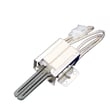
- Igniter and safety valve system: the igniter glows, then the oven valve opens and the burner lights.
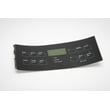
- Oven controls: electronic oven control and temperature settings manage the heat cycle.
- Oven cavity parts: bottom panel/liner, insulation, and racks hold heat and support cookware.
- Door system: door, hinges, handle, and door seal keep heat inside.
- Oven light system: bulb, socket, and door light switch help you see inside.
Parts you can shop for on this model
If you are identifying parts on your Kenmore 79078802501, these are common oven-related items customers replace:
- Range bake burner 316404400 (heat source for baking)
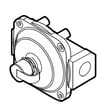
- Range oven gas valve 316404900 (opens to feed gas to the bake burner)
- Range oven door seal 5304498835 (helps prevent heat loss)
- Range oven light bulb 316538904 (interior light)
- Range light socket (if the bulb is good but the light still fails)
How the oven ignition cycle works on this model
The installation information for this range describes a normal sequence:
| Step | What you notice | Typical meaning |
|---|---|---|
| 1 | You set BAKE | Control sends power to the igniter |
| 2 | Igniter “glows” | Igniter is heating up |
| 3 | Burner lights after a short delay | Oven valve opens and gas ignites |
| 4 | Igniter cycles on and off | Normal temperature regulation |
Why it matters
Knowing the major parts helps you troubleshoot faster. For example, if the igniter glows but the burner never lights, the issue is often in the igniter strength or the oven gas valve. If heat escapes or cooking is uneven, the door seal or insulation can be a factor.
Last updated: January 2026
What is the F2 code on a Kenmore stove?
On the Kenmore gas range model 79078802501, an F2 error code indicates the electronic oven control detected a fault condition, commonly tied to an oven temperature problem (overheating) or a control/sensor circuit issue. Clear the code, then troubleshoot if it returns using the 79078802501 owner's manual.
What to do first (safe, quick steps)
- Press CLEAR/OFF to stop the beeping and clear the display.
- Let the oven cool completely; then restore power and try a simple bake cycle.
- If the code returns, write down the exact code and when it happens (preheat, after preheat, during broil).
- Turn off power at the breaker before inspecting wiring or accessing internal parts.
- If you smell gas or suspect a gas leak, shut off the gas supply and have the range checked by a qualified technician.
Common causes of an F2 code
In many Kenmore ranges of this design, F2 is most often related to temperature regulation or the control reading an unsafe condition.
| Likely cause | What you may notice | Typical fix |
|---|---|---|
| Oven temperature sensor circuit issue | Oven heats erratically, code during preheat | Check sensor wiring/connection; replace sensor if out of spec |
| Electronic oven control (ERC/clock) fault | Code returns quickly after clearing | Replace control if diagnostics confirm |
| Stuck relay on control board | Oven continues heating too long | Replace control (relay is typically not serviceable separately) |
| Wiring/connectors problem | Intermittent codes, especially when hot | Repair loose/burnt connectors or damaged harness |
Checks that help pinpoint the problem
- Confirm actual oven temperature: if food burns quickly or the oven overshoots set temp, suspect sensor/control.
- Inspect for heat damage: look for discolored terminals or brittle insulation near the oven cavity.
- Use a meter when appropriate: continuity and resistance checks help confirm a sensor or harness issue (power off).
If you need to verify whether the oven is running hot or a circuit is open/shorted, our how to use a multimeter to test electrical parts video walks through the basics.
Why it matters
An F2 code is the range telling you it detected an unsafe operating condition. Addressing it promptly helps prevent overheating, poor baking results, and repeated shutdowns.
Last updated: January 2026