Owner’s manual



What size dehumidifier do I need for an 800 sq ft basement?
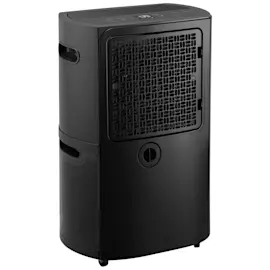
For an 800 sq ft basement, most homeowners do best with a 50 to 70 pint dehumidifier (per day), then adjust based on how damp the space is and whether you have standing water or musty odors. Use the placement and operating guidance in the 40554570411 owner's manual to get full performance.
How to choose the right capacity for 800 sq ft
Use these common sizing targets for basements:
- 50 pint: damp basement (minor condensation, occasional musty smell)
- 60 pint: very damp (frequent condensation, musty odor, humidity stays high)
- 70 pint: wet conditions (water seepage, persistent dampness, heavy odor)
Quick sizing table
| Basement condition | Typical signs | Recommended size for ~800 sq ft |
|---|---|---|
| Damp | Slight musty smell, mild condensation | 50 pint |
| Very damp | Regular condensation, humidity stays high | 60 pint |
| Wet | Seepage, puddles, strong odor | 70 pint |
Setup tips that matter as much as “size”
Even a correctly sized unit can underperform if airflow or temperature is wrong. For best results with a Kenmore Elite dehumidifier like model 40554570411:
- Run it in an enclosed area (close doors and windows)
- Keep at least 8 inches of clearance on all sides for airflow
- Avoid cold basements below 41°F (5°C); coils can frost and performance drops
- Place it on a smooth, level floor that can support the unit with a full bucket
- Clean and reinstall the air filter every two weeks; running without filters can cause failures
Why it matters
Choosing the right pint rating helps you reach a comfortable humidity level faster, reduces run time, and can prevent coil icing and short cycling. Correct placement and airflow (clearances, enclosed space) are what let the dehumidifier actually hit its rated capacity.
Last updated: January 2026
What does P2 mean on my dehumidifier?
On the Kenmore Elite dehumidifier model 40554570411, code P2 means the water bucket is full or the bucket is not seated correctly/removed. The unit will stop the compressor, turn on the Full light, and restart after you empty and reinstall the bucket properly (after the compressor safety delay). See the 40554570411 owner's manual.
What to do when you see P2
- Turn the unit off, then slowly pull the bucket straight out to avoid spills.
- Empty the bucket and reinstall it fully so it sits securely in position.
- Confirm the Full indicator turns off after the bucket is seated.
- Wait for the compressor safety delay (about 3 minutes) before expecting cooling and water removal to resume.
- If you use a drain hose, make sure the unit is set up correctly for continuous drain (drain plug and hose connections must match the setup).
Quick checks if P2 won’t clear
| What to check | What you’re looking for | What to do |
|---|---|---|
| Bucket position | Bucket not pushed in all the way | Push bucket in gently until fully seated |
| Float/foam in bucket | Float system missing, stuck, or not moving freely | Inspect and reposition; replace if damaged |
| Drain setup | Drain hose connected but bucket still filling | Check hose connection and internal path for blockage |
If the bucket float foam is damaged or missing, replacing the midea float foam 12820100000004 can restore proper “bucket full” sensing.
Why it matters
P2 is a protection code that prevents overflow and helps protect internal components. Clearing the bucket-full condition lets the compressor and fan return to normal dehumidifying operation.
Last updated: January 2026
Why is my Kenmore dehumidifier not working?
If your Kenmore Elite dehumidifier 40554570411 will not start or is not collecting water, the most common causes are power supply issues, a full or mispositioned bucket, blocked airflow, or the built-in 3-minute compressor safety delay. Use the 40554570411 owner's manual troubleshooting chart to match your symptom.
Quick checks we recommend first
- Push the plug fully into a grounded outlet.
- Check the house fuse or circuit breaker.
- Empty the bucket and reinstall it firmly; if the bucket is not in the proper position, the unit will not operate.
- Wait at least 3 minutes after the compressor stops before expecting it to restart (this is a normal safety delay).
- Confirm room temperature is within the unit’s operating range: 41°F to 95°F.
- Make sure curtains, blinds, or furniture are not blocking airflow at the front or back.
If it runs but does not remove moisture
Performance problems usually come from settings, airflow, or room conditions.
- Set the humidity control lower and allow several hours for the room to dry.
- Close doors and windows to prevent humid outdoor air from constantly entering.
- Clean the air filter; a clogged filter can reduce airflow and moisture removal.
- If frost appears on the coils, the manual notes this can be normal because the unit has an auto-defrost feature.
Symptom guide
| Symptom | Most likely cause | What to do |
|---|---|---|
| Unit does not start | No power, bucket full, bucket not positioned | Verify outlet and breaker; empty and reseat bucket |
| Stops and will not restart right away | 3-minute compressor safety delay | Wait 3 minutes, then recheck operation |
| Runs but collects little or no water | Airflow blocked, humidity set too high, room below 41°F | Clear airflow; lower setting; warm the space |
| Frost on coils | Auto-defrost operation | Keep airflow clear and allow defrost cycle |
Why it matters
The bucket switch and compressor delay protect against water spills and compressor damage. Airflow and room temperature directly control how much moisture the evaporator can remove, so these checks restore normal drying without unnecessary parts replacement.
Last updated: January 2026