 Error Codes




Do electric wall ovens need to be vented?
Electric wall ovens like model JJW9630BAW do not need an external vent duct to the outdoors. They are designed to vent heat and moisture through built-in oven vents around the door frame or trim area, so keeping those openings clear is what matters most.
How wall oven venting works
Most electric wall ovens use a built-in airflow path to:
- Release heat and moisture during baking and broiling
- Cool internal components (controls, wiring, insulation)
- Help protect surrounding cabinetry from excess heat
Because the venting is built into the oven design, you typically do not add a separate vent pipe like you would for a range hood.
What to do during installation and daily use
Use these practical checks to avoid venting problems:
- Keep the front vent openings clear; do not cover them with foil, trim kits, or insulation
- Do not block airflow with oversized oven liners or pans pressed against the door frame
- Confirm the cabinet cutout is correct and not pinching the oven frame
- Avoid sealing the oven face to the cabinet with caulk that could restrict vent paths
- If you notice excessive heat at the control panel, stop using the oven and inspect for blocked vents
Common symptoms of blocked or poor venting
| What you notice | What it can mean | What to check first |
|---|---|---|
| Control panel gets very hot | Restricted cooling airflow | Front vent openings and cabinet fit |
| Longer preheat times | Heat not circulating correctly | Door closing fully, vents unobstructed |
| Moisture on cabinet edges | Steam not exiting normally | Vent area around door frame |
| Oven shuts off mid-cycle | Overheating protection triggered | Airflow, cooling fan operation |
Why it matters
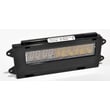
Proper venting helps the JJW9630BAW maintain stable cooking temperatures and protects key electrical parts like the wall oven control board WP71003401 from heat stress.
Last updated: January 2026
How long do Jenn-Air wall ovens last?
A Jenn-Air wall oven like model JJW9630BAW typically lasts 15 years with normal household use and basic maintenance. Keeping the door sealed, temperatures accurate, and airflow unobstructed helps you reach that lifespan and avoid premature heating and control issues.
Typical lifespan and what affects it
Most wall ovens land in a similar range, but these factors move the needle:
- Heat exposure: frequent high-heat baking, broiling, and self-clean cycles shorten component life
- Door seal condition: heat leaks make the oven work harder and can overheat controls
- Temperature accuracy: a drifting sensor can cause longer run times and uneven cooking
- Electrical health: loose connections and overheated terminals damage wiring and boards
- Cleaning habits: heavy grease buildup can restrict airflow and trap heat
Quick maintenance checklist (high impact)
Use this as a simple routine to protect the heating system and electronics:
- Wipe spills after the oven cools to reduce smoke and excess heat retention
- Avoid running self-clean back-to-back; allow full cool-down between cycles
- Inspect the door gasket for gaps, tears, or flattening; replace if it no longer seals
- If baking is inconsistent, test temperature accuracy and consider replacing the sensor
- If the oven overheats or shuts down, check the high-limit thermostat and wiring connections
Common “wear” parts that influence longevity
These parts often drive performance complaints as the oven ages:
| Symptom | Common part involved | Example part for JJW9630BAW |
|---|---|---|
| Uneven baking, long preheat | Bake element | Bake element WPW10310258 |
| Temperature swings, error-like behavior | Oven sensor | Oven sensor 12001656 |
| Heat leaking, hot handle, poor browning | Door seal | Wall oven door seal WP71001841 |
Why it matters
When the oven has to run longer to hit temperature (because of a weak element, leaking door seal, or inaccurate sensor), it stresses the control board, wiring harness, and safety thermostat. Fixing the root cause early usually extends the oven’s useful life.
Last updated: January 2026
How to reset Jenn-Air wall oven?
To reset your Jenn-Air wall oven model JJW9630BAW, we recommend doing a full power reset at the breaker for 1 minute, restoring power, then starting a Bake cycle and watching for 1 minute to confirm the control clears and the error does not return.
Quick reset steps (breaker reset)
- Turn OFF the oven circuit breaker(s) supplying the wall oven.
- Wait 1 full minute.
- Turn the breaker(s) ON.
- Start a Bake cycle.
- Monitor the display for 1 minute to confirm normal operation.
If the oven still will not reset
These checks help separate a one-time control glitch from a heat, sensor, or wiring issue.
- Press Cancel/Off once, then try Bake again.
- If an error returns quickly, power-cycle again and note the exact code or message.
- If the oven overheats or shuts down during preheat, inspect the temperature sensing and safety devices.
- If the display is blank or resets randomly, check for a loose connection at the terminal block (a technician can verify safely).
- If the oven heats unevenly or will not heat, inspect the heating circuit.
Parts that commonly relate to reset, heat, or error-code symptoms
If the reset does not hold, these model-compatible parts are common suspects depending on the symptom.
| Symptom after reset | Common part to check | What it affects |
|---|---|---|
| Error returns during preheat | Oven sensor 12001656 | Temperature feedback to the control |
| Oven overheats or trips out | Range high-limit thermostat WP71001844 | Safety cutoff for overheating |
| No heat or weak heat | Bake element WPW10310258 | Primary heating for Bake |
| Random resets, dead display, persistent errors | Wall oven control board WP71003401 | User interface and heating control |
Why it matters
A breaker reset clears temporary control faults, but if the same error comes back during a Bake test, the oven is usually reacting to a real condition (temperature sensing, overheating protection, wiring, or a control issue). Catching that early helps prevent repeat shutdowns.
Last updated: January 2026
Why is my Jenn-Air oven not working?
If your Jenn-Air JJW9630BAW wall oven is not working at all (no heat, no display, or dead controls), the most common causes are a power supply problem, a failed temperature safety device, or a failed electronic control. For control-related failures, the wall oven control board WP71003401 is a key part to check.
Quick checks first (no parts needed)
- Confirm the oven is getting full power at the breaker; wall ovens typically use a 240V circuit.
- Reset the breaker by switching it fully OFF, then back ON.
- Check for a tripped GFCI (if your installation uses one).
- If the display is on but the oven will not heat, try a different cooking mode (Bake vs. Broil) to narrow the failure.
- If the oven is in a locked mode, cancel the lock and retry.
Most common causes and what they look like
| Symptom | Most likely cause | What to check next |
|---|---|---|
| Completely dead (no display, no heat) | Power supply issue, wiring issue | Breaker, junction box connections, harness condition |
| Display works but no heat in Bake | Failed bake circuit | Inspect/test the bake element WPW10310258 and wiring |
| Heats sometimes, then shuts down | Overheat protection opening | Check the range high-limit thermostat WP71001844 and airflow |
| Erratic temps, undercooks/overcooks | Bad temperature sensing | Test/replace the oven sensor 12001656 |
| Random beeping, unresponsive keypad, blank segments | Control failure | Inspect connections, consider wall oven control board WP71003401 |
Safe troubleshooting steps we recommend
- Cut power at the breaker before removing panels or touching wiring.
- Inspect for loose or overheated wire terminals, especially at heating element connections.
- If Bake does not work but Broil does, focus on the bake element circuit.
- If the oven overheats or shuts down during use, check the high-limit thermostat and cooling airflow.
- If temperature is consistently off, test the oven sensor resistance at room temperature and compare to typical sensor behavior.
Why it matters
A wall oven that will not run can be a simple power interruption, but it can also be a failed heating circuit or control. Narrowing the symptom (dead vs. no-heat vs. temperature problems) helps you choose the right repair path and avoid replacing the wrong part.
Last updated: January 2026





