 Error Codes



How do I reset my Kenmore electric range?
To reset your Kenmore electric range model 8504258390, we recommend doing a full power reset: turn the range off, cut power at the breaker for a few minutes, then restore power and re-test Bake and Broil. This clears many control glitches.
Quick reset steps (power cycle)
- Turn the oven controls to OFF.
- Switch the range circuit breaker OFF (or unplug if it’s on a cord).
- Wait 3 to 5 minutes.
- Turn the breaker ON (or plug back in).
- Set the clock (if prompted) and test Bake for 10 minutes.
If the reset did not fix it
A reset helps when the control is “stuck”, but it will not fix a failed heating part or a power supply problem.
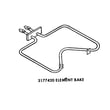
- If the oven will not heat in Bake, inspect and test the bake element WP3177420.
- If the oven light is out, replace the light bulb 8009.
- If the oven heats unevenly or takes too long, check for a partially failed bake element (blistering, cracks, or hot spots).
What to check first (fast troubleshooting)
- Confirm the range has 240 VAC supply (a tripped breaker can leave you with only 120 VAC, which causes weak or no heat).
- Look for an error code or flashing display after power is restored.
- Verify the oven door is fully closed; some models limit heating if the door switch is not made.
- If you recently ran self-clean, let the oven cool completely and try the reset again.
Why it matters
A proper reset is the safest first step because it can clear a temporary electronic control fault without replacing parts. If the problem returns immediately, testing the heating circuit (especially the bake element) prevents repeated shutdowns and poor baking results.
Reset vs. repair: what usually works
| Symptom | Reset helps most when | Part check most when |
|---|---|---|
| Display frozen or unresponsive | Control glitch after outage | Keypad/control issue persists |
| Oven will not bake | Control logic latched | Bake element open or wiring issue |
| Light not working | Rarely | Bulb burned out |
Last updated: February 2026
How do I turn off the lock on my Kenmore oven?
On the Kenmore 8504258390 electric self-cleaning built-in oven, you turn off Control Lock (child lock) by pressing and holding the pad with a LOCK or key/lock icon until the lock indicator turns off and the keypad responds again.
Steps to unlock the controls
Try these common Kenmore control-lock steps in order:
- Press and hold LOCK, CONTROL LOCK, or the key/lock icon pad for 3 to 5 seconds
- Keep holding until the lock light or key indicator goes out
- Test the keypad by pressing BAKE and setting a temperature
- If it re-locks immediately, press and hold the lock pad again for 3 to 5 seconds
If the oven seems locked after self-clean
After a self-clean cycle, the door latch can stay engaged until the oven cools.
- Wait until the oven is fully cool
- Confirm the door is completely closed
- Press and hold the LOCK/key pad for 3 to 5 seconds to clear Control Lock (if enabled)
If the lock will not turn off
A lock that will not clear is usually a power reset issue, a stuck keypad, or a control/wiring problem.
- Turn the range breaker OFF for 1 minute, then turn it back ON
- Press each keypad once to check for a stuck or continuously beeping key
- If the display and keys still do not respond, inspect wiring and connections (or schedule service)
Quick symptom guide
| What you see | Most likely cause | What to do |
|---|---|---|
| Lock light on; most keys do nothing | Control lock enabled | Hold LOCK/KEY pad 3 to 5 seconds |
| Beeping with key presses | Lock enabled or key stuck | Hold LOCK/KEY; then reset power |
| Still locked after reset and cool-down | Keypad/control or wiring issue | Check connections; service if needed |
Why it matters
Control Lock disables the touchpad so the oven can look “dead” even though heating parts like the bake element are fine; unlocking restores normal operation.
Related DIY help
If you need to safely check power and continuity during troubleshooting, use how to use a multimeter to test electrical parts video.
Last updated: February 2026
What does PF mean on Kenmore Elite oven?
PF on a Kenmore Elite oven typically means power failure: the oven’s control detected an interruption in electrical power. On your Kenmore model 8504258390, you can usually clear PF by pressing Cancel/Stop (or Clear/Off) and then resetting the clock.
What to do when PF shows up
- Press Cancel/Stop once; if PF stays, press it again.
- Set the clock; some controls keep showing PF until time is set.
- If the oven is unresponsive, turn the range breaker OFF for 1 minute, then back ON.
- If PF returns during baking, avoid using the oven until you check the power supply (repeated power drops can cause heating problems).
- If you recently ran self-clean, let the oven cool fully and then clear PF; heat can reveal a weak connection.
Common causes of a PF message
PF is almost always about power to the control, not a “bad recipe” or user setting.
| Likely cause | What you may notice | What to check |
|---|---|---|
| Brief outage or flicker | PF appears after a storm | Clear code; reset clock |
| Tripped/weak breaker | PF repeats, oven may go dead | Breaker condition; reset fully |
| Loose power cord or terminal connection | PF when the oven heats up | Tight, secure connections (power off) |
| House wiring issue | Lights dim when oven cycles | Have wiring evaluated |
Why it matters
A one-time PF is usually harmless. Repeated PF events can interrupt cooking, cause temperature swings, and point to a power supply issue that can eventually damage the electronic control.
When a part is involved
If the oven light is out at the same time you are troubleshooting, replacing the bulb will not fix PF, but it can restore visibility while you diagnose power issues. Use the model-matched light bulb 8009 if needed.
Last updated: February 2026
Where can I find my Kenmore electric range model number?
For your Kenmore electric range model 8504258390, the model number is printed on a rating label attached to the range body. On most Kenmore ranges, you will find it in the oven door area (door jamb or frame), behind the storage/warming drawer, or on the back panel.
Common model number label locations
Check these spots in this order (they are the most common for electric ranges and built-in ovens):
- Oven door frame/door jamb: open the oven door and look along the frame edge
- Behind the bottom drawer: pull the storage or warming drawer out and look on the frame
- Back of the range: near the upper back panel or vent area
- Side panel edge: sometimes visible when you pull the unit slightly forward
Quick steps to find it fast
- Turn the oven light on and use a flashlight to read small print.
- Look for a label that says Model, MOD, or Model No.
- Write down the full model number exactly as shown (numbers and any letters).
- If the label is worn, take a photo and zoom in.
What the label usually looks like
| What you may see | What it means | Why you need it |
|---|---|---|
| Model / MOD | The full model number | Ensures parts match your exact range |
| Serial / SER | The serial number | Helps identify production run/version |
| Electrical rating | Volts/amps info | Useful for troubleshooting and safe testing |
Why it matters
We use the model number to match the correct diagrams and replacement parts for your exact Kenmore range configuration. That prevents ordering a part that fits a similar looking unit but mounts or wires differently.
If you are ordering a common oven repair part after you find the model label, examples for this model include the bake element WP3177420 and light bulb 8009.
Last updated: February 2026




