Owner’s manual




How to force a Samsung washer to drain?
To force-drain a Samsung WF405ATPASU washer, we recommend first trying a Drain/Spin (or Spin Only) cycle; if the washer will not run the drain, use the emergency drain hose and clean the drain pump filter to empty the tub safely.
Fast ways to drain (start with the easiest)
- Cancel and restart: Press Power to turn the washer off, wait 30 seconds, then turn it back on.
- Run a drain cycle: Select Drain/Spin (or Spin Only, depending on the console options) and press Start.
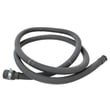
- Use the emergency drain: Open the lower front access area, pull out the small emergency drain hose, and drain into a shallow pan.
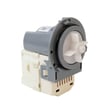
- Clean the drain pump filter: After draining, remove and clean the filter to clear coins, lint, and debris.
- Check the drain hose: Make sure it is not kinked, crushed, or shoved too far down the standpipe.
Emergency drain steps (front-load style)
- Unplug the washer.
- Put towels down; use a shallow pan.
- Open the lower front access panel/door.
- Pull out the emergency drain hose and remove the cap to drain water.
- Once empty, twist out the drain pump filter, clean it, reinstall it, then try Drain/Spin again.
What to do if it still will not drain
Common causes are a clog, a weak drain pump, or a control issue. Use this quick check:
| What you notice | Most likely cause | What we do next |
|---|---|---|
| Hums but no water moves | Clogged filter or pump impeller jam | Clean filter; check for debris in pump inlet |
| Drains slowly | Partial clog or restricted hose | Inspect hose routing and standpipe height |
| Stops and shows a drain error | Drain system fault | Follow Samsung front load washer nd error code steps |
Why it matters
Forcing a drain the right way prevents water spills, protects the door lock, and helps you confirm whether the problem is a simple clog (filter/hose) or a failed drain pump.
Model-specific reference
For panel access, filter location, and any model-specific button sequence, follow the WF405ATPASU manual.
Last updated: January 2026
What are the specs of the wf405atpasu?
The Samsung WF405ATPASU is a 27-inch front-load washer with a 4.0 cu. ft. capacity, designed for multiple fabric-care needs with 15 wash cycles, 9 options, and 5 temperature settings. It is commonly described as featuring PowerFoam, steam washing, and an internal water heater; confirm cycle and option details in the WF405ATPASU manual.
Key specs at a glance
- Washer type: Front-load washer
- Width class: 27-inch
- Capacity: 4.0 cu. ft.
- Wash cycles: 15
- Options: 9
- Temperature settings: 5
- Feature highlights: PowerFoam, steam washing, internal water heater
What we can and cannot verify for this exact model
Some specifications for Samsung washers can vary by revision (for example, WF405ATPASU/AA-00 vs. other suffixes) and by how retailers list features. For the most accurate, model-specific confirmation (especially for cycle names, option behavior, and temperature mapping), we recommend using the WF405ATPASU manual.
| Spec type | Typically listed for WF405ATPASU | Best place to confirm |
|---|---|---|
| Capacity | 4.0 cu. ft. | Owner’s manual and rating label |
| Cycles/options | 15 cycles, 9 options | Owner’s manual |
| Temperature settings | 5 settings | Owner’s manual |
| Steam/heater features | Steam, internal heater | Owner’s manual |
Why it matters
Matching specs to your Samsung WF405ATPASU helps you choose the right cycle and temperature for better cleaning, avoid overloading a 4.0 cu. ft. drum, and troubleshoot performance issues (like long heat times or poor suds control) more accurately.
Related troubleshooting help (when specs are not the issue)
If you are checking specs because the washer is not draining, not filling, or showing a code, these guides can help narrow it down:
- Samsung front load washer error codes
- Samsung front load washer nd error code
- Samsung front load washer nf error code
Last updated: January 2026
How do you reset a Samsung washing machine?
To reset your Samsung washer model WF405ATPASU, we recommend a simple power reset: turn the washer off, unplug it (or switch off the breaker) for 1 to 5 minutes, then restore power and start a cycle. This clears many temporary control glitches and some error conditions.
Reset steps (safe, model-friendly)
- Press Power to turn the washer off.
- Unplug the washer (or turn the dedicated breaker off).
- Wait 1 to 5 minutes.
- Restore power.
- Press Power, select a cycle, and press Start/Pause.
- If an error returns immediately, stop and troubleshoot the specific symptom instead of repeating resets.
For control panel behavior and any model-specific button sequences, follow the instructions in the WF405ATPASU manual.
Power reset vs. “factory reset” (what to expect)
On many washers, a “reset” means clearing a stuck control state, not erasing settings like a phone.
| Reset type | What it does | When to use it |
|---|---|---|
| Power reset (recommended) | Reboots the electronic control | Frozen buttons, cycle won’t start, random beeps, some error codes |
| Cancel/stop cycle | Stops the current cycle and drains (if applicable) | Wrong cycle selected, need to restart load |
| Factory reset | Not available on all models; may clear stored options | Only if your WF405ATPASU manual describes it |
If you are resetting because of an error code
A reset may clear the display briefly, but the washer will usually show the code again if the underlying issue remains. Common causes include:
- Drain problems (kinked drain hose, clogged filter, blocked pump)
- Fill problems (water supply valves closed, inlet screens clogged)
- Door lock or door switch not engaging
- Out-of-balance load during spin
- Suds/overdosing detergent (especially with HE cycles)
If you are seeing a drain-related code, we use the same troubleshooting approach outlined in Samsung front load washer nd error code.
Why it matters
Resetting WF405ATPASU the right way protects the machine control board and helps you separate a one-time glitch from a real failure (drain pump, door lock, water inlet valve, or wiring).
Last updated: January 2026