Owner’s manual
 View engine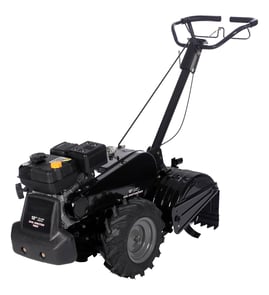



How often should I change the oil in my tiller?
For the Craftsman rear-tine tiller model 917293472, we change the engine oil after every 50 hours of operation or at least once a year, whichever comes first. We also check the oil level before starting and after each 5 hours of continuous use; keeping the crankcase full prevents engine damage.
Recommended oil-change schedule
- Change oil: every 50 hours of use
- Change oil (minimum): once per year if you do not reach 50 hours
- Check oil level: before each use
- Recheck during long jobs: after each 5 hours of continuous operation
Oil type and temperature tips
The manual calls for high-quality detergent oil with API service classification SF-SJ and notes that multi-viscosity oils can increase oil consumption in warmer temperatures.
| Expected temperature | Common choice | What to watch for |
|---|---|---|
| Above 32°F (0°C) | SAE 30 | Check level more often if using 5W-30 or 10W-30 |
| Cold weather starts | 5W-30 or 10W-30 | Oil consumption can increase above 32°F |
For the exact oil guidance and capacities for your setup, follow the steps in the 917293472 owner's manual.
How we change the oil (quick overview)
- Run the engine briefly so the oil is warm (it drains faster).
- Park the tiller on a level surface.
- Remove the drain plug and catch oil in a suitable container.
- Tip the tiller forward to fully drain.
- Reinstall and tighten the drain plug.
- Refill through the oil fill opening; tighten the oil filler plug securely.
Why it matters
Fresh oil protects internal engine parts from wear and overheating. On a rear-tine tiller like the Craftsman 917293472, consistent oil checks and 50-hour oil changes help prevent low-oil operation, which is a common cause of premature engine failure.
Last updated: January 2026
Where is the model number on a tiller?
On the Craftsman rear-tine tiller model 917293472, the model number is printed on the tiller’s ID label (a sticker or metal tag) attached to the machine frame. On many tillers, you’ll find it near the tine shield/guard area or on the front section of the unit; confirm the exact label location in the 917293472 owner's manual.
Common places to check first
- Tine shield or tine guard area (near the rear tines)
- Front of the main frame (ahead of the transmission/gear case)
- Side of the main frame rail (left or right side)
- Near the engine mounting area (on the frame, not on the engine)
- Under or behind protective shields/guards (wipe dirt off to see the label)
What the label usually looks like
Most tiller model/serial labels are designed to survive outdoor use, so they are typically:
- A rectangular sticker or metal tag
- Printed with MODEL and SERIAL (or S/N)
- Mounted to a flat frame surface so it stays readable
| What you need | Example for this tiller | Why you need it |
|---|---|---|
| Tiller model number | 917293472 | Ensures diagrams and parts match your exact Craftsman tiller |
| Serial number | Varies by unit | Helps confirm production run and correct part variations |
| Engine model number | Often different from tiller model | Used for engine-specific parts like carburetor or ignition |
Why it matters
We use the model number to match the correct parts diagrams and hardware sizes for your Craftsman rear-tine tiller. For example, the manual’s parts listings and component dimensions (in U.S. inches) are organized by the tiller model number, so having the exact ID label information prevents ordering the wrong belt, cable, or hardware.
Last updated: January 2026
What is the back of a tiller called?
On the Craftsman rear-tine tiller model 917293472, the “back” is typically referred to as the rear tine area (the tine end), and it includes components like the tines, leveling shield, and depth stake that control how the soil is cut and leveled. For the exact control and component names used on this model, use the 917293472 owner's manual.
Common names you will hear (and what they mean)
These terms often get used interchangeably, but they refer to different parts of the rear of a rear-tine tiller:
- Tines (rear tines): the rotating blades that dig and break up soil
- Tine end / tine area: the back end of the machine where the tines are located
- Leveling shield: the shield behind the tines that helps level tilled soil
- Depth stake: the adjustable stake that sets how deep the tines dig and helps stabilize the tiller
- Drag stake (common generic term): another name people use for the depth stake on many tillers
Quick reference: “back of tiller” terms
| What you mean | Common name | What it does |
|---|---|---|
| The digging blades at the back | Rear tines | Cuts, churns, and breaks up soil |
| The part that sets digging depth | Depth stake | Controls tilling depth and helps handling |
| The part that smooths soil behind tines | Leveling shield | Levels and contains thrown soil |
| The whole rear assembly area | Tine end / tine area | Where tilling action happens |
Why it matters
Using the right term helps you get the right part and the right adjustment. For example, if the tiller is bouncing or not digging well, adjusting the depth stake is often the first step; if the soil is being thrown unevenly, the leveling shield is the component to check.
Related operating tips for this model
From the operating guidance for this Craftsman rear-tine tiller, these points help when working at the tine end:
- Set the depth stake for the job; typical best tilling depth is 4 to 6 inches
- Avoid very dry, hard soil; it can prevent tine penetration and make handling difficult
- Avoid extremely wet soil; it can clump and “ball up”
- Release the drive control bar before moving the shift lever
- Wear eye protection; tillers can throw debris from the tine area
Last updated: January 2026
What are common tiller problems?
Common problems on the Craftsman 917293472 rear-tine tiller include hard shifting, tines that stop or skip, the engine running but the tiller not moving, stalling when the drive control is engaged, and overheating. Many of these issues trace back to belt adjustment, broken shear pins, tine jams, or basic engine maintenance listed in the Craftsman 917293472 owner's manual.
Quick troubleshooting checklist (most common fixes)
- If the tiller will not move but the engine runs: confirm the tine/drive control is engaged and inspect belt routing and tension.
- If the tiller shuts off when you engage the drive control bar: make sure the shift lever is fully in a till position (not between positions) and clear any jammed tines.
- If tines skip over the ground: check for broken shear pins and replace with the correct type.
- If shifting is hard: briefly engage and release the drive control bar, or rock the tiller forward and backward to align gears.
- If the engine overheats: check oil level and condition, clean the air screen and cooling fins area, and inspect the muffler for restriction.
Symptoms, likely causes, and what to check
| Symptom | Most likely cause | What to do next |
|---|---|---|
| Engine runs but tiller will not move | Drive not engaged, belt off or loose | Engage control; inspect belt on pulleys; adjust belt tension |
| Tines skip | Shear pin(s) broken | Replace shear pins; check for rocks/roots causing overload |
| Shuts off when drive is engaged | Shift lever between positions, tines jammed | Shift fully into position; clear tines and debris |
| Hard to shift gears | Gears not aligned | Rock tiller or briefly engage drive to align |
| Overheats | Low/dirty oil, dirty air screen, muffler restriction | Service oil; clean air screen; clean muffler area |
Parts that commonly relate to these problems
If you find wear or damage during checks, these model-matched parts are often involved:
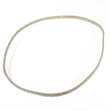
- Husqvarna rear-tine tiller drive belt 591372401 if the tiller will not move, slips, or the belt is off pulleys
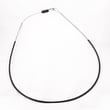
- Tiller clutch cable 532110675 if the control does not fully engage the drive/tines
- Tiller chain, #25-50 532102134 if you have drive noise, binding, or inconsistent tine movement
Why it matters
Continuing to till with a loose belt, jammed tines, or broken shear pins can overload the transmission and make handling unpredictable. The manual also emphasizes not tilling too deep too fast and keeping guards in place for safer operation.
Last updated: January 2026