 Owner’s manual
 Error Codes








How do I reset my Kenmore 79046372400 electric oven?
To reset your Kenmore Elite electric range model 79046372400, press STOP/CLEAR to cancel the current cooking mode and clear most control errors; if the control is locked, press and hold STOP/CLEAR for 3 seconds to turn Oven Lockout off. For exact keypad behavior, use the owner's manual.
- Press STOP/CLEAR once to cancel Bake, Broil, Clean, Timer, or other active modes.
- If the display is beeping with an F1, F2, F3, or F9 code, press STOP/CLEAR to stop the beeping and clear the display.
- If the oven won’t respond and a lock icon is on, press and hold STOP/CLEAR for 3 seconds to disable Oven Lockout.
- If the issue started after a power outage, restore power at the home breaker, then press STOP/CLEAR.
- Re-enter your cooking settings (time, temperature, mode) after the reset.
Oven Lockout prevents most oven functions and can make it seem like the oven needs a reset.
| What you see | What it means | What to do |
|---|---|---|
| Lock icon or “DOOR LOCKED” behavior | Oven Lockout is active | Press and hold STOP/CLEAR for 3 seconds |
| Door won’t unlock right away | Lock motor is cycling | Wait until the lock indicator clears |
A reset helps with control states, but it will not fix a failed component. If the oven temperature is inaccurate or the oven won’t regulate heat after you reset and reprogram settings, a common item to check is the oven temperature sensor: frigidaire range oven temperature sensor 316217002.
Resetting clears stuck modes and stops fault beeping so you can confirm whether the problem is a temporary control condition (lockout, canceled mode, power interruption) or a true failure in a part like a sensor, element, or control.
Last updated: February 2026
Is Kenmore 79046372400 high end?
Yes. The Kenmore Elite 79046372400 is part of the Kenmore Elite line, which is positioned as a premium tier compared to standard Kenmore ranges; it typically includes upgraded cooking features and a more feature-rich control setup. For the most accurate feature list for your exact configuration, use the owner's manual.
When we describe a range as high end, we focus on cooking performance, feature set, and build details that affect daily use.
Common “premium” traits you’ll typically see in Kenmore Elite electric ranges include:
- More precise oven temperature control and better baking consistency
- A larger or more flexible cooktop layout (multiple element sizes)
- Enhanced oven modes (such as convection on some configurations)
- Higher-quality control panel design and more cooking options
- Better fit and finish than entry-level models
Use these checks to decide if your 79046372400 feels “high end” for your needs:
- Preheat and recovery: oven returns to set temperature quickly after opening the door
- Baking results: even browning across multiple racks
- Cooktop control: elements cycle smoothly without extreme temperature swings
- Noise and heat management: cooling fan runs as needed without excessive noise
- Door seal and insulation: door closes firmly and holds heat well
A range can feel less “high end” when key components are worn or failing. These parts are commonly involved in performance complaints:
| Symptom | Often involved part | Example part for this model |
|---|---|---|
| Oven temperature seems off | Oven temperature sensor | Frigidaire range oven temperature sensor 316217002 |
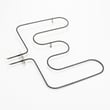
| Broil is weak or uneven | Broiler element | Oven broiler element 318255605 |
| Bake is slow or uneven | Bake element | Element 318255401 |
| Oven light not working | Bulb or socket | Range oven light bulb 316538904, range oven light socket 316116400 |
“High end” is most noticeable in consistency and control. If your Kenmore Elite 79046372400 is heating accurately and the elements and sensor are in good shape, you get more predictable baking, broiling, and day-to-day cooking results.
Last updated: February 2026
Where can I find my Kenmore 79046372400 oven model number?
For Kenmore Elite electric range model 79046372400, the model and serial number are printed on the serial plate located on the left side of the oven front frame behind the oven door. Open the oven door and look along the front frame to find the label.
Use this quick checklist to spot the serial plate fast:
- Open the oven door fully.
- Look at the left vertical front frame (the frame the door closes against).
- Check behind the door, not inside the oven cavity.
- Wipe the area with a dry cloth if the label is dusty or greasy.
- Record both the model number and serial number for parts matching.
For the illustrated location and product record section, use the 79046372400 owner's manual.
We use the model number to match the correct Kenmore range parts and variations (finish, wiring, and component revisions). It helps ensure you get the right items such as an oven temperature sensor, bake element, or control panel.
Most serial plates include these fields:
| Label item | What it’s used for |
|---|---|
| Model number (79046372400) | Identifies the exact range version for parts lookup |
| Serial number | Helps confirm production series and compatible replacements |
| Electrical ratings | Useful when diagnosing power and heating issues |
Try these practical steps:
- Shine a flashlight across the label at an angle to reduce glare.
- Take a close-up photo and zoom in.
- Clean gently with mild soap and water on a cloth, then dry.
- Avoid abrasive pads or harsh cleaners that can remove printing.
Last updated: February 2026
Why is my Kenmore 79046372400 stove not working?
If your Kenmore Elite electric range 79046372400 is not working at all, the most common causes are a power supply problem (tripped breaker, loose cord connection) or an oven control fault showing an F1, F2, F3, or F9 code. Start with power checks, then clear any fault and retest using the steps in the owner's manual.
- Confirm the range cord is fully seated in the outlet.
- Reset the breaker: electric ranges typically use a 240V double-pole breaker; reset both sides.
- Check for a power outage by verifying other 240V appliances (like an electric dryer) if available.
- If the display is beeping and shows F1, F2, F3, or F9, press STOP/CLEAR to stop the beeping.
- After a power interruption, reset the clock and try a simple bake cycle again.
| Symptom | Most likely cause | What to do next |
|---|---|---|
| Entire range dead (no display, no heat) | No power to range | Reset breaker, verify outlet, inspect cord/terminal connections |
| Beeping with F1/F2/F3/F9 | Control detected a fault | Press STOP/CLEAR, reprogram; if it returns, service is needed |
| Cooktop works but oven does not | Control setting or oven circuit issue | Verify correct mode/temp; watch for fault codes |
| Oven light out only | Bulb or socket issue | Replace bulb; inspect socket if bulb is good |
These are model-matched parts we often see involved when the oven will not heat or basic functions fail:
- Terminal block 5304409888 (burned or loose power connections can stop the range)
- Frigidaire range oven temperature sensor 316217002 (can contribute to heating problems or erratic temps)
- Range oven light bulb 316538904 (for “works but light is out” situations)
A range that is partially powered can act “dead” in certain modes, and a loose or overheated power connection at the terminal block can damage wiring. Clearing fault codes and confirming stable power prevents repeat failures and helps you target the right repair.
Last updated: February 2026





