 Installation guide
 Owner’s manual
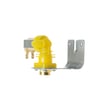


How do I clear the error code on my GE dishwasher?
On the GE GLD5604V00WW dishwasher, we clear most error states by resetting the control (press Start/Reset to cancel the cycle) and then restoring power if needed. If the code returns, it is pointing to a real issue (drain, fill, heat, or control) that needs troubleshooting.
Quick ways to clear the code
- Press Start/Reset once to cancel the current cycle.
- Wait for the dishwasher to drain and shut off (many models drain during cancel).
- If the display stays stuck, turn power off at the breaker for about 5 minutes, then restore power.
- Run a short test cycle such as Rinse Only to see if the code comes back.
- If the unit will not drain during cancel, check for a drain restriction (see next section).
Use a simple “Rinse Only” check (matches GE’s wet test)
GE’s installation wet test is a good, safe way to confirm the dishwasher can fill and drain after you clear a code. Steps are outlined in the installation guide.
What we look for:
- Water enters shortly after starting.
- No leaks under the unit or around the door.
- The dishwasher drains and turns off a few minutes after starting.
If the code comes back: what to check first
These are the most common causes behind repeat error codes on this model family:
| Symptom you notice | Most likely area | What to do next |
|---|---|---|
| Won’t drain, standing water | Drain path | Check hose for kinks, disposer plug, air gap; inspect the drain tube WD24X10045 and pump area |
| Not cleaning well | Filtration or spray | Clean filters; inspect the dishwasher filter WD22X10077 and spray arm ports |
| Stops mid-cycle, heat-related issues | Heating protection | Check wiring and the dishwasher high-limit thermostat WD01X10567 |
| Leaks at door/tub edge | Seals | Inspect the dishwasher tub gasket WD08X10018 and door alignment |
Why it matters
Clearing the code gets the control back to normal operation, but repeat codes help you pinpoint the failing system (drain, fill, heating, or a leak condition). Fixing the root cause prevents repeat shutdowns and protects the pump, heater, and control.
For code definitions and what each one means, use GE dishwasher error codes.
Last updated: February 2026
How to replace filter in GE dishwasher?
On the GE GLD5604V00WW dishwasher, filter replacement is a quick twist-lock job: remove the lower rack, lift out the old filter from the sump area, set the new filter in place, then twist it clockwise until it locks before reinstalling the rack. See the GLD5604V00WW owner's manual for the exact filter style and orientation.
Steps to replace the dishwasher filter
- Turn off the dishwasher and let it cool if it just ran.
- Pull out and remove the lower rack for clear access.
- Locate the filter assembly in the bottom (sump) area.
- Remove the filter by lifting it out; if it has a lock ring, twist counterclockwise to unlock.
- Install the new filter: seat it fully, then twist clockwise until it locks.
- Reinstall the lower rack and run a short rinse cycle to confirm normal water flow.
Which filter do I need for GLD5604V00WW?
This model can use different filter components depending on the exact configuration. On this page, we list two dishwasher filters that are commonly associated with this model:
| Part option | Part name | What it typically affects |
|---|---|---|
| WD22X10077 | Dishwasher filter | Helps keep debris out of the wash system and spray arms |
| WD12X10109 | Dishwasher filter | Helps protect the pump and improve cleaning performance |
If your current filter does not match the shape or locking tabs of the replacement, use the diagrams in the GLD5604V00WW owner's manual to confirm the correct filter position and style.
Why it matters
A clogged or damaged filter reduces water circulation and can cause poor cleaning, redepositing food particles, and strain on the circulation pump and drain pump. Keeping the filter seated and locked also helps prevent debris from reaching the spray arm and impeller.
Related help
- If the dishwasher still is not cleaning well after replacing the filter, check the spray arm holes for blockage and review dishwasher not cleaning dishes video.
Last updated: February 2026
What is the average lifespan of GLD5604V00WW?
A GE dishwasher like model GLD5604V00WW typically lasts 10 years with normal household use and basic maintenance. Keeping filters clean, fixing small leaks quickly, and using the right detergent helps you reach that lifespan.
What affects lifespan most
- Water quality (hard water speeds up mineral buildup)
- Cleaning and maintenance (filter and spray arm care)
- Loading habits (overloading strains racks and wash system)
- Heat and drying performance (heating issues can shorten component life)
- Leak prevention (door seals and gaskets protect the tub and electronics)
Maintenance that extends life (high impact)
Use these steps as a simple routine; the detailed cleaning and care schedule is in the GLD5604V00WW owner’s manual.
- Clean the dishwasher filter regularly; replace it if damaged (example: dishwasher filter WD22X10077)
- Check spray arms for clogs and clear debris from the holes
- Run hot water at the sink before starting a cycle to improve wash performance
- Inspect the door sealing surfaces; replace worn seals (example: dishwasher door seal, lower WD08X10059)
- Use rinse aid and the correct detergent amount to reduce residue
Common “end-of-life” symptoms and what they usually mean
| Symptom | Most common cause | Typical fix |
|---|---|---|
| Not draining | Clog or failing drain pump | Clear blockage; replace pump if needed (example: dishwasher drain pump WD26X10046) |
| Poor cleaning | Clogged filter or spray arm | Clean filter/spray arm; replace worn parts |
| Leaking at door | Worn door seal or tub gasket | Replace seal or gasket |
| No heat or overheating | Heating circuit protection issue | Check heating components and wiring |
Why it matters
Dishwashers often fail from buildup, leaks, or drainage problems, not from the tub itself. Preventive care protects high-cost components like the pump, controls, and wiring, and it keeps cycle times and cleaning performance consistent.
Last updated: March 2026





