 Installation guide
 Owner’s manual
 Error Codes







Are there any 36 wall ovens?
Yes, 36-inch wall ovens exist, but they are specialty sizes and are much less common than standard 30-inch models. For Kenmore Pro model 79042003605, the installation guide shows 30-inch wall-oven cutout dimensions, so this model is designed for a 30-inch cabinet opening (not a 36-inch opening). See the 79042003605 installation guide.
What “36-inch wall oven” usually means
Most “36-inch” products you’ll see are one of these:
- A true 36-inch wide built-in wall oven (limited selection, typically premium lines)
- A 36-inch cooktop installed above a single wall oven in an undercounter setup
- A 30-inch wall oven paired with trim/filler panels in a wider cabinet run
- A 36-inch range (freestanding or slide-in), which is a different appliance type
How to confirm what will fit in your cabinet
Use your cabinet cutout measurements and compare them to the oven’s required cutout specs.
Key measurements to check:
- Cutout width (side-to-side)
- Cutout height (top-to-bottom)
- Cutout depth (front-to-back)
- Electrical supply requirements (dedicated circuit, correct voltage)
- Support capacity of the cutout base
The 79042003605 installation instructions also call out important safety and fit items like keeping spacers in place to center the oven and securing the oven with mounting brackets. Refer to the 79042003605 installation guide.
Typical size comparison (quick reference)
| Wall oven nominal size | Common availability | Typical use case |
|---|---|---|
| 24-inch | Common | Smaller kitchens, condos |
| 27-inch | Common | Mid-size built-ins |
| 30-inch | Most common | Standard cabinet cutouts |
| 36-inch | Uncommon | High-capacity, premium installs |
Why it matters
A 36-inch wall oven requires a different cabinet cutout and often different trim and mounting considerations. Installing the wrong size can lead to poor fit, heat buildup around cabinetry, and installation rework.
Last updated: February 2026
Can you replace the oven heating element in a Kenmore oven?
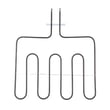
Yes. On the Kenmore Pro wall oven model 79042003605, you can replace a failed heating element, but we recommend shutting off power at the breaker first and working only after the oven is fully cool. Use the steps and safety notes in the 79042003605 owner's manual.
Before you start (safety and prep)
- Turn OFF the circuit breaker to the wall oven (do not rely on the control panel).
- Confirm the oven is cool; heating elements can stay hot after they turn off.
- Pull the oven racks out for room to work.
- Use gloves; sheet metal edges inside the cavity can be sharp.
- If you need to move racks while the oven is hot, use extreme caution and proper mitts (best practice is to wait until cool).
Basic replacement steps (typical wall oven method)
- Shut off power at the breaker.
- Remove oven racks.
- Remove the mounting screws holding the element to the rear wall (usually 2 screws).
- Gently pull the element forward a few inches.
- Disconnect the wire terminals (note wire positions; take a photo).
- Connect the wires to the new element terminals firmly.
- Reinstall the element and mounting screws.
- Restore power and test Bake (and Broil if you replaced the broil element).
Which part is it: bake vs. broil?
Use this quick guide to choose the right element.
| Element type | Location | Common symptom when failed |
|---|---|---|
| Bake element | Bottom of oven cavity | Oven heats slowly or not at all on Bake; uneven baking |
| Broil element | Top of oven cavity | No broil heat; poor browning |
If your oven is not holding temperature (instead of not heating at all), check the frigidaire range oven temperature sensor 316217002 because a bad sensor can cause incorrect temperature readings.
Why it matters
A weak or open heating element can cause long preheat times, undercooked food, and temperature swings. Replacing the correct element restores normal bake or broil performance and helps protect the control system from extended high-demand heating.
Last updated: February 2026
How long does it take for a Kenmore electric oven to self clean?
For Kenmore Pro wall oven model 79042003605, the Self-Clean cycle is 3 hours, and the full start-to-finish process takes about 4 1/2 hours when you include cool-down time and the door unlocking period (see the 79042003605 owner's manual).
Typical self-clean timeline (model 79042003605)
- Set the selector and temperature controls to Clean.
- The motor-driven door lock engages automatically; allow about 20 seconds for the lock to close.
- The high-heat cleaning portion runs for about 3 hours.
- After the cycle, the oven must cool before the door unlocks; this normally takes about 1 1/2 hours.
- The control display shows the time remaining during the cycle.
| Stage | What you will notice | Time for 79042003605 |
|---|---|---|
| Door lock engages | Lock icon flashes, then stays on | ~20 seconds |
| Self-clean heating | Soil burns off; heat and odor are normal | ~3 hours |
| Cool-down and unlock | Door stays locked until safe temperature | ~1 1/2 hours |
| Total | Start to door opening | ~4 1/2 hours |
What is normal during self-clean
- Odor is normal as food soil is removed.
- Some smoke can vent from the oven.
- Heavy spillovers that were not wiped up can cause more smoke and odor.
- Using an exhaust fan (if available) helps clear smoke.
Why it matters
Self-clean runs at very high temperatures, so the door lock and cool-down period are a built-in safety feature. Planning for the extra unlock time prevents surprises if you need the oven soon after cleaning.
Last updated: February 2026
How many watts does a Kenmore oven use?
For Kenmore Pro wall oven model 79042003605, watt usage depends on which heating elements are running. The installation instructions direct you to use the oven’s serial plate wattage to determine the correct circuit size; most wall ovens fall in the 4,800 to 9,600 watt range at 240V.
Where to find the exact wattage for model 79042003605
Use the rating label (serial plate) on the oven to get the exact wattage for your specific unit, then confirm the electrical requirements in the 79042003605 installation guide.
Typical places to check:
- Along the oven frame behind the door (door open)
- On a side trim area near the front frame
- On the rear of the unit (more visible during installation)
- In the electrical connection area (varies by installation)
What wattage means for breaker size (quick reference)
The installation instructions include a wattage-to-breaker table. Here is the practical summary:
| Supply voltage | Total wattage (nameplate) | Recommended circuit |
|---|---|---|
| 240V | Less than 4,800W | 20A |
| 240V | 4,800W to 7,200W | 30A |
| 240V | 7,200W to 9,600W | 40A |
| 240V | 9,600W and up | 50A |
Why your oven’s watt draw changes during cooking
Even if the nameplate shows a high maximum wattage, the oven does not pull that amount constantly. Actual draw varies based on what is energized.
Common factors:
- Bake vs. broil selection
- Preheat (highest sustained demand)
- Convection fan running (adds a smaller load)
- Cycling (elements turn on and off to hold temperature)
- Temperature accuracy issues that cause longer run times
If temperatures seem off and the oven runs excessively, checking the frigidaire range oven temperature sensor 316217002 is a common first step.
Why it matters
Correct wattage and circuit sizing helps prevent nuisance breaker trips, slow preheat, and overheating at the junction box. It also ensures the oven is properly grounded and protected as intended.
Last updated: February 2026
What does PF mean on Kenmore Elite oven?
On Kenmore wall ovens like model 79042003605, PF means the power supply was interrupted (power failure). When power is restored, the display can flash “PF” and the oven will typically require you to acknowledge it and reset the clock before normal cooking functions work.
How to clear PF and get the oven working again
Use these steps in order:
- Press the Clock pad once to stop “PF” from flashing.
- Set the correct time of day using the up or down arrow pads (hold to move faster).
- Wait about 5 seconds for the control to accept the new time.
- Try a simple Bake cycle to confirm the control responds normally.
- If “PF” returns repeatedly, check for a loose power cord connection or a household breaker issue.
For the exact button names and clock-setting sequence on this control, follow the 79042003605 owner's manual.
Why PF happens
PF is not a cooking mode; it is a notification that the electronic oven control lost power. Common causes include:
- Brief outage or utility “blink”
- Tripped breaker (or one side of a 240V circuit dropping out)
- Loose wiring at the junction box or terminal block
- Power restored after service work or installation
Quick troubleshooting: one-time PF vs. repeating PF
| What you see | Most likely cause | What to do next |
|---|---|---|
| PF appears once after an outage | Normal power interruption | Clear PF, set clock, resume cooking |
| PF appears often (no obvious outage) | Unstable power or connection issue | Check breaker, wiring connections, and installation |
| PF plus odd temps or long preheat | Possible sensing/control issue | Test components and inspect wiring |
When a part may be involved
If the oven also heats erratically, overbakes, or shows temperature-related symptoms after power events, the temperature sensor circuit is one of the first items we check. For this model, a common replacement is the range oven temperature sensor 316217002.
Why it matters
Clearing PF and resetting the clock restores normal control operation and helps prevent missed timers, delayed starts, and incorrect cooking cycles after a power interruption.
Last updated: February 2026





