 Owner’s manual
 Error Codes
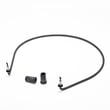




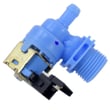



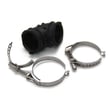
What is WDF520PADW9?
WDF520PADW9 is a Whirlpool dishwasher model number that identifies the exact built-in dishwasher design, parts list, and service information for your unit. Using the full model number helps us match the correct replacement parts (like the heater, spray arm, or door latch) and the right operating instructions.
What the model number tells you
WDF520PADW9 is used to match key details that affect fit and function, including:
- Brand and product type (Whirlpool dishwasher)
- Correct replacement parts and diagrams (filters, pumps, hoses, controls)
- Installation requirements (cabinet opening, drain, water supply, electrical)
- Operating and care guidance (maintenance, cleaning, cycle use)
For model-specific specs and setup details, use the WDF520PADW9 owner's manual.
Common parts customers replace on this model
If you are troubleshooting performance issues, these are frequent wear or failure items on Whirlpool dishwashers like WDF520PADW9:
- Heating system components (helps with water heating and drying)
- Wash system components (spray arm, circulation pump, sump)
- Drain components (drain hose, clamps)
- Door components (latch, seals, vent gasket)
- Filtration components (filter and filter cup)
Quick examples (from available parts)
| Symptom | Part that often relates | Example part ID |
|---|---|---|
| Dishes not drying well | Heater circuit | W10518394 |
| Poor cleaning or low spray | Spray arm | WPW10491331 |
| Won’t fill or fills slowly | Water inlet valve | W11175771 |
| Door won’t latch or start | Door latch | WPW10653840 |
| Debris left in tub | Filter | WPW10463906 |
Why it matters
Dishwasher parts are highly model-specific. Even small design changes within a Whirlpool series can change the correct spray arm, filter, or control. Using WDF520PADW9 prevents ordering the wrong part and helps you follow the correct electrical and installation requirements.
Last updated: January 2026
What's the most common problem with a Whirlpool dishwasher?
The most common Whirlpool dishwasher problems (including model WDF520PADW9) are poor cleaning and draining issues. In many homes, the root cause is simple: a dirty filter, clogged spray arm holes, or a drain path restriction that reduces wash pressure and leaves water behind. See the WDF520PADW9 owner's manual for the exact cleaning and maintenance steps for your unit.
Most common symptoms and what they usually mean
- Dishes still dirty or gritty: spray arm holes clogged, filter needs cleaning, or low wash pressure
- Water left in the bottom: drain hose restriction, sink drain/disposer blockage, or a drain path clog
- White film or spots: hard water, low rinse aid, or too much detergent
- Not drying well: rinse aid low, heater issue, or door opened too soon
- Won’t start: door not fully latched, cycle not selected correctly, or control not responding
Quick checks we recommend first (fast, no parts)
- Clean the filter area and remove debris from the sump.
- Inspect and rinse the spray arm; if it is cracked or won’t spin freely, consider replacing the dishwasher spray arm WPW10491331.
- Confirm the drain hose is routed correctly and not kinked; a damaged hose can be replaced with the dishwasher drain hose 8269144A.
- Verify the door closes firmly; if it feels loose or intermittent, the dishwasher door latch WPW10653840 is a common fix.
- Run hot water at the sink before starting the cycle to improve cleaning performance.
Common problem vs. likely fix (at-a-glance)
| Problem you notice | Most likely cause | What to do next |
|---|---|---|
| Dirty dishes | Clogged filter or spray arm | Clean filter, rinse spray arm, check for cracks |
| Standing water | Drain restriction | Check hose routing, air gap (if used), sink drain/disposer |
| Poor drying | Low heat or low rinse aid | Fill rinse aid, use heated dry, check heater circuit |
| Won’t start | Door not latching | Check latch alignment and switch operation |
Why it matters
Poor cleaning and draining are usually maintenance-related at first, but if they continue, they can strain the wash system (pump, heater, and seals) and lead to bigger performance problems over time.
Last updated: January 2026
Why won't my Whirlpool dishwasher drain E1 F9?
On a Whirlpool WDF520PADW9 dishwasher, an E1 F9 drain error means the unit is not pumping water out fast enough. The most common causes are a clogged drain path (filter, hose, air gap, disposer inlet) or a drain pump obstruction; cold-weather freezing can also trigger it.
Quick checks that fix most E1 F9 drain problems
- Cancel the cycle and let the dishwasher sit a few minutes, then try Drain/Cancel again.
- Check and clean the sink drain air gap (if your setup has one).
- Inspect the drain hose for kinks, crushing, or a low spot that traps water.
- If the hose connects to a garbage disposer, make sure the disposer inlet knockout plug was removed.
- Clean the filter area in the bottom of the tub (food debris here can slow draining).
Parts to inspect on WDF520PADW9
If the drain path is clear but it still will not drain, we focus on the components that move water out.
| What to check | What you may notice | Related part for this model |
|---|---|---|
| Drain hose | Slow drain, backflow, gurgling | Dishwasher drain hose 8269144A |
| Sump filter | Standing water, debris in sump | Dishwasher filter WPW10463906 |
| Drain pump area (in sump) | Humming, intermittent drain | (inspect for debris first) |
Cold weather and freezing (important)
If the dishwasher or plumbing is exposed to cold conditions, ice in supply or drain lines can prevent proper draining. We follow the winter-use guidance in the WDF520PADW9 owner's manual and restore normal temperatures before running cycles again.
Why it matters
A dishwasher that cannot drain will often stop mid-cycle, leave dirty water in the tub, and can cause odors and poor cleaning. Clearing the drain path early also helps protect the pump and motor from strain.
Last updated: January 2026
How to reset error codes on Whirlpool dishwasher?
To clear many error codes on your Whirlpool dishwasher model WDF520PADW9, we reset power to the control by turning the dishwasher off and cycling power at the breaker for several minutes, then restoring power and restarting a cycle. Use the WDF520PADW9 owner's manual for the exact reset and diagnostic steps.
Quick reset steps (most common)
- Press Cancel/Drain to stop the current cycle.
- Turn the dishwasher off.
- Turn off the circuit breaker (or unplug the dishwasher if it uses a cord).
- Wait 5 to 10 minutes.
- Restore power, then start a short cycle and listen for normal fill and wash.
If the code comes back right away
A repeating code usually means the dishwasher is still detecting the problem. These checks fix the most common causes:
- Clean the filter system; hard water and soil buildup can trigger performance issues.
- Confirm the dishwasher is filling; low fill can cause poor washing and repeated faults.
- Check for a drain restriction (kinked hose, disposal plug not removed, clogged air gap).
- Make sure the door closes and latches firmly; a weak latch can interrupt cycles.
- If you see heating-related symptoms (cool water, wet dishes), inspect the heater circuit.
Helpful references for identifying the code
Use the code list to match the displayed error to a specific system (drain, fill, heating, control):
Common “code families” and what they point to
| What the dishwasher is doing | What it often points to | What to check first |
|---|---|---|
| Won’t drain or stops mid-cycle | Drain path issue | Drain hose routing, sink/disposal connection |
| Won’t fill or fills slowly | Water supply issue | Shutoff valve fully open, inlet screen |
| Dishes not drying, long cycle | Heating issue | Heater operation, rinse aid use |
| Random beeping or stops | Door/latch issue | Latch engagement and alignment |
Why it matters
Resetting clears the control’s stored fault so you can confirm whether the issue was a one-time glitch or an active problem that needs attention. If the code returns, troubleshooting the specific system prevents repeat shutdowns and incomplete washes.
Last updated: January 2026










