Owner’s manual
 Error Codes


How to remove bottom grille on GE refrigerator?
On the GE GFE26GMKGES bottom-mount refrigerator, the bottom grille (base grille) typically comes off by releasing its retaining clips and pulling it forward; some versions also use a couple of screws. Unplug the refrigerator or switch off power before working near wiring and the condenser fan area.
Quick steps (most common)
- Pull the refrigerator slightly forward if you need more hand room.
- Look along the top edge of the grille for clip points.
- Firmly pull the grille straight out toward you to pop it free.
- If it will not release, check the left and right ends for Phillips or 1/4-inch hex-head screws.
- Remove any screws, then pull the grille forward and lift it off.
- Reinstall by lining it up and pressing it in until it snaps, then reinstall screws (if used).
What to check if it feels stuck
- Hidden screws: Some base grilles are secured at the ends.
- Brittle plastic: Warm the room slightly; cold plastic cracks more easily.
- Leveling legs: If the grille is binding, raise the front slightly by adjusting the leveling legs, then try again.
Tools and time
| Task | Typical tools | Typical time |
|---|---|---|
| Remove grille with clips only | None | 1 to 3 minutes |
| Remove grille with screws | Phillips or 1/4-inch nut driver | 3 to 10 minutes |
Why it matters
Removing the bottom grille gives you access for basic maintenance like cleaning dust from the condenser area, which helps cooling performance and can reduce compressor run time.
For model-specific diagrams and any fastener locations used on your exact configuration, follow the owner's manual.
Last updated: February 2026
How to remove the bottom shelf of a GE fridge?
To remove the bottom shelf in your GE GFE26GMKGES refrigerator, take everything off the shelf, tilt the front edge up, then lift the back up and pull the shelf straight out. Follow the same steps in reverse to reinstall it; lower the front until it locks.
Step-by-step: removing the shelf safely
- Remove all food and bins sitting on the shelf.
- Support the glass with both hands (it can be slippery).
- Tilt the shelf up at the front.
- Lift the shelf up at the back to unhook it from the track.
- Pull the shelf out of the refrigerator.
- Set it down on a flat surface to avoid twisting the frame.
Reinstalling the shelf
- Tilt the shelf up and insert the top hook at the back into the correct slot on the track.
- Lower the front of the shelf.
- Press down gently until the bottom locks into place.
Cleaning and handling tips (important for glass shelves)
Glass shelves can break if they are shocked by temperature changes or impact.
- Let cold glass warm up before washing.
- Do not clean cold glass with warm or hot water.
- Avoid bumping the shelf on the door frame while removing it.
- Hand-wash plastic refrigerator parts (do not use a dishwasher).
| Task | Best practice | What to avoid |
|---|---|---|
| Removing shelf | Two hands, steady lift | Twisting the frame |
| Washing glass | Room-temp water | Warm water on cold glass |
| Reinstalling | Hook back first, then lock front | Forcing it into the track |
Why it matters
Removing the shelf the right way prevents cracked tempered glass, broken shelf supports, and misaligned tracks that can make shelves sit unevenly and spill.
For diagrams of the shelf hooks and track positions, use the owner's manual.
Last updated: February 2026
What does the GFE26GMKGES stand for?
For GE bottom-mount refrigerators like model GFE26GMKGES, the model number is a manufacturer code that identifies the product family and key configuration. In this case, the GFE prefix indicates a GE standard-depth refrigerator series, and the remaining characters help match the correct features and replacement parts.
How to read the model number (what we can confirm)
From the documentation for GE and GE Profile bottom-freezer refrigerators:
- GFE: GE standard-depth model family (the manual groups models starting with DFE, GFE, GNE, PFH, PFE, PFD, and GFD as standard depth).
- 26: Commonly used by manufacturers to indicate an approximate capacity class (for example, around 26 cubic feet), and it also helps distinguish series within the family.
- GMKGES: A GE internal configuration code (feature package, finish, and revision identifiers) used to match the exact parts list for your refrigerator.
Why the exact letters matter for parts
Even small differences in the suffix can change which parts fit (controls, doors, sensors, filters). When ordering parts, always match the full model number from the rating label.
- Look for the model/serial label inside the fresh food compartment.
- Use the full model number when selecting parts such as a water filter, control board, or door gasket.
- If you are troubleshooting, the model family also helps you use the correct control style and settings.
Quick examples of parts that depend on the exact model
| Part type | Example for GFE26GMKGES | What it affects |
|---|---|---|
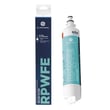
| Water filter | GE refrigerator water filter RPWFE | Water taste, flow, ice quality |
| Temperature sensing | Refrigerator temperature sensor WR55X10025 | Cooling accuracy, temperature swings |
| Door sealing | Refrigerator freezer door gasket WR14X36194 | Frost buildup, warm spots, energy use |
Why it matters
Using the correct GFE26GMKGES identifier prevents ordering the wrong GE refrigerator parts and helps ensure troubleshooting steps in the manual match your control layout and features.
For model-family details and where to find the model/serial label, use the owner's manual.
Last updated: February 2026
What is the most common problem with a GE refrigerator?
The most common issue we see with a GE refrigerator like model GFE26GMKGES is a cooling complaint (fresh food warm, freezer not holding temperature). In many cases, the root cause is airflow or temperature control related, such as a fan issue, a sensor problem, or frost buildup from a defrost failure; our owner's manual troubleshooting section helps you narrow it down quickly.
Most common symptoms and what they usually point to
- Not cooling or uneven temps: evaporator fan not moving air, temperature sensor out of range, or heavy frost restricting airflow
- Strange noises: normal fan speed changes, refrigerant flow sounds, or ice chute motor operation (often normal per the manual)
- Ice maker or dispenser issues: clogged filter, air in the water line, or a weak inlet valve
- Water leaking: filter not seated, drain issue, or water line connection problem
- Door not closing or alarm beeping: door left ajar, gasket not sealing, or door alignment
Quick checks we recommend first (no parts needed)
- Confirm the controls are set to cooling (some “not cooling” calls are the cooling system being turned off).
- Give a new install or a warm fridge 24 hours to stabilize temperatures.
- Make sure vents inside the fresh food section are not blocked by food packages.
- Listen for the evaporator fan; it may run faster after door openings or heavy loading.
- Check door seal contact all the way around and verify doors are aligned.
Common parts that solve “not cooling” and dispenser complaints
| Symptom | Common suspect | Example part for GFE26GMKGES |
|---|---|---|
| Warm fresh food, weak airflow | Evaporator fan motor | GE refrigerator evaporator fan motor WR60X26866 |
| Temps swing, runs too warm or too cold | Temperature sensor | Refrigerator temperature sensor WR55X10025 |
| Frost buildup, warm temps | Defrost system issue | Refrigerator defrost heater WR51X10132 or refrigerator defrost bi-metal thermostat WR50X10108 |
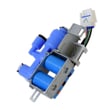
| Slow water, no ice, dispenser issues | Filter or inlet valve | GE refrigerator water filter RPWFE or refrigerator water inlet valve WR57X10098 |
Why it matters
Cooling problems can look like a “bad compressor,” but they are often caused by airflow, defrost, or water system restrictions. Doing the quick checks first helps prevent unnecessary part replacement and gets temperatures back to safe food-storage ranges faster.
Last updated: February 2026