Installation guide
 Owner’s manual
 Error Codes




How to fix oven temperature sensor Whirlpool?
On the Whirlpool WFE505W0HW2 electric range, fixing an oven temperature sensor issue usually means checking the sensor connection, testing the sensor for proper resistance, and replacing the sensor if it is out of spec or damaged. Use the WFE505W0HW2 owner's manual for safety steps and control settings.
Quick checks before replacing the sensor
- Turn off power at the breaker (range circuits are high voltage).
- Confirm the oven is not in a special mode (timed bake, delay start, etc.).
- Make sure the sensor harness plug is fully seated and not heat-damaged.
- Look for pinched or broken wires at the rear oven wall and along the harness.
- If the oven temperature seems “off,” try the control calibration first (see next section).
Try calibrating the oven temperature first
This model allows you to adjust the oven temperature offset when it consistently cooks hotter or cooler than expected.
| Situation | Best next step |
|---|---|
| Food consistently undercooks or overcooks | Use oven temperature calibration (control offset) |
| Temperature swings wildly, error codes, or no heat | Test sensor and wiring; replace sensor if failed |
| Broil works but bake is weak | Inspect bake circuit and bake element condition |
How we replace the oven temperature sensor (overview)
- Disconnect power.
- Remove the mounting screws for the sensor inside the oven cavity (typically on the rear wall).
- Carefully pull the sensor forward and disconnect the wire plug.
- Install the new sensor, reconnect the plug, and secure the screws.
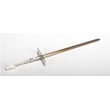
For the correct replacement part for this model, use the range oven temperature sensor WPW10181986.
Why it matters
The oven temperature sensor tells the electronic control how hot the oven is. If the sensor is out of range or the wiring is failing, the control can cycle the bake and broil elements incorrectly, causing uneven baking, long preheat times, or temperature errors.
Last updated: January 2026
What does it mean if my oven says psh?
On the Whirlpool WFE505W0HW2 electric range, a PSH message typically shows up when the oven control is not accepting a bake command because a control feature is active (most often Control Lock). Unlocking the controls and resetting power usually restores normal baking.
What to do first (quick fix)
- Press and hold CONTROL LOCK for 3 seconds to unlock the control panel.
- Press Cancel to clear the display.
- If the message returns, turn off power at the breaker for 1 minute, then restore power.
- Try starting Bake again and press Start to begin the cycle.
- If the display is flashing after an outage, clear it and reset the clock as needed.
For the exact keypad names and display behavior on your unit, follow the steps in the WFE505W0HW2 owner's manual.
Why PSH can appear on this model
PSH is commonly reported as a “prompt” style message when the control is waiting for a required action or is blocked by a feature. On WFE505W0HW2, the manual troubleshooting guidance points to these common causes:
| What you see | Most likely cause | What to do |
|---|---|---|
| Controls won’t respond | Control lock is on | Hold CONTROL LOCK 3 seconds |
| Display shows a flashing time | Power failure | Clear display; reset clock |
| Error code (letter + number) | Control detected a fault | Press Cancel; if it returns, service is needed |
If you still cannot bake
- Confirm the range has proper power (a tripped breaker can cause odd control behavior).
- Make sure you are pressing Start after setting Bake.
- If the oven temperature seems inaccurate after the message clears, the oven temperature sensor can be a factor; for this model, see range oven temperature sensor WPW10181986.
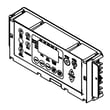
- If the control panel continues to act erratically after a reset, the electronic control can be involved (for example, control, electronic (lcx) (white) W11546066).
Why it matters
Control Lock and power interruptions can make the oven look “broken” even when the heating system is fine. Clearing the lock and resetting the control prevents unnecessary part replacement and gets you back to baking faster.
Last updated: January 2026
What does F5E2 mean on a Whirlpool oven?
On the Whirlpool WFE505W0HW2 electric range, the F5E2 error code points to a problem with the oven door lock system during Self-Clean (the control is not seeing the lock switch change state as expected). Start by canceling Self-Clean, letting the oven cool completely, and checking the door latch area for anything preventing full movement; then follow the reset and troubleshooting steps in the WFE505W0HW2 owner's manual.
What to do first (safe, quick checks)
- Press Cancel/Off to stop the cycle and allow a full cool-down.
- Confirm the oven door is fully closed and not being pulled out of alignment by a heavy rack or pan.
- Look for debris or baked-on residue around the latch opening that could block the lock from traveling.
- Turn power off at the breaker for 1 minute, then restore power and try a normal Bake cycle (not Self-Clean).
- If Bake works but Self-Clean immediately returns F5E2, focus on the door lock/latch circuit.
Likely causes on this model
F5E2 is most often triggered by one of these conditions:
- Door lock motor not moving the latch fully
- Door lock switch not closing or opening when the latch moves
- Loose wiring connection at the lock assembly or control
- Control not interpreting the lock feedback correctly
Basic symptom guide
| What you notice | Most likely area to check | What it means |
|---|---|---|
| Door will not lock at all in Self-Clean | Latch/lock motor or linkage | Latch is not traveling |
| Door locks but code appears quickly | Lock switch or wiring | Switch state not changing |
| Code appears after a power outage or flicker | Control reset needed | Control lost latch position |
When parts testing makes sense
If you are comfortable using a meter, testing the lock switches and related wiring is the fastest way to confirm the failure. For safe technique and setup, use our how to use a multimeter to test electrical parts video.
If you also see temperature-related symptoms (long preheat, uneven baking, overheating), check the oven sensor circuit; the model uses a dedicated sensor such as the range oven temperature sensor WPW10181986.
Why it matters
During Self-Clean, the range must verify the door is locked for safety. If the control cannot confirm the lock position, it stops the cycle and displays F5E2 to prevent unsafe operation.
Last updated: January 2026
What is F9E0 after power outage?
On the Whirlpool WFE505W0HW2 electric range, an F9E0 code after a power outage points to a home power-supply problem, most commonly a miswired outlet or incorrect electrical connection. Correcting the electrical supply clears the fault and restores normal operation; use the WFE505W0HW2 installation guide for the electrical checks.
What to do first (safe, fast checks)
- Reset the range by turning the breaker OFF for 1 minute, then ON.
- Confirm the power cord is fully seated in the receptacle.
- Verify the household breaker is not tripped (reset it firmly).
- If the code returns, stop cooking until the supply is verified.
- Have a qualified electrician verify the receptacle and supply wiring.
What the documentation says for this model
Both the installation instructions and troubleshooting guidance for WFE505W0HW2 state that if the control displays F9 or F9E0, the electrical outlet may be miswired and a qualified electrician should verify the electrical supply. For operating tips and other display behaviors after a power failure, use the WFE505W0HW2 owner’s manual.
Common causes and best next step
| Likely cause | What you may notice | Best next step |
|---|---|---|
| Miswired 240 V receptacle (hot/neutral/ground issue) | F9E0 returns quickly after reset | Electrician verifies wiring at outlet and panel |
| Loose connection at the range power connection | Intermittent power, code after movement/outage | Electrician checks cord, strain relief, and terminal connections |
| Overheated or damaged terminal block | Discoloration or heat damage where cord enters | Replace the terminal block after power is disconnected |
Parts that may be involved (after power is verified)
If the home supply checks good and the code persists, the power connection hardware is the next place to inspect.
Why it matters
F9E0 is a power-supply safety warning. Fixing the wiring or connection prevents repeat shutdowns and helps avoid overheating at the cord and terminal block.
Last updated: January 2026