Owner’s manual
 Error Codes





How to replace a Kenmore 79579009901 water filter?
To replace the water filter in your Kenmore 79579009901 bottom-mount refrigerator, we remove the old filter from the filter housing (usually behind a small access door or inside the fresh food compartment), install the new filter, then flush water to clear air and carbon fines. See the 79579009901 owner's manual for the exact filter location and reset steps.
Step-by-step: replacing the filter
- Dispense a few cups of water first (if possible) to relieve pressure.
- Open the filter access door or cover.
- Turn the old filter counterclockwise (or push and release, depending on the housing) and pull it out.
- Check that the old O-rings came out with the filter; wipe the housing clean.
- Insert the new filter fully, then lock it in place (turn clockwise or push until it clicks).
- Close the access door.
If the filter door is taped shut or damaged
A taped or broken filter door is common on “came with the house” refrigerators. We handle it like this:
- Carefully remove tape so you do not crack the plastic door.
- If the door will not open, access may be blocked by misalignment; gently press the door inward while releasing the latch.
- If the hinge or latch area is broken, avoid forcing it; remove shelves/drawers that interfere and try again.
- After replacement, re-secure the door so it seals and does not rattle.
Flush and reset (what to expect)
| After installing the new filter | What we do | What you may notice |
|---|---|---|
| Purge air from lines | Dispense water for several minutes | Sputtering, spurts, cloudy water at first |
| Improve taste/odor | Run and discard several gallons total | Carbon “fines” (tiny black specks) initially |
| Restore ice production | Dump the first 1 to 2 bins of ice | Smaller cubes until the line fully purges |
Why it matters
A properly installed refrigerator water filter protects the water inlet valve and ice maker from sediment, improves taste, and helps maintain normal water flow.
For dispenser or filter-housing access tips, use how to replace the water filter in a Kenmore refrigerator.
Last updated: January 2026
What is error 15 on Kenmore refrigerator?
On Kenmore model 79579009901, error 15 commonly appears as Er IS (Er 15) and points to an ice maker sensor problem (the control is not getting the expected signal from the in-door ice maker sensor). Start by power-resetting the refrigerator, then inspect wiring and the ice maker area.
What to do first (safe, quick checks)
- Unplug the refrigerator (or turn off the breaker) for 5 minutes, then restore power.
- Confirm the freezer is cold enough for normal ice making (typically near 0°F).
- Check for ice buildup around the ice maker that could interfere with sensor operation.
- Reseat any accessible wire connectors to the ice maker (loose connections can trigger sensor errors).
- If the code returns quickly after reset, plan on deeper diagnosis.
Likely causes and what they mean
| What’s happening | What it usually indicates | What we do next |
|---|---|---|
| Code clears after reset | Temporary control glitch | Monitor for 24 to 48 hours |
| Code returns, ice maker stops | Sensor circuit issue | Inspect harness, connectors, ice maker assembly |
| Intermittent code | Loose connection or moisture/icing | Dry/defrost area, secure connectors |
Parts that can be involved
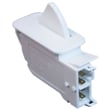
This error is tied to the ice maker sensor circuit, but related issues can also come from door-related wiring interruptions. If the interior light or door sensing is acting up too, check the door switch.
Why it matters
When the control board can’t read the ice maker sensor correctly, it may disable ice production or run the ice maker inconsistently. Addressing the root cause helps prevent repeated errors and protects normal freezer temperature control.
Model-specific reference
Use the 79579009901 manual to locate the ice maker components, access panels, and any model-specific diagnostic steps or connector locations.
Last updated: January 2026
What is the average lifespan of 79579009901?
The average lifespan of the Kenmore 79579009901 bottom-mount refrigerator is 13 years with normal household use and basic maintenance. Keeping airflow clear, doors sealing tightly, and temperatures set correctly helps you reach that typical service life.
Typical lifespan and what affects it
Most bottom-mount refrigerators last about the same amount of time; the biggest differences come from usage and maintenance.
- Kitchen temperature and ventilation around the cabinet
- Door gasket condition and how often doors are opened
- Dust buildup on condenser area and fan airflow
- Ice maker and water system upkeep (if equipped)
- Power quality (surges and frequent outages)
Quick maintenance checklist (adds years)
Use these habits to reduce compressor and fan run time.
- Set temps to about 37°F fresh food and 0°F freezer
- Keep vents inside the refrigerator and freezer unblocked
- Clean dust from the condenser area periodically
- Check for a tight door seal; replace if torn or warped
- Fix water leaks quickly to prevent corrosion and icing
Parts that commonly impact cooling longevity
If cooling performance drops, these parts are frequent contributors on refrigerators like model 79579009901.
| Symptom | Common area | Example part on this model |
|---|---|---|
| Warm fridge, freezer OK | Air movement | Refrigerator evaporator fan motor 4681JB1027N |
| Frost buildup, warm temps | Defrost system | Refrigerator defrost sensor assembly 6615JB2005C |
| Water under fridge or ice buildup | Drain system | Refrigerator drain tube 5251JA3003D |
Why it matters
A refrigerator that is running longer than normal to hold temperature wears the sealed system (compressor, relay, fans) faster. Addressing airflow, defrost, and door-seal issues early helps the Kenmore 79579009901 reach its expected lifespan.
For model-specific care and cleaning intervals, follow the 79579009901 manual.
Last updated: March 2026