Installation guide
 Owner’s manual
 Error Codes








How big is the Kenmore 79098023802?
The Kenmore Elite 79098023802 is a 30-inch class electric range. Most ranges in this size are about 30 inches wide, roughly 36 inches tall to the cooktop, and about 25 to 28 inches deep (not counting the handle). For the exact cutout and clearance needs, use the installation guide.
Typical dimensions you can expect
Because ranges vary by handle depth, leveling legs, and rear anti-tip bracket clearance, we use these common ranges when planning space:
- Width: ~29 7/8 to 30 inches
- Height (to cooktop): ~36 inches (often adjustable with leveling legs)
- Depth (cabinet): ~25 to 28 inches
- Depth (with handle): often ~27 to 30+ inches
- Electrical: typically a 240V range circuit (confirm in the owner's manual)
How to measure your range correctly
Measure with the range in its installed position (or as close as possible):
- Measure width at the widest point of the body (not the door).
- Measure height from floor to the cooktop surface; check both front corners (leveling legs matter).
- Measure depth two ways: to the front of the door, and to the front of the handle.
- Confirm required rear clearance for the anti-tip bracket and power cord routing.
Planning checklist (space and fit)
| What you are planning | What to use | Why |
|---|---|---|
| Replacing an existing 30-inch range | Width and depth measurements | Ensures it slides into the opening without binding |
| New install or remodel | Cutout and clearance specs | Prevents heat damage and door interference |
| Moving the range | Depth with handle | Avoids getting stuck in doorways or tight turns |
Why it matters
Correct sizing prevents installation problems like a range that will not sit flush, a door that hits adjacent cabinetry, or unsafe clearances around heat and wiring.
Last updated: February 2026
How do you reset a Kenmore 79098023802 oven?
To reset your Kenmore Elite range model 79098023802, clear the control by pressing STOP/CLEAR, then restore power (unplug or switch the breaker off, then back on) and reset the clock. After a power interruption, the oven will not program correctly until the time is set (see the owner's manual).
Quick reset options (use the one that matches your situation)
- After an F-code error beep: Press STOP/CLEAR to stop beeping and clear the display; then reprogram the oven.
- After a power outage or flicker: Turn the oven off, restore power, then set the clock and reselect your cooking mode.
- If the oven seems “locked”: Turn off Oven Lockout (it prevents the oven from being turned on).
- If the display is flashing: Set the time of day first; the oven cannot be programmed until the clock is set.
- If settings are acting strange: Clear stored recipes (this also resets several control preferences back to factory settings).
How to turn Oven Lockout off (control reset for “LOC/LOCKED” symptoms)
Oven Lockout can make it look like the oven is not working because it prevents the oven from being turned on.
- Press the Oven Lockout pad.
- Press and hold the same pad for 3 seconds.
- Wait for the door to fully unlock; the “DOOR/LOCKED” indicator stops flashing when it is unlocked.
What a “full reset” does (and does not do)
| Reset method | What it fixes | What you still must do |
|---|---|---|
| STOP/CLEAR | Clears many active cooking entries and stops error beeping | Re-enter bake/broil settings |
| Power cycle (breaker off/on) | Reboots the electronic control after glitches | Set the clock; reprogram cooking |
| Clear stored recipes | Returns multiple user adjustments to factory defaults | Re-set preferences you use |
Why it matters
A reset is often the fastest way to recover from a control glitch, a flashing display after a power interruption, or an F-code fault. Setting the clock is especially important on this model because the oven cannot be programmed until the time is set.
Last updated: February 2026
Where can I find my Kenmore 79098023802 oven model number?
On the Kenmore Elite electric range model 79098023802, the model and serial number are printed on the serial plate. You can use the serial plate location diagram in the 79098023802 owner's manual to see the exact spot on your range.
Where to look on the range
Check these common serial plate locations first:
- Open the oven door and look along the door frame (door jamb area)
- Look just inside the storage or warming drawer opening (if your range has a bottom drawer)
- Check the frame behind the lower drawer front (you may need to pull the drawer out)
- Look on the back panel of the range near where the power cord connects
What the label looks like
The serial plate typically includes:
- Model number (for example, 79098023802)
- Serial number
- Electrical ratings (volts/amps)
- Manufacturer information
| Item on the serial plate | Why you need it |
|---|---|
| Model number | Matches the correct parts list and diagrams |
| Serial number | Helps confirm production details for the right replacement parts |
Why it matters
Using the exact model number from the serial plate prevents ordering the wrong bake element, oven temperature sensor, control board, or other electrical parts that can look similar across Kenmore Elite ranges.
Last updated: February 2026
Why is my Kenmore 79098023802 stove not working?
If your Kenmore Elite 79098023802 electric range is not working, the most common causes are a power supply problem (tripped double breaker, loose or burned power connection), a control reset needed after a power interruption, or a failed heating or control component. Start by confirming full power, then isolate which functions fail.
Quick checks first (power and reset)
- Do not operate the range during a power failure; when power returns, reset the clock and reselect the cooking function (the oven may not program until the clock is set). See the owner's manual.
- Reset the home 240V double-pole breaker fully (OFF, then ON).
- If the display is flashing after an outage, set the clock before testing Bake or Broil.
- If the range is completely dead, turn power off and inspect the power connection area for heat damage.
Narrow it down by symptom
| What is not working? | Most likely causes | What to do next |
|---|---|---|
| Entire range is dead (no display) | No power, loose/burned connection | Verify breaker, then inspect wiring at the power connection (power off) |
| Cooktop works but oven will not heat | Settings, failed bake circuit part, control fault | Confirm settings, check for F-code beeps, test bake components |
| One surface element will not heat | Wrong control used, low setting, failed element/relay | Try higher setting, verify correct knob, then test the element circuit |
| Oven beeps and shows an F code | Control detected a fault | Press STOP to clear; if it returns, troubleshoot that circuit |
Parts that commonly fix “not working” problems
- Terminal block 5304409888 if the power connection is loose, burned, or damaged
- Oven element 318601604 if the oven will not bake or heats poorly
- Frigidaire range oven temperature sensor 316217002 if temperature is erratic or a sensor-related fault appears
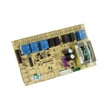
- Frigidaire range oven relay control board 316443927 if the oven circuits will not energize
Why it matters
A partially working range usually points to a single circuit (bake, broil, surface, or control). A completely dead range points to the power path (breaker, wiring, terminal block). Matching the symptom to the circuit prevents replacing the wrong part.
Last updated: February 2026