 Owner’s manual
 Error Codes



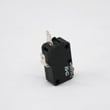
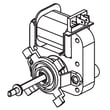

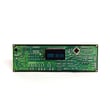
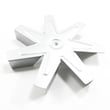

How do I know if my Samsung oven igniter is bad?
If your Samsung NX58M5600SB gas range oven takes longer than about 60 to 90 seconds to light after you start Bake or Broil, or the igniter never glows and the oven will not heat, the oven burner igniter is failing. A weak igniter can glow but still not pull enough current to open the gas valve.
- Oven will not heat, even though the control panel appears to work
- Igniter glows dull orange instead of a bright glow
- Burner lights only after a long delay (often over 90 seconds)
- Oven temperature is uneven because the burner cycles incorrectly
- You smell unburned gas briefly before ignition (shut the oven off and ventilate)
- Set the oven to Bake and watch through the broiler openings or oven bottom vents for ignition.
- Listen for the normal sequence: igniter glow first, then a smooth “whoosh” as the burner lights.
- If the igniter glows but the burner does not light within 90 seconds, stop the cycle and let the oven cool.
- If the oven control is beeping and showing a code, clear it and restart; the troubleshooting and code steps are in the NX58M5600SB owner's manual.
A technician typically confirms igniter failure by checking current draw (amps) during ignition. In most gas ranges, a weak igniter glows but draws too little current to open the safety gas valve, so the burner never lights.
| What you see | Most likely cause | What usually fixes it |
|---|---|---|
| No glow at all | Open igniter, wiring issue, control issue | Inspect wiring; replace igniter if open |
| Glows but no flame | Weak igniter or gas valve not opening | Replace igniter first |
| Lights after long delay | Weak igniter | Replace igniter |
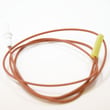
For this model, the oven burner igniter is a common replacement when the oven will not light or preheats very slowly: Samsung range oven burner igniter DG94-00520A.
A failing igniter can prevent the oven from heating properly, cause long preheat times, and lead to inconsistent baking results. Replacing the igniter restores reliable burner ignition and normal temperature control.
Last updated: February 2026
Why is my gas stove not getting gas?
If your Samsung NX58M5600SB gas range is not getting gas, the most common causes are a closed gas shutoff, the gas pressure regulator shutoff being OFF, or an installation or supply issue. If you smell gas at any point, follow the safety steps in the NX58M5600SB owner's manual and stop using the range.
- Confirm the house gas shutoff valve is fully open.
- Make sure the range is plugged in and has power; many Samsung ranges need power for spark ignition and controls.
- Verify the gas pressure regulator shutoff switch is in the ON position (a common no-gas cause).
- Check that burner caps and burner heads are seated correctly; misalignment can prevent ignition and make it seem like there is no gas.
- If you recently moved the range, recheck the flexible gas connector for kinks or a pinched line.
The manual’s gas warnings are clear: do not try to light burners or operate electrical switches.
- Close the gas valve.
- Clear the area.
- Call your gas supplier from a neighbor’s phone.
| What you see | Likely cause | What we recommend |
|---|---|---|
| No burners get gas | Shutoff valve closed, regulator OFF, supply issue | Confirm shutoffs ON; then have supply checked |
| Surface burners click but won’t light | Igniter not sparking at burner, burner head/cap misaligned, spark module issue | Clean and reseat parts; consider range spark module DG96-00297A if no consistent spark |
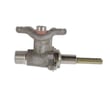
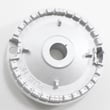
| Oven won’t heat but surface burners work | Weak/hot-surface igniter or bake burner issue | Check ignition; consider Samsung range oven burner igniter DG94-00520A or Samsung range bake burner DG62-00066A |
A “no gas” condition can be a simple shutoff setting, but gas leaks and improper gas supply connections are safety issues. Correct gas flow and proper ignition protect your home and help the oven bake and roast evenly.
Last updated: February 2026
How to reset Samsung oven gas?
To reset the oven controls on your Samsung NX58M5600SB gas freestanding range, press OFF/CLEAR to stop the current cycle and clear the display. If the control is still beeping or showing an information code, disconnect power to the range for at least 30 seconds, then restore power and try again (see the NX58M5600SB owner's manual).
- Press OFF/CLEAR once to cancel cooking and clear most control errors.
- Wait 5 to 10 seconds, then start a simple test cycle (example: BAKE 350°F).
- If an error code returns, unplug the range (or switch the circuit OFF) for 30 seconds, then restore power.
- If the display shows a Lock icon and the oven burners will not light, hold the oven door open and press START/SET for 3 seconds to turn the lock off.
A gas range still uses household electricity for the display, keypad, igniters, and control board. Resetting can mean clearing the keypad (OFF/CLEAR) or rebooting the control (30-second power disconnect).
| Situation | Best reset | What to expect |
|---|---|---|
| Wrong setting selected, want to stop cooking | OFF/CLEAR | Cycle stops, display clears |
| Control beeps and shows an information code | OFF/CLEAR, then 30-second power disconnect | Code often clears if it was a temporary glitch |
| Surface burners light but oven burners do not and Lock icon is on | START/SET (3 seconds) with door open | Lock icon turns off |
- Confirm the range has power (clock/display on); reset any tripped breaker or GFCI outlet.
- Make sure the oven door is fully closed and the Lock feature is off.
- If the oven will not ignite after resetting, inspect the oven igniter area for heavy grease or debris.
- If ignition problems continue, a failing igniter is a common cause; see Samsung range oven burner igniter DG94-00520A.
Resetting is the first step for many Samsung control beeps and information codes; it clears temporary keypad/control-board glitches and helps confirm whether you have a repeatable fault that needs diagnosis.
Last updated: February 2026





