 Installation guide
 Owner’s manual




How do I fix a Frigidaire Gallery dishwasher that won't drain?
If your Frigidaire dishwasher (model FDB1500LFS0) won’t drain and you find water left in the bottom of the tub after a cycle, focus on the drain path: clear the sump area, check the drain hose routing, and inspect the drain pump for a blockage. Use the FDB1500LFS0 owner's manual for the model’s drain-related checks.
- Turn off power at the breaker before accessing internal parts.
- Remove standing water (cup or wet/dry vac) so you can see the sump area.
- Clean the bottom filter area and remove debris (labels, glass, food, twist ties).
- Inspect the drain hose for kinks, crushing, or a clog; make sure it has a proper high loop or air gap per the FDB1500LFS0 installation guide.
- Check the sink drain or garbage disposal inlet where the dishwasher drain connects; clear any blockage.
- If the dishwasher hums but won’t drain, inspect the drain pump impeller area for obstructions; a failed pump is a common next step.
If cleaning and hose checks don’t restore draining, these model-matched parts are often involved:
| Symptom | Most likely area | Example model-matched part |
|---|---|---|
| Water stays in tub, pump is silent | Drain pump not running | Drain pump 154580301 |
| Slow drain or intermittent drain | Drain hose restricted or routed wrong | Hose 807117001 |
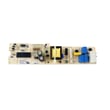
| Overfill then drain issues, odd water level behavior | Float system sticking | Switch 154773201 |
Water left in the tub is not normal after the cycle completes; it points to a drain restriction or a drain pump issue. Fixing it quickly helps prevent odors, poor cleaning, and water backing up into the dishwasher.
Last updated: January 2026
How to do a hard reset on a Frigidaire dishwasher?
For a Frigidaire dishwasher like model FDB1500LFS0, a “hard reset” is typically a control reset: cancel the current cycle and then power-cycle the dishwasher to clear a stuck keypad or control glitch. Use the steps in the FDB1500LFS0 owner's manual for the exact button behavior on your console.
- Cancel/Drain reset: Press and hold START/CANCEL for about 3 seconds to stop the cycle and command a drain.
- Power-cycle reset: Turn the dishwasher off at the circuit breaker for 5 to 10 minutes, then restore power.
- Fresh start: Close the door to latch, select a cycle, then press START/CANCEL to begin.
- Close the door fully so it latches.
- Press and hold START/CANCEL for about 3 seconds.
- Wait for the drain portion to finish.
- Select a new cycle and press START/CANCEL to start.
- Switch the dishwasher breaker OFF.
- Wait 5 to 10 minutes.
- Switch the breaker ON.
- Run hot water at the nearest faucet until it is hot, then start a cycle (this supports detergent activation and wash performance).
A reset clears the control state, but it does not fix a mechanical issue. These checks usually pinpoint the real cause:
- Door not fully latched or strike misaligned
- Dishwasher not filling (water supply valve closed, inlet issue)
- Dishwasher not draining (clogged drain path or pump problem)
- No heat or poor drying (heater circuit issue)
- Detergent cup not opening (dispenser problem)
| Symptom | What it often points to | Example part for this model |
|---|---|---|
| Won’t fill or fills slowly | Water inlet problem | Valve 154637401 |
| Won’t drain | Drain restriction or drain pump | Pump 154580301 |
| Not drying well | Heating circuit issue | Heater 154825001 |
Resetting is a safe first step because it restores normal cycle logic and lets you confirm whether the issue is a one-time control glitch or a repeatable failure that needs troubleshooting.
Last updated: January 2026
What do blinking lights mean on a Frigidaire dishwasher?
On the Frigidaire FDB1500LFS0 dishwasher, blinking or changing indicator lights usually show where the cycle is (washing, drying, sanitized, clean) or that the cycle was interrupted and needs to be restarted or canceled. Use the FDB1500LFS0 owner's manual to match the specific light to the exact status.
These models use status lights to show progress through the cycle:
- Washing: on during the main wash portion of the cycle.
- Drying: on during the drying portion, and it can also light when a drying option is selected.
- Sanitized: glows when the sanitize option finishes successfully.
- Clean: comes on at the end of the cycle and stays on until you open the door.
If the Sanitized light does not come on after using sanitize, the cycle was interrupted (for example, the door was opened or the cycle was canceled) and the dishwasher did not complete sanitizing.
If the dishwasher seems “stuck” with blinking lights, these steps often get it running again:
- Press START/CANCEL once to cancel; the dishwasher runs about a 90-second drain.
- After the drain ends, reselect your cycle and options.
- Make sure the door is fully closed and latched before pressing START/CANCEL.
- If you used Delay Start and want to begin sooner, press START/CANCEL to start the cycle before the delay period ends.
Blinking lights can also happen when the dishwasher cannot safely continue. Check these common causes:
| What you notice | What to check first | Common part involved |
|---|---|---|
| Cycle won’t continue after closing door | Door fully latched, strike aligned | Strike 154662601 |
| Dishwasher overfills or won’t fill correctly | Float moves freely, no debris under float | Switch 154773201 |
| Water on the floor near the door | Door seal seated, no tears or gaps | Dishwasher door seal 809006501 |
Interpreting the lights correctly helps you avoid repeat cancellations, improves cleaning and drying results, and prevents leaks caused by running with a door that is not sealing or latching properly.
Last updated: January 2026
What does i20 mean on a dishwasher?
On a Frigidaire dishwasher like model FDB1500LFS0, the i20 code points to a draining problem: the dishwasher is taking too long to pump water out. The fix is usually clearing a blockage in the drain path or correcting a kinked/blocked drain hose.
- Cancel the cycle and let the unit drain; many Frigidaire models run a short drain when you press Start/Cancel (about 90 seconds).
- Check the sink drain and garbage disposal inlet (a clogged sink drain can slow dishwasher draining).
- Inspect the drain hose for kinks, crushing, or a low spot that traps water.
- Make sure the drain hose routing is correct (high loop or air gap, depending on your setup).
- Clean the dishwasher filter/trap area in the bottom of the tub so debris cannot restrict flow.
If the hose and filter area are clear but i20 keeps returning, these parts are the most common suspects:
- Drain hose: cracks, internal collapse, or heavy buildup (see hose 807117001).
- Drain pump: weak pump, jammed impeller, or electrical failure.
- Control or wiring: less common, but possible if the pump never runs.
| What you notice | Most likely cause | What to do |
|---|---|---|
| Standing water after cycle | Clog in filter/trap or hose | Clean filter area; inspect hose routing |
| Hums but drains slowly | Partial blockage or weak pump | Clear hose; check pump for debris |
| Drains sometimes, errors other times | Intermittent restriction or pump issue | Recheck hose for kinks; inspect pump |
A slow drain can leave dirty water in the tub, reduce cleaning performance, and trigger repeated cycle interruptions. Fixing the drain path usually restores normal wash and dry results.
For a step-by-step walkthrough of common drain checks, use dishwasher not draining video. For model-specific cycle cancel and indicator behavior, use the FDB1500LFS0 owner's manual.
Last updated: January 2026





