 Owner’s manual



What is the most common problem with Samsung washing machines?
The most common problems we see on Samsung washers like model WA45H7200AW are spin issues (shaking, walking, or not spinning out), draining problems, and fill problems. Many start with load balance, leveling, or a restriction in the drain path; others point to a failed pump, valve, or control.
Most common issues (and what they usually mean)
- Excessive vibration or out-of-balance during spin: load is uneven, washer is not level, or suspension components are worn.
- Won’t drain or drains slowly: drain hose restriction, clogged pump area, or a failing drain pump.
- Won’t fill or fills too slowly: water supply valves not fully open, inlet screens clogged, or a failing inlet valve.
- Stops mid-cycle or shows an information code: often triggered by drain, fill, lid, or balance detection problems.
- Leaks during fill or drain: loose hose connections, damaged drain hose, or a sealing issue.
Quick checks we recommend first (no parts required)
- Redistribute the load: bulky items can ball up and cause violent shaking.
- Level the washer: the manual notes the washer should not rock or vibrate excessively; re-level if it does.
- Check water connections: if leaking during fill or drain, re-check hose connections.
- Inspect the drain hose: look for kinks, clogs, or an improper standpipe setup.
- Run Calibration Mode after leveling: this model supports calibration to improve weight detection (steps are in the manual).
For the exact leveling and calibration steps for WA45H7200AW, use the WA45H7200AW owner's manual.
When a part is the likely fix
If the basic checks do not change anything, these are the most common repair directions for this model family.
| Symptom | Most likely system | Common part to check/replace |
|---|---|---|
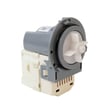
| Hums but won’t drain | Drain system | Washer drain pump DC31-00054D |
| Drains intermittently or slowly | Drain system | Washer drain hose DC67-00601A |
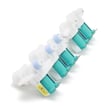
| Won’t fill or fills slowly | Water inlet system | Samsung washer water inlet valve DC97-15459G |
Why it matters
Spin, drain, and fill problems can trigger information codes, leave clothes soaking wet, and increase vibration stress on the tub and suspension. Fixing leveling, calibration, and restrictions early helps prevent repeat failures.
Last updated: February 2026
What is the capacity of the WA45H7200AW?
The Samsung WA45H7200AW is a large-capacity top-load washer; its tub capacity is about 4.5 cubic feet. For the exact capacity listing and other model specs (dimensions, water pressure, spin speed), we recommend confirming in the WA45H7200AW owner's manual.
Quick specs you can verify for WA45H7200AW
From the specification section in the manual, we can confirm these key measurements for this model family:
- Width: 27.0 in
- Height: 43.9 in
- Depth: 29.3 in
- Height with lid open: 58.1 in
- Max spin speed (WA45H7200A*): 1000 rpm
Specs snapshot
| Spec | Value |
|---|---|
| Washer type | Top-loading washer |
| Width | 27.0 in |
| Height | 43.9 in |
| Depth | 29.3 in |
| Spin speed (max) | 1000 rpm |
Why capacity can look different depending on where you check
Washer capacity is typically shown in cubic feet (cu. ft.) and refers to the approximate tub volume. Depending on the source, you may see capacity described as “large” or “extra large,” but the most consistent number is the cu. ft. rating listed with the model specifications.
Why it matters
Capacity helps you choose the right load size and cycle (Normal, Heavy Duty, Bedding) so the washplate can circulate clothing properly. Overloading a top-load washer often leads to poor cleaning, out-of-balance spinning, and extra wear on suspension components.
Related maintenance tip
If you notice odor or residue buildup, running the washer’s Self Clean cycle on schedule helps keep the tub fresh; the timing guidance is outlined in the WA45H7200AW owner's manual.
Last updated: February 2026
Is the Samsung WA45H7200AW a good washer?
Yes. The Samsung WA45H7200AW is a solid high-efficiency top-load washer when it’s installed correctly, calibrated after installation, and loaded evenly; those basics help it clean well and reduce out-of-balance shaking. For the best day-to-day results, follow the cycle and option guidance in the owner's manual.
What “good” looks like on this model
A good experience with the WA45H7200AW usually means:
- Loads are placed dry and evenly around the tub (not in one heavy pile)
- The washer completes cycles without repeated rebalancing or stopping
- You use the right soil level and spin setting for the fabric type
- You run Self Clean regularly (about every 40 washes is a strong routine)
- Cycle time estimates change slightly during the wash (that’s normal)
Setup steps that make the biggest difference
Samsung designed this washer to sense load weight; calibration improves accuracy after installation.
- Run Calibration Mode after installation (empty tub)
- Confirm the washer is level and stable on the floor
- Use the correct cycle for bulky items (comforters, towels) to reduce imbalance
- Avoid overloading; high-efficiency washers need room for turnover
- If the washer clicks briefly before filling, that’s part of its lid-lock check and quick drain routine
Quick reference table
| Item | What to expect | Why it matters |
|---|---|---|
| Calibration Mode | About 1 minute of pulsator movement | Improves load sensing and balance behavior |
| Cycle time display | Time can fluctuate | Helps the washer adjust for water temp, pressure, and load |
| Self Clean | Run regularly, no detergent needed | Reduces odor-causing buildup and residue |
Common complaints and what usually fixes them
Most “not a good washer” feedback comes from a few repeat issues that are often correctable:
- Out-of-balance loads: Re-load items evenly around the tub; mix large and small items.
- Long cycles: Normal for high-efficiency washing; choose soil level appropriately.
- Not enough water: HE washers use less water by design; use the correct cycle and avoid tightly packed loads.
- Won’t start: Make sure the lid is closed, water faucets are open, and Child Lock is off.
Why it matters
This washer’s cleaning and reliability depend heavily on installation, calibration, and loading habits. When those are right, you get better cleaning, fewer vibration issues, and less wear on parts like the suspension and drive system.
If you ever do need repair parts for the WA45H7200AW, you can order model-matched replacements from the parts list for this washer or search by model on Sears PartsDirect.
Last updated: February 2026





