 Installation guide
 Owner’s manual
 Error Codes




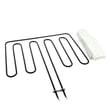
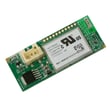

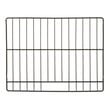
How to order GE appliance parts?
You can order replacement parts for your GE JKS5000SN1SS electric wall oven by using the parts list for this model and matching the part to your exact symptom and diagram location. For part identification and safe handling steps, use the owner's manual.
How we recommend ordering parts for model JKS5000SN1SS
- Confirm the full model number (JKS5000SN1SS) from the appliance ID tag before ordering.
- Use the exploded-view diagrams to identify the exact part name and part ID.
- Match the part to the problem you’re seeing (for example, heating issues vs. door issues).
- Order the part and keep your receipt and any warranty documentation.
- If the part is out of stock, check back and consider ordering other needed items in the same shipment.
Commonly ordered parts for this wall oven
These are examples of parts customers often replace when troubleshooting performance or convenience issues:
| Symptom | Part to check | Part ID |
|---|---|---|
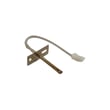
| Oven temperature seems off | Temperature sensor | Wall oven temperature sensor WB21X10165 |
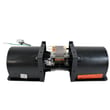
| Oven runs hot around the control area or won’t cool down normally | Cooling fan assembly | Wall oven cooling fan assembly WB26X31060 |
| Oven door won’t lock or unlock (often during self-clean) | Door lock assembly | Wall oven door lock assembly WB10X28391 |
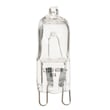
| Oven light is out | Light bulb | Wall oven light bulb WB25T10102 |
Why it matters
Ordering by the exact model number and diagram-matched part ID helps ensure proper fit and correct electrical ratings for your GE electric wall oven. That reduces repeat repairs and helps the oven operate safely and consistently.
Last updated: February 2026
How do I find the right GE part number?
For your GE JKS5000SN1SS electric wall oven, the right part number comes from matching your exact model number to the parts diagram and list, then selecting the specific component (for example, a sensor, bake element, or door part) shown for that model. Use the owner's manual to confirm features and the parts list to confirm fit.
Step-by-step: find the correct part number
- Confirm the model number is JKS5000SN1SS (use the rating label on the oven frame area).
- Identify the system you are repairing: heating, door/lock, cooling fan, lighting, or controls.
- Use the model-specific parts diagram to locate the exact item callout.
- Match the callout to the part listing and verify the description matches your symptom.
- If multiple similar parts appear (common with wiring and door hardware), compare where it installs and what it connects to.
Common parts people mix up on this model
| What you need | What it affects | Example part on this model |
|---|---|---|
| Oven temperature sensing | Baking temperature accuracy, error codes, overheating | Wall oven temperature sensor WB21X10165 |
| Heating | No heat, weak bake, uneven baking | Range bake element WB44X21668 |
| Door locking | Self-clean lock issues, door won’t unlock/lock | Wall oven door lock assembly WB10X28391 |
| Cooling | Fan runs constantly, overheating, fan not running | Wall oven cooling fan assembly WB26X31060 |
Why the model number matters
GE uses different wiring, mounting brackets, and connectors across similar-looking wall ovens. Using the exact JKS5000SN1SS parts list prevents ordering a part that looks right but will not mount correctly or plug into your harness.
Quick tips before you order
- Compare your old part to the listing: connector style, mounting holes, and wire length.
- For electrical parts, shut off power at the breaker before inspecting.
- If the issue is temperature-related, check the sensor first because it directly controls bake performance.
Last updated: February 2026
What are the parts of an electric oven?
A GE electric wall oven like model JKS5000SN1SS is built around heating, temperature sensing, airflow cooling, lighting, and door components that work together to cook evenly and operate safely. You can confirm your exact features and care steps in the owner's manual.
Main parts you will commonly find
Most electric wall ovens include these core components:
- Bake element: provides the primary heat for baking
- Broil element: provides high, top-down heat for broiling
- Oven temperature sensor: tells the control how hot the oven is
- Control board and user interface: manages temperature, modes, and timing
- Convection fan and motor (on convection models): circulates hot air for even cooking
- Cooling fan system: moves heat away from controls and cabinetry
- Oven light system: bulb, lens, and light housing
- Door system: hinges, gasket, glass/window, and panels
- Racks: support cookware at different rack positions
Model JKS5000SN1SS examples of replaceable parts
These are examples of common service parts available for this model:
| What it does | Example part for JKS5000SN1SS | When it is commonly replaced |
|---|---|---|
| Senses oven temperature | Wall oven temperature sensor WB21X10165 | Oven runs too hot or too cool, temperature errors |
| Provides bake heat | Range bake element WB44X21668 | No bake heat, uneven baking, visible damage |
| Lights the oven cavity | Wall oven light bulb WB25T10102 | Light does not turn on |
| Circulates cooling air | Wall oven cooling fan assembly WB26X31060 | Fan noise, overheating around controls |
Why these parts matter
When one key part is weak or failed (like a bake element, temperature sensor, or cooling fan), the oven can heat unevenly, take longer to preheat, or shut down to protect the controls. Keeping the door gasket and door glass in good shape also helps the oven hold temperature efficiently.
Quick safety notes before inspecting parts
We recommend these basics before you remove panels or touch wiring:
- Turn power off at the circuit breaker before servicing
- Let the oven cool completely before checking elements, glass, or the light cover
- Never lean or put weight on the open oven door
- Use the correct tools and follow the installation and service precautions in the documentation
Last updated: February 2026
How to replace the control panel on a GE oven?
To replace the control panel on your GE JKS5000SN1SS electric wall oven, we shut off power at the breaker, remove the oven from the cabinet enough to access the rear of the control area, transfer the wiring one connector at a time, then reassemble and restore power. Use the installation guide for safe handling and access steps.
Safety first (do this every time)
- Turn off the oven circuit at the main breaker; confirm the display is off.
- Let the oven cool completely.
- Use cut-resistant gloves; sheet metal edges behind the panel are sharp.
- Support the oven if it must be pulled forward; do not rely on the door for support.
- If you remove the door, do not lift by the handle (the door is heavy).
Replacement steps (typical for this model style)
- Disconnect power at the breaker.
- Remove the oven door (optional but helpful): unlock the hinge locks, close to the removal position (about 1 to 2 inches from closed), then lift the door up and out.
- Pull the oven forward enough to work safely: remove mounting screws and slide the unit out partway.
- Access the control panel: remove screws securing the rear cover/control area, then loosen the screws holding the control panel.
- Transfer wiring: move connectors from the old panel to the new one one at a time (take a photo first so wire routing stays correct).
- Reinstall the panel and covers, slide the oven back, and secure mounting screws.
- Restore power and test Bake, Broil, Convection, oven light, and keypad response.
Quick checklist: what usually causes trouble after a panel swap
| Symptom after install | Most common cause | What to check |
|---|---|---|
| Dead display | No power or loose connector | Breaker, harness plugs fully seated |
| Buttons work but no heat | Misrouted/loose harness | Connector match and wire routing |
| Random beeping/errors | Pinched wire | Harness not trapped under a cover |
Parts that are commonly involved
If your “control panel” issue is actually a no-heat or erratic temperature problem, these model-matched parts are common suspects:
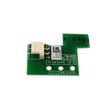
- Control board asm WB27X36807 (electronic control)
- Wall oven temperature sensor WB21X10165 (temperature feedback)
- Ui com and rj45 harness WB18X32871 (communication wiring)
Why it matters
The control panel area carries line-voltage wiring and sensitive electronic connections. Correct wire routing and fully seated connectors prevent nuisance error codes, overheating, and intermittent operation.
Last updated: February 2026





