Installation guide
 Owner’s manual


How do I get rid of standing water in my Kenmore dishwasher?
Standing water in your Kenmore dishwasher model 66513832K600 usually means the drain path is restricted (filter area, drain hose, air gap, disposer connection) or the dishwasher did not complete the drain portion of the cycle. We recommend removing the water safely first, then checking the drain hose routing and connections per the installation guide.
Safely remove the standing water
- Turn off power at the breaker (or unplug the dishwasher).
- Place towels under the front edge to catch spills.
- Scoop water out with a cup, then soak up the remainder with towels or a sponge.
- Remove the lower rack so you can access the sump area.
Check the most common drain causes
- Drain hose routing: Make sure the hose is not kinked and is routed to avoid contact with the motor, door springs, water line, cabinet edges, or flooring.
- High loop and air gap: If your setup uses an air gap, check it for clogs; also confirm the drain hose maintains a proper high loop under the counter.
- Disposer or waste tee blockage: If connected to a garbage disposer, confirm the disposer inlet knockout plug was removed.
- Hose connection fit: The hose should be pushed fully onto the connector up to the stop, then clamped between the connector stops.
- Pump issue: If the hose and plumbing are clear but it still will not drain, the drain pump can be the failure point.
Parts that commonly fix a “won’t drain” problem
| Symptom | What to check first | Part that may be needed |
|---|---|---|
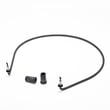
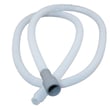
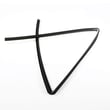
| Water remains after cycle | Kinked/clogged hose, disposer inlet | Dishwasher drain hose 8269144A |
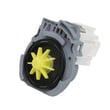
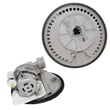
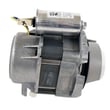
| Hums but does not drain | Debris in pump, failed pump | Dishwasher drain pump WPW10348269 |
Why it matters
Standing water can cause odors, redeposit soil on dishes, and lead to leaks if the dishwasher overfills on the next cycle. Restoring proper drain flow protects the pump and helps cycles finish normally.
Helpful related guide
If the dishwasher will not start or stops mid-cycle (which can leave water behind), use our dishwasher wont start video to narrow down power, latch, and control checks.
Last updated: January 2026
How to access a dishwasher pump?
On the Kenmore 66513832K600 dishwasher, we typically access the pump from inside the tub by removing the lower rack and working at the sump area; for deeper access, we remove the lower access panels first. Follow the safety and panel-removal steps in the installation guide.
Quick access steps (from inside the tub)
- Turn off power at the breaker and shut off the water supply.
- Pull out the lower dishrack.
- Remove standing water with a cup or towels so you can see the sump area.
- If you are removing a twist-lock style pump, press the locking tab and rotate the pump about 1/4 turn counterclockwise, then lift it out.
- Keep a towel over the pump area when working with screws so nothing drops into the sump.
Accessing the pump from below (toe-kick area)
The installation instructions for this model show how to remove the lower panels so you can reach components near the water inlet valve and pump area.
- Remove the two screws holding the access panel and lower panel (typically a 1/4-inch hex socket, nut driver, or Phillips screwdriver).
- Set panels aside on a protective surface.
- Confirm the grounding clip stays attached to the lower panel.
Common parts you may be working around
| What you are servicing | What it affects | Example part for this model |
|---|---|---|
| Drain function | Water left in tub, poor draining | Dishwasher drain pump WPW10348269 |
| Wash circulation | Weak spray, poor cleaning | Pump motor/sump area |
| Heating/drying | Water not heating, poor drying | Dishwasher heating element W10518394 |
Why it matters
Correct pump access prevents stripped screws, broken tabs, and leaks at the sump. It also helps you confirm whether the issue is a clog, a hose problem, or a failed drain pump motor.
Last updated: January 2026
How to do a hard reset on a Kenmore dishwasher?
To hard reset a Kenmore dishwasher model 66513832K600, we clear the current cycle and options by running CANCEL/DRAIN, letting the unit drain for about 2 minutes, then restarting with START/RESUME. This resets the control logic for most “stuck cycle” and “won’t start” situations.
Hard reset steps (66513832K600)
- Close the door fully so the controls can run.
- Press CANCEL/DRAIN once.
- Let the dishwasher run the drain cycle for about 2 minutes (the Cancel/Drain light should turn off when finished).
- Select your desired cycle and options.
- Press START/RESUME to begin.
If you need the exact button names for your console layout, follow the control instructions in the 66513832K600 owner's manual.
If the buttons do nothing, check the control lock
This model uses a control lock that disables the keypad.
- If LOCK ON is lit, press and hold HEATED DRY for 4 seconds to turn the lock off.
- Try the hard reset steps again.
- If the lock turns on unexpectedly, avoid leaning on the control panel during loading.
What to do if it still will not reset
Use this quick checklist before replacing parts:
- Confirm the door is latching; the dishwasher will not drain or start with the door open.
- Verify power at the outlet or breaker (a tripped breaker can look like a “dead” control).
- If the dishwasher drains but will not run a cycle, the issue is often in the control or a safety circuit.
Common parts related to “won’t start” symptoms
| Symptom | What it often points to | Example part for this model |
|---|---|---|
| No lights, no response | Power interruption or blown safety device | Fuse W10258275 |
| Lights on, won’t run cycle | Control not processing inputs | Electronic control WPW10084141 |
Why it matters
A proper CANCEL/DRAIN reset clears stored cycle selections and forces the dishwasher to a known “ready” state, which prevents repeat drain loops, stuck indicators, and failed restarts after opening the door mid-cycle.
Last updated: January 2026