 Installation guide
 Owner’s manual





How to tell GE microwave model?
On the GE JVM7195DF1BB over-the-range microwave/hood combo, we identify the model by opening the door and checking the rating label around the door opening (the frame area). That label lists the model number and serial number you will need for parts and service.
Where to look on the microwave
Check these common label locations first:
- Open the door and look along the front frame (around the oven cavity opening)
- Look on the left or right side of the door opening near the latch area
- Check the upper inside edge of the opening (still on the frame, not the door)
- If it is hard to read, use a flashlight and wipe grease off the label gently
For diagrams and model-specific details, use the JVM7195DF1BB owner's manual.
What to write down (and why)
Record both numbers exactly as shown:
- Model number (example format: JVM7195DF1BB)
- Serial number (unique to your unit)
- Any suffix letters or extra digits (they can affect part compatibility)
Why it matters
| You need this for | What it helps with |
|---|---|
| Ordering parts | Ensures the correct GE microwave/hood combo parts fit |
| Troubleshooting | Matches the right wiring diagrams and component layouts |
| Service calls | Speeds up scheduling and warranty verification |
If the label is missing or unreadable
Use these practical options:
- Check your purchase receipt or installation paperwork
- Look for a duplicate label on the unit (some models have an additional tag behind the grille)
- Confirm the installation configuration and clearances using the JVM7195DF1BB installation guide (helpful when comparing to paperwork)
Last updated: February 2026
What are common problems with GE profile microwaves?
Common problems we see on GE Profile style over-the-range microwaves like model JVM7195DF1BB include not heating, not starting, loud humming or buzzing, a dead display from Power Saver settings, and door-related start failures caused by interlock parts. Use the JVM7195DF1BB owner's manual troubleshooting chart to match symptoms to the safest next step.
Most common symptoms and what they usually point to
- Runs but does not heat: high-voltage circuit issue (magnetron, diode, capacitor, transformer)
- Will not start: door not fully closed, Start/Pause not pressed, power surge, house fuse or breaker
- Display off: Power Saver (Zero Standby) feature enabled
- Turntable not turning: turntable motor or coupler issue
- Buttons not responding: control panel or control board problem
- Burning smell or arcing: metal/foil use, food splatter, or damaged waveguide cover (stop using until corrected)
Quick checks we recommend first (safe, no disassembly)
- Confirm the door closes firmly and latches cleanly.
- Press Start/Pause after selecting a cook setting.
- Reset power: unplug for 1 minute, then plug back in (helps after a power surge).
- Check your home fuse or reset the circuit breaker.
- If the display is off, turn off Power Saver/Zero Standby (not a failure in many cases).
Parts commonly involved (when symptoms match)
| Symptom | Common part area | Example part for JVM7195DF1BB |
|---|---|---|
| Won’t start, door issues | Door interlock system | Micro-switch WB24X830 |
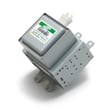
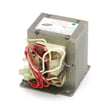
| Runs but won’t heat | High-voltage components | Microwave magnetron WB27X11079, microwave high-voltage capacitor WB27X10011 |
| Turntable not moving | Drive system | Microwave turntable motor WB26X10233 |
| Dead or erratic controls | Electronics | Microwave power control board WB56X20629 |
Why it matters
Microwaves contain high-voltage components that can store a dangerous charge even when unplugged. We follow the manual guidance: do not attempt internal servicing beyond the basic checks and cleaning described; use qualified service for internal electrical repairs.
Last updated: February 2026
What's the average lifespan of a GE microwave?
Most GE microwaves, including the GE microwave/hood combo model JVM7195DF1BB, last about 8 years. A typical real-world range is 5 to 10 years, depending on daily run time, ventilation/grease buildup, and whether the door and interlock system stay properly aligned.
Typical lifespan range (what to expect)
For over-the-range microwave/hood combos like JVM7195DF1BB, lifespan usually tracks with heat exposure, cooking habits, and how clean the venting stays.
- Light use (a few minutes/day): 9 to 10 years
- Average use (10 to 20 minutes/day): about 8 years
- Heavy use (multiple long cycles/day): 5 to 7 years
- Poor airflow or heavy grease: shorter life due to heat stress
- Frequent door slamming/misalignment: earlier switch and latch wear
What wears out first (and what it looks like)
These are common failure points that affect heating, starting, and safe operation.
| Symptom | Common area involved | Example part for this model |
|---|---|---|
| Runs but does not heat | High-voltage circuit | Microwave magnetron WB27X11079 |
| Dead display or no start | Control or power path | Microwave power control board WB56X20629 |
| Starts then stops, or will not run with door closed | Door interlock system | Micro-switch WB24X830 |
| Loud hum, burning smell, weak heat | High-voltage components | Microwave high-voltage capacitor WB27X10011 |
Maintenance that extends microwave life
We see the biggest lifespan gains from keeping heat and grease away from the electronics and magnetron.
- Clean the cavity and door seals regularly; avoid harsh abrasives
- Keep the hood vent path clear and use the fan when cooking on the range
- Wash or replace the grease filter on schedule (grease traps heat)
- Do not run the microwave empty (it stresses the magnetron)
- Close the door gently so the latch and interlock switches stay aligned
Why it matters
A microwave/hood combo lives above the cooktop, so heat and grease are constant. When airflow is restricted or filters are clogged, internal temperatures rise; that shortens the life of components like the magnetron, thermostats, and control board.
Helpful references for your model
- Use the cleaning and troubleshooting sections in the JVM7195DF1BB owner's manual.
- For mounting, venting direction, and airflow setup, follow the JVM7195DF1BB installation guide.
Last updated: February 2026
How do I know how many watts my GE microwave is?
Your GE JVM7195DF1BB microwave/hood combo has two “watt” numbers that matter: cooking (output) watts for heating food and electrical (input) watts for circuit sizing. The fastest way to confirm both is the rating label with the door open and the JVM7195DF1BB owner’s manual.
Where to find the watt rating (best to check in this order)
- Open the door and look for the model and serial label; the watt rating is typically listed on or near this label.
- Check the specifications section in the JVM7195DF1BB owner’s manual.
- Use the JVM7195DF1BB installation guide to confirm electrical requirements (volts/amps/kilowatts).
- If you are comparing performance, use cooking (output) watts, not the electrical rating.
Cooking watts vs input watts (what each number means)
Cooking watts tell you how strongly the microwave heats food; input watts tell you what it draws from the outlet.
| Watt number | What it describes | What you use it for |
|---|---|---|
| Cooking (output) watts | Heating power delivered to food | Recipe timing, performance comparisons |
| Input watts (kW/W) | Electrical draw from the outlet | Dedicated circuit and installation checks |
Quick tip for adjusting cook times
If a package or recipe is written for 1000W and your microwave is higher wattage, reduce time slightly; if it is lower wattage, increase time.
- Start with a 10% time adjustment.
- Stir or rotate food halfway through.
- Use lower power levels for more even heating.
Why it matters
Using the correct watt number prevents undercooking or overcooking and helps ensure the microwave is installed on the proper 120V grounded circuit.
Last updated: February 2026


