Owner’s manual
 Error Codes


How to get the bottom shelf out of a Samsung fridge?
On the Samsung RF4267HABP, the bottom glass shelf typically lifts slightly, then slides forward to disengage from the rear supports so you can remove it for cleaning. Use steady, even pressure so you do not twist the glass; confirm the exact release points in the RF4267HABP owner's manual.
Steps to remove the bottom shelf
- Remove all food and bins sitting on the shelf.
- Open both fresh food doors fully for clearance.
- Lift the front edge of the shelf slightly to take weight off the side rails.
- Slide the shelf straight forward until it stops.
- If the shelf is retained by side tabs or stops, press the tabs inward while pulling forward.
- Tilt one side up slightly and lift the shelf out with two hands.
If it feels stuck (common causes)
- Shelf not centered: Push it back in, level it, then try again.
- Ice buildup: Unplug the refrigerator and let the area warm up; then retry.
- Door not open far enough: The shelf can catch on the door liner.
- Debris in the rails: Wipe the rails and shelf edges before reinstalling.
Quick do and do not checklist
| Do | Do not |
|---|---|
| Lift and pull evenly with two hands | Twist the shelf corner-to-corner |
| Remove drawers/bins that block the shelf | Force it past a stop tab |
| Warm up the compartment if ice is present | Pry against the glass with a metal tool |
Why it matters
Removing the shelf the right way prevents cracked glass, broken shelf rails, and air leaks that can cause temperature swings in the fresh food section.
Last updated: January 2026
How to reset bottom ice maker on Samsung fridge?
To reset the bottom ice maker on your Samsung RF4267HABP, we typically use the ice maker’s test/reset button after removing the ice bin; this forces a harvest cycle and often restores normal ice production. Then confirm the freezer is set cold enough and the bin seats fully.
Quick reset steps (bottom freezer ice maker)
- Open the freezer drawer and pull out the ice bin.
- Look for the ice maker test/reset button (often a small recessed button on the ice maker housing).
- Press and hold the test/reset button until you hear a chime or the mechanism starts cycling.
- Reinstall the ice bin fully so it sits squarely and engages the auger.
- Wait for the cycle to finish, then allow time for new ice to form.
If it still will not make ice
These checks fix the most common “no ice” issues after a reset:
- Freezer temperature: Set the freezer to about 0°F; warmer temps slow or stop ice production.
- Ice bin and auger: Make sure the bin is not overfilled or jammed with clumped ice.
- Water supply: Confirm the shutoff valve is open and the water line is not kinked.
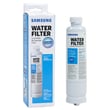
- Filter restriction: Replace a clogged filter if water flow is weak; use the correct refrigerator water filter DA29-00020B.
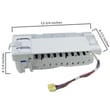
- Ice maker hardware: If the ice maker will not cycle or keeps freezing up, the refrigerator ice maker assembly DA97-07365A is a common replacement.
What to expect after a reset
| Item | Normal result | What it suggests if missing |
|---|---|---|
| Test cycle starts | Motor/gear moves, tray cycles | Ice maker not getting power or failed module |
| Water fills after cycle | You hear a brief fill | Water supply, valve, or filter flow issue |
| Ice production returns | Ice within several hours | Temperature, airflow, or ice maker fault |
Why it matters
Resetting clears minor control glitches and confirms whether the ice maker can complete a harvest cycle. If the test cycle runs but there is no water fill, we focus on water flow (valve, line, filter). If the cycle will not run, we focus on the ice maker assembly and controls.
For model-specific button location and control panel behavior, follow the RF4267HABP owner's manual.
Last updated: January 2026
How to tell if a Samsung fridge compressor is bad?
If your Samsung RF4267HABP refrigerator has a failing compressor, you’ll typically see poor cooling with the unit running almost constantly, unusual buzzing or clicking near the back, and a very hot compressor shell. Confirm basic airflow and power checks first before replacing major sealed-system parts.
Quick signs the compressor is the problem
- Refrigerator and freezer temperatures keep rising even though the unit runs a lot
- Repeated clicking every few minutes (start attempt, then stop)
- Loud buzzing or rattling from the compressor area
- Compressor is extremely hot to the touch (use caution)
- Breaker trips or the overload protector opens repeatedly
Rule out common look-alikes first (important)
Before you blame the compressor, we recommend these checks because they cause the same “warm fridge” symptoms:
- Condenser airflow: clean dust from the condenser area and confirm the condenser fan is running
- Evaporator airflow: listen for the evaporator fan; weak airflow can mimic a compressor issue
- Door sealing: check for gaps, torn gasket areas, or doors not closing fully
- Defrost problems: heavy frost on the evaporator can block airflow and reduce cooling
- Control settings: verify temperatures are set correctly and not in a special mode
What to check and what it usually means
| What you observe | What it often points to | What we recommend next |
|---|---|---|
| Runs constantly, still warm | Sealed system issue (compressor or refrigerant) | Verify fans and coils first; then schedule sealed-system service |
| Clicks every few minutes, won’t start | Start device/overload issue or locked compressor | Inspect wiring and start components; consider refrigerator compressor overload protector DA34-00004D |
| Compressor runs, fans run, but little cooling | Low refrigerant or weak compressor | Sealed-system diagnosis by a technician |
| Breaker trips when compressor tries to start | Electrical short or locked rotor | Unplug and have it tested; do not keep resetting breaker |
Why it matters
A compressor replacement on the RF4267HABP is a major repair and is only the right fix after confirming airflow (condenser fan, evaporator fan, clean coils) and start-protection components. Replacing the wrong part can waste time and money.
Parts that may be involved
- Samsung refrigerator compressor MKV190CL2BASH (sealed-system component)
- Refrigerator compressor overload protector DA34-00004D (protects compressor during overheating or start failures)
Model-specific reference
Use the RF4267HABP owner's manual for control settings, operating modes, and basic troubleshooting steps that can affect cooling performance.
Last updated: January 2026
What is force defrost, RD or FD?
On Samsung refrigerator model RF4267HABP, force defrost is a built-in service mode that manually starts a defrost cycle to melt frost off the evaporator. RD typically refers to a refrigerator (fresh food) defrost mode, while FD refers to a full forced defrost mode.
What RD and FD usually mean
When you step through the forced-operation modes on many Samsung refrigerators, you may see:
- RD: refrigerator defrost (fresh food compartment)
- FD: forced defrost (often a broader defrost mode)
- Normal: exits service mode and returns to standard cooling
Exact naming and the order of modes can vary by control board version; use the RF4267HABP manual for the model-specific button sequence and display behavior.
When to use force defrost
Force defrost is most useful when you suspect frost buildup is blocking airflow or the evaporator fan.
Common symptoms include:
- Fresh food section warming while the freezer stays cold
- Weak airflow from the vents
- Frost or ice behind the rear panel
- Fan noise changing, then stopping (fan hitting ice)
- Water leaking after a heavy defrost or door-left-open event
What to check after running force defrost
After the unit completes the forced defrost and you return it to normal operation, we recommend these checks:
- Confirm the evaporator fan runs and airflow returns
- Verify temperatures stabilize (about 37°F fresh food, 0°F freezer)
- Inspect door gaskets for gaps or tearing
- Make sure vents are not blocked by food packages
- If ice maker issues continue, follow why your Samsung fridge stopped making ice and how to fix it
Quick comparison
| Mode shown | What it does | What you may notice |
|---|---|---|
| RD | Defrost focused on the refrigerator section | Fresh food cooling pauses; melting sounds/drips |
| FD | Forced defrost (broader/manual defrost) | Cooling pauses; more noticeable melting/draining |
Why it matters
Using RD/FD helps confirm whether a cooling problem is caused by frost buildup (defrost system or airflow) versus a sealed-system issue (compressor, refrigerant, or restrictions). It can save time before replacing parts like a control board or evaporator assembly.
Last updated: January 2026