Owner’s manual
 Error Codes


What is the common problem with Samsung fridges?
Many Samsung refrigerators (including top-mount models like RT21M6215SR) most commonly run into cooling and ice-making complaints: warm temperatures from airflow or fan/defrost issues, and ice maker problems tied to water supply or freezing. Use the RT21M6215SR owner's manual troubleshooting tables to narrow the symptom quickly.
Most common issues we see (and what to check first)
- Warm fridge or freezer: confirm the temperature setting is correct and the doors are closing fully.
- Poor airflow or uneven temps: do not block interior air vents with food packages.
- Ice maker not making ice: verify the household water supply is on and the water line is not kinked.
- Frost buildup, noisy fan, or warm fresh-food section: points to defrost or evaporator fan/airflow problems.
- Water leaks: often related to a water filter issue, water line connection, or overcooling from blocked vents.
Quick troubleshooting steps for RT21M6215SR
- Check power and reset safely: if you unplug the refrigerator, wait at least 5 minutes before plugging it back in.
- Set temps and give it time: after changes, allow 24 hours for temperatures to stabilize.
- Protect airflow: keep vents clear; blocked vents can cause overcooling and even contribute to water filter leaks.
- Confirm installation clearance: keep about 2 inches (5 cm) of space behind and at the sides for proper heat release.
- If you smell burning or see smoke: unplug immediately and contact service.
Parts that commonly relate to these symptoms
| Symptom | Likely system | Example part for this model |
|---|---|---|
| Ice maker not filling | Water supply | Refrigerator water inlet valve (DA62-01477A or DA97-13268A) |
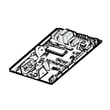
| Warm temps, erratic cooling | Temperature sensing/control | Refrigerator temperature sensor (DA32-00070A) or electronic control board (DA92-00979C) |
| Frost buildup, fan noise | Defrost/airflow | Refrigerator defrost thermal fuse (DA47-00301F) or fresh food evaporator cover and fan assembly (DA97-16256M) |
Why it matters
Cooling and ice-making problems often share the same root causes: restricted airflow, incorrect temperature settings, or water supply issues. Fixing the basic setup items first prevents unnecessary part replacement and helps the refrigerator cool consistently.
Last updated: January 2026
How to fix Samsung freezer temperature?
On the Samsung RT21M6215SR, we fix freezer temperature issues by setting the Freezer temperature correctly and using Power Freeze only when you need a fast pull-down. After you change a setting, give the refrigerator time to stabilize before judging results; quick changes can make temperatures swing.
Set the freezer temperature from the control panel
- Press the Freezer button to adjust the freezer temperature setting (this model uses the Freezer button for temperature control).
- Avoid setting the freezer to Colder during very hot weather (above 95 °F / 35 °C); that setting can cause performance problems.
- After changing the setting, wait several hours and recheck with a thermometer.
- For exact button behavior on your control type, follow the steps in the RT21M6215SR user manual.
Use Power Freeze the right way
Power Freeze is for quickly freezing large loads or recovering after the door was left open.
- Turn Power Freeze on when you need rapid freezing.
- Plan to run it at least 20 hours before loading large amounts of food.
- The freezer can run at full speed for up to 50 hours, then returns to the previous setting.
- Turn Power Freeze off when you no longer need it; it increases power use.
- On some control types, holding Power Freeze too long can activate the ice maker instead of Power Freeze; the RT21M6215SR user manual shows the correct press-and-hold timing.
Quick checks if the freezer is still warm
- Confirm the power cord is plugged in firmly.
- Make sure the refrigerator is not in Freezer Convert modes like Fridge or Off.
- Keep the unit away from heat sources and direct sunlight.
- Maintain at least 2 inches (5 cm) of clearance at the sides and rear for airflow.
- Do not overpack; blocked vents reduce cold air circulation.
What to expect (normal timing)
| Situation | What’s normal | What we recommend |
|---|---|---|
| After changing the set temp | Temps drift for hours | Recheck after 6 to 12 hours |
| After adding lots of food | Temporary warming | Use Power Freeze and avoid frequent door openings |
| Hot room conditions | Longer run times | Use a moderate setting, keep clearance, improve room ventilation |
Why it matters
Correct freezer settings protect food quality and help the compressor and fans run efficiently. Using Power Freeze only when needed also prevents unnecessary energy use and reduces temperature swings.
Last updated: January 2026
What causes a Samsung freezer to stop working?
On the Samsung RT21M6215SR top-mount refrigerator, a freezer that stops working is usually caused by a power issue, incorrect temperature settings, blocked airflow, poor clearance around the cabinet, or a cooling-system problem such as a failed fan or sensor. Start with the basic checks, then move to airflow and component tests.
Quick checks first (fastest fixes)
- Confirm the power cord is plugged in firmly and the outlet is working.
- If the unit was unplugged recently, wait at least 5 minutes before plugging it back in.
- Set the freezer temperature colder and allow 24 hours to stabilize.
- Make sure interior air vents are not blocked by food packages.
- Verify the refrigerator has at least 2 inches (5 cm) of clearance at the sides and rear.
Common causes and what to look for
| Likely cause | What you notice | What to do |
|---|---|---|
| Temperature set too warm | Soft ice, thawing food | Lower the setting; recheck after 24 hours |
| Blocked vents/airflow | Warm spots, weak airflow | Rearrange items; keep vents open |
| Poor installation clearance | Runs a lot, still warm | Improve airflow around cabinet |
| Fan or defrost issue | Frost buildup, warming over time | Inspect for heavy frost; service defrost system |
| Sensor/control problem | Temps swing, inconsistent cooling | Test/replace failed components |
Parts that commonly affect freezer cooling
If basic checks do not restore cooling, these model-compatible parts are often involved in freezer temperature complaints:
- Refrigerator temperature sensor DA32-00070A: A bad sensor can misreport temperature and reduce cooling.
- Refrigerator electronic control board DA92-00979C: Control issues can prevent proper compressor/fan operation.
- Refrigerator defrost thermal fuse DA47-00301F: A failed defrost safety device can contribute to icing and airflow loss.
Why it matters
A freezer that is warming up can quickly lead to food spoilage and can also force the refrigerator to run longer than normal. Restoring airflow and correct temperature control is the fastest path back to stable freezing.
For model-specific operating and troubleshooting steps, follow the RT21M6215SR manual.
Last updated: January 2026
How to replace Samsung ice tray?
On the Samsung RT21M6215SR, the ice tray replacement is a slide-out, slide-in swap: remove the ice bucket for access, slide the tray out, then slide the new tray fully back into position and confirm the bucket sits directly underneath. Use the steps in the RT21M6215SR owner's manual.
Before you start
- Turn the ice maker off (if your model has an on or off control).
- Empty and remove the ice bucket so you can reach the tray.
- Use potable water only when refilling the tray.
- Work carefully around glass shelves and bins to prevent breakage.
- If you unplug the refrigerator, wait at least 5 minutes before plugging it back in.
Replace the ice tray (slide-in style)
- Open the freezer door.
- Slide the ice tray forward to the open position.
- Remove the ice bucket by slightly twisting and pulling it forward.
- Pull the ice tray straight out.
- Slide the replacement tray straight in until it seats fully.
- Reinstall the ice bucket behind and under the tray so cubes drop into the bucket.
- Fill the tray to the maximum level mark on the tray, then slide it back into position.
Quick checks after replacement
| What to check | What you should see | What to do if it is off |
|---|---|---|
| Tray seating | Tray slides smoothly and sits level | Remove, clear frost or ice, re-seat |
| Bucket position | Bucket is directly under the tray | Reposition the bucket fully to the rear |
| Fill level | Water at the tray’s max line | Dump excess water and refill to the line |
Why it matters
A tray that is not fully seated or a bucket that is out of position can cause cubes to miss the bucket, create ice buildup, and reduce ice production.
Last updated: January 2026