 Owner’s manual


What is the life expectancy of a GE washing machine?
A GE washing machine typically lasts 10 to 14 years with normal household use. For your GE GTW750CSL1WS top-load washer, consistent cleaning, correct loading, and replacing wear items (like hoses) on schedule are the biggest factors in reaching that lifespan.
What affects lifespan the most
We see these factors make the biggest difference in how long a washer runs reliably:
- Overloading the basket or packing items tightly (extra strain on the drive system)
- Using too much detergent (can cause residue buildup and odor issues)
- Skipping routine cleaning (especially the monthly Basket Clean cycle)
- Unbalanced loads and repeated out-of-balance spinning
- Not replacing water supply hoses on time
For cycle and care details specific to this model, follow the maintenance guidance in the GTW750CSL1WS owner’s manual.
Maintenance schedule we recommend
The GTW750CSL1WS manual calls out a few key care items; here’s a simple schedule to follow.
| Task | How often | Why it helps |
|---|---|---|
| Run Basket Clean cycle (with washer empty) | Monthly | Reduces odor and detergent/soil buildup |
| Check load size and distribute items evenly | Every load | Helps prevent vibration and drive wear |
| Inspect fill hoses for bulges/cracks | Monthly | Catches hose failure early |
| Replace water supply hoses | Every 5 years | Reduces leak risk and water damage |
Signs your washer is nearing end-of-life
A washer can still run, but these symptoms often signal major wear:
- Frequent drain or spin problems
- Loud grinding, squealing, or repeated belt slip
- Persistent leaks not tied to a loose hose connection
- Repeated error conditions or cycle interruptions
- Excessive vibration even with properly balanced loads
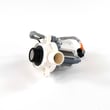
If you’re troubleshooting a drain issue that points to a failed pump, the compatible replacement for this model is the washer drain pump assembly WH23X28418.
Why it matters
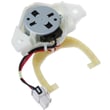
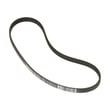
Knowing the typical 10 to 14 year lifespan helps you decide whether to invest in a repair (like a drain pump, shifter, or belt) or plan for replacement, especially if multiple high-wear components are failing close together.
Last updated: January 2026
What is the most common problem with GE washers?
On GE washers like model GTW750CSL1WS, the most common service issues are drain and spin problems (won’t drain, won’t spin, or leaves clothes too wet). These are often tied to a restriction in the drain path, a lid lock issue, or a drive system problem. See the troubleshooting section in the GTW750CSL1WS owner’s manual.
Most common symptoms we see
- Washer won’t drain at the end of the cycle
- Washer won’t spin, or spins slowly
- Clothes come out wetter than normal
- Cycle stops or pauses unexpectedly
- Out-of-balance behavior (rebalancing, vibration, or spin light blinking)
Quick checks you can do first (GTW750CSL1WS)
Start with the simplest, most common causes before replacing parts:
- Run Drain & Spin with an empty basket to confirm the unit can drain and reach spin.
- Redistribute the load evenly; bulky items can prevent a full-speed spin.
- Confirm the lid closes fully and the lid lock engages.
- Check the standpipe and household drain for slow draining or backing up.
- Reduce detergent if you see heavy suds; oversudsing can interfere with drain/spin performance.
Parts that commonly relate to drain/spin complaints
If the basic checks point to a component failure, these are frequent suspects on top-load GE designs:
| Symptom | Common part area | Example compatible part for this model |
|---|---|---|
| Hums but won’t drain, drains slowly | Drain pump or drain path | Washer drain pump assembly WH23X28418 |
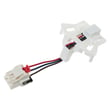
| Won’t start spin or stops mid-spin | Lid lock system | Washer lid lock WH08X37938 |
| Agitates but won’t spin correctly | Shifting/drive system | Washer shifter WH03X30517 |
Why it matters
Drain and spin issues are the problems that most often turn into repeat laundry headaches: longer cycle times, wet loads, and extra wear on the motor and drive components. Catching a restriction or a failing lid lock early can prevent bigger repairs.
Last updated: January 2026
What does IH mean on a washer?
On the GE GTW750CSL1WS washer, the Delay Wash setting is shown as 01H for a 1-hour delay (and 00H when cleared). If you’re seeing “IH,” it’s most often a misread of 01H on the display. Confirm the Delay Wash setting using the GTW750CSL1WS owner’s manual.
What the display should show on this model
The GTW750CSL1WS uses an “hours” format for Delay Wash:
| Display | Meaning | What to do |
|---|---|---|
| 01H | Delay Wash set for 1 hour | Reduce to 00H or reset Delay Wash |
| 00H | Delay Wash off | Select cycle and press Start |
| dELAY | Delay Wash mode active | Set hours you want or turn it off |
How to clear a 1-hour delay (01H)
We recommend trying these steps in order:
- Press Delay Wash repeatedly until the display shows 00H.
- Press and hold Delay Wash for 3 seconds to reset the delay (if your control supports the reset).
- Close the lid and press Start to begin the cycle.
- If the washer is paused, press Start/Pause to resume.
If it still will not start
If Delay Wash is off (00H) and the washer still won’t run, check for other scrolling status messages described in the manual, such as:
- LId (lid is open)
- H2O SUPPLY (water valves off or water not entering)
- PAUSE (cycle paused)
Why it matters
A Delay Wash setting makes the washer look “ready” but it will not start washing until the delay time counts down. Clearing 01H is a quick first step before troubleshooting controls or components like the washer lid lock WH08X37938.
Last updated: January 2026


