Owner’s manual








How to unlock control lock on Kenmore Elite dryer?
To unlock Control Lock on your Kenmore Elite dryer model 79691983410, turn the dryer on and press and hold the CHIME button for 3 seconds. When Control Lock is on, you will typically see “CL” alternating with the cycle time, and most buttons will not work.
Control Lock is designed to prevent accidental button presses during a cycle or while the dryer is powered on.
- Disables all controls except POWER
- Shows CL in the display (often alternating with remaining time)
- Makes the dryer beep when you press buttons, but nothing changes
- Stays on even after the dryer shuts off until you turn it off
- Press POWER to turn the dryer on.
- Press and hold CHIME for 3 seconds.
- Confirm CL disappears and the buttons respond normally.
If the dryer is mid-cycle, you can still unlock it the same way; you may need to wake the controls first by pressing POWER.
| Symptom | Most likely cause | Fix |
|---|---|---|
| Dryer beeps but won’t change settings | Control Lock is enabled | Hold CHIME 3 seconds |
| “CL” shows on display | Control Lock is enabled | Hold CHIME 3 seconds |
| Only POWER works | Control Lock is enabled | Hold CHIME 3 seconds |
Control Lock is a common reason a Kenmore Elite dryer looks “stuck” even though it has power. Unlocking it restores normal operation so you can select cycles, options, and start the dryer.
For the exact button locations and panel layout for your unit, use the 79691983410 owner's manual. If you’re shopping for replacement parts for this model, you can also search by model number on Sears PartsDirect.
Last updated: February 2026
What is the life expectancy of a Kenmore dryer?
A Kenmore dryer typically lasts 10 to 13 years with normal household use. For Kenmore Elite model 79691983410, consistent airflow maintenance (lint screen and venting) and quick replacement of wear parts like the drum belt and rollers are what most often push service life to the higher end.
Most dryers fail from heat and airflow stress or from normal drum-drive wear. Here are realistic expectations:
- Typical service life: 10 to 13 years
- Often longer with good care: 14 to 18 years
- Most common wear items over time: belt, drum rollers, idler pulley, thermostats
| Usage pattern | What we typically see | What helps most |
|---|---|---|
| Light (1 to 3 loads/week) | Longer lifespan | Keep vent short and clean |
| Average (4 to 7 loads/week) | Typical lifespan | Clean lint path monthly |
| Heavy (daily loads) | Shorter lifespan | Replace wear parts early |
These steps reduce overheating, shorten dry times, and protect the motor and controls:
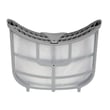
- Clean the lint screen every load; replace a damaged screen such as the lg dryer lint screen ADQ73373201.
- Check airflow: strong exhaust outside; weak airflow usually means a restricted vent.
- Clean the vent duct at least once per year (more often with long runs or pets).
- Do not overload; overloading strains the drum support system and belt.
- If you hear squealing or thumping, address it early; worn rollers and idlers can damage the drum.
When a dryer is otherwise in good shape, replacing a few common parts often restores quiet, reliable operation:
- Dryer drum belt 4400EL2001D (slipping, broken belt, drum not turning)
- Dryer drum support roller 4581EL2002H (thumping, rumbling)
- Dryer idler pulley 4560EL3001A or dryer idler assembly 4561EL3002A (squeal, belt wear)
- Dryer high-limit thermostat 6931EL3003C (overheating shutoff symptoms)
A dryer that runs hot or has restricted airflow wears out faster and can also shrink fabrics and increase energy use. Keeping the lint path and venting clear is the single most important factor in maximizing lifespan.
For model-specific care and cleaning intervals, follow the owner's manual. If you need to order replacement parts for Kenmore Elite 79691983410, use the parts list for this model or search by model number on Sears PartsDirect.
Last updated: February 2026
How do I know if my Kenmore dryer thermal fuse is blown?
A blown thermal fuse on your Kenmore Elite dryer 79691983410 usually causes the dryer to not start at all, or to run with no heat. We confirm it by unplugging the dryer and checking the fuse with a multimeter; a blown fuse reads open (no continuity). Use the 79691983410 owner's manual for access and troubleshooting steps.
- Dryer will not turn on: fuse may have opened, or you have a power supply issue
- Dryer tumbles but no heat: heating circuit problem (fuse, thermostats, igniter on gas models)
- Dry times were getting longer before failure: airflow restriction is likely
- CHECK VENT light blinks: exhaust airflow is restricted (performance will be poor)
- Breaker trips or fuse blows: correct the power issue before replacing parts
- Unplug the dryer (and shut off gas if it is a gas model).
- Access the fuse (commonly on the blower housing or exhaust duct area).
- Remove the wires from the fuse terminals.
- Meter set to continuity or lowest ohms; probe the terminals.
| Meter result | What it means | Next step |
|---|---|---|
| Near 0 ohms / continuity | Fuse is good | Diagnose heat or power issue elsewhere |
| Open / no continuity | Fuse is blown | Replace the fuse and correct overheating cause |
Overheating from restricted venting is the most common reason. If your lint screen is torn or warped, replace it with the correct part for this model, such as the lg dryer lint screen ADQ73373201.
- Clean the lint screen every load
- Clear lint from the vent duct to the outside
- Make sure the outside damper opens freely
- Avoid crushed, kinked, or extra-long vent runs
- Leave enough space so the dryer does not pinch the vent
The thermal fuse is a safety device; replacing it without fixing airflow restrictions often leads to repeat failures and longer dry times.
For parts for 79691983410, order from the parts list for this model or search by model number on Sears PartsDirect.
Last updated: February 2026
Where is the model number on Kenmore Elite dryer?
On Kenmore Elite dryer model 79691983410, the model and serial number are printed on an identification plate located inside the dryer door. Open the door and look just inside the door opening to read the label; this location is shown in the 79691983410 owner's manual.
- Open the dryer door fully
- Look for a sticker or metal plate just inside the door opening
- Check the cabinet frame area around the opening (sides and top)
- Use a flashlight if the label is hard to see
- Write down the model and serial number exactly as printed
| Item on the plate | Why it matters |
|---|---|
| Model number (79691983410) | Matches the correct parts diagrams and replacement parts for your Kenmore Elite dryer |
| Serial number | Helps identify production details when a part has version changes |
We use the model number to ensure part fit for your exact Kenmore Elite dryer configuration. Even a single digit off can pull the wrong diagram, which can lead to ordering the wrong belt, thermostat, or control part.
- Take a close-up photo and zoom in to read faint print
- Clean dust and residue off the plate gently with a damp cloth
- If you need a common wear item after confirming the model, examples include the dryer drum belt 4400EL2001D and the dryer drum support roller 4581EL2002H
To order parts from the model parts list or search by model number, use Sears PartsDirect.
Last updated: February 2026
What are common problems with Kenmore dryers?
Common problems we see with the Kenmore Elite dryer model 79691983410 are no heat or long dry times (most often from restricted venting), won’t start (power supply or control lock), won’t tumble (belt or idler issues), and loud thumping/squealing (worn drum support rollers). For model-specific operating and troubleshooting steps, use the owner's manual.
- Long dry times or “CHECK VENT” light: restricted exhaust duct, wrong vent material, too many elbows
- Dryer runs but no heat: tripped breaker or blown fuse; gas shutoff closed on gas models
- Dryer won’t turn on: loose plug, tripped breaker, blown fuse, or control lock enabled
- No tumbling: worn belt or idler pulley
- Loud noise: worn drum rollers or idler pulley; sometimes a failing motor
- Clean the lint screen and confirm strong airflow at the outside vent hood.
- Inspect venting for crushed ducting, heavy lint buildup, or plastic or foil vent material.
- Keep the vent run as short and straight as possible; extra elbows reduce airflow.
- For “won’t start,” confirm the outlet has power and the breaker is fully reset.
- If CL shows, press and hold CHIME for 3 seconds to toggle Control Lock.
If your 79691983410 is noisy or the drum is not turning, these model-matched parts are common fixes:
| Symptom | Likely wear item | Example part for this model |
|---|---|---|
| Thumping, rumbling | Drum support roller | Dryer drum support roller 4581EL2002H |
| Squeal, belt slipping, no tumble | Idler pulley or idler assembly | Dryer idler pulley 4560EL3001A |
| Drum not turning | Drum belt | Dryer drum belt 4400EL2001D |
Restricted venting is the most common root cause of dryer complaints because low airflow increases dry time and can trigger the CHECK VENT indicator. Even after you clear the restriction, the dryer may need multiple cycles before the indicator resets.
We recommend matching parts by the full model number 79691983410 and comparing the part ID on the listing. You can order replacement parts from the parts list for this model, or search by model number on Sears PartsDirect.
Last updated: February 2026