Installation guide
 Owner’s manual
 Error Codes












Is a dryer 220 or 110?
Kenmore electric dryers like model 11066002010 use 240 volts (often called 220V) for the heater, and they also use 120 volts internally for the motor and controls. That is why an electric dryer plugs into a dedicated 240V dryer outlet, not a standard 120V receptacle.
What to expect for this Kenmore electric dryer
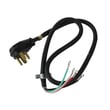
Most homes supply an electric dryer with a 30-amp circuit and a 120/240V cord connection. The installation instructions for this model call for a UL-listed 30-amp power supply cord rated 120/240V minimum and a matching receptacle (commonly NEMA 14-30R for 4-wire setups). See the installation guide.
- Electric dryer heat requires 240V to reach proper drying temperatures.
- The drum motor, timer, and electronic controls typically run on 120V.
- The circuit is usually 30 amps with heavier gauge wiring.
- Many installations use a 4-wire cord and receptacle (hot, hot, neutral, ground).
- Local codes can affect whether 3-wire or 4-wire is allowed.
Quick comparison: electric vs. gas dryer power
| Dryer type | Typical supply | What the electricity runs | Outlet style (typical) |
|---|---|---|---|
| Electric dryer (like 11066002010) | 120/240V, 30A | Heater (240V) plus motor/controls (120V) | 3-prong or 4-prong dryer outlet |
| Gas dryer | 120V, 15A | Motor/controls/igniter (heat comes from gas) | Standard household outlet |
How to confirm what you have at home
- Check the wall outlet shape: a dryer outlet is larger than a standard 120V outlet.
- Check the breaker: electric dryers are typically on a double-pole 30A breaker.
- Check the dryer terminal block area and cord type (3-wire vs. 4-wire).
- Follow the grounding and cord-connection steps in the 11066002010 installation guide.
Why it matters
Using the correct voltage and cord setup prevents nuisance tripping, poor drying performance, and wiring damage. It also ensures the dryer is properly grounded, which reduces shock risk.
Last updated: February 2026
What is an F1 code on a Kenmore dryer?
An F1 code on a Kenmore dryer typically points to an electronic control problem (the main control board or the user interface) on model 11066002010. In most cases, the fix is checking wiring connections first, then replacing the failed control component if the code returns.
What to do first (quick checks)
- Unplug the dryer (or switch off the breaker) for 2 minutes, then restore power and try a cycle.
- Confirm the dryer is getting proper power (electric dryers need full 240V; a partial power loss can cause odd behavior).
- Reseat the wire harness plugs at the control and user interface (a loose connector can trigger false errors).
- Look for pinched, rubbed, or heat-damaged wires near the console and cabinet edges.
- If the code appears only when pressing certain buttons, the console interface is a strong suspect.
For console access and wiring routing, follow the disassembly and safety steps in the 11066002010 owner's manual.
Likely causes and common fixes
| What’s failing | What you’ll notice | Typical fix |
|---|---|---|
| Main electronic control | F1 returns quickly after reset, random beeping, cycle won’t start | Inspect connectors; replace control if needed |
| User interface (console) | Certain keys do not respond, F1 after button presses | Inspect ribbon/connector; replace interface if needed |
| Wire harness/connector issue | Intermittent F1, dryer works sometimes | Repair terminals, secure harness, correct routing |
If you’re also seeing other fault codes, use the Kenmore 110 series electronic control model dryer error codes reference to match symptoms to the right checks.
Why it matters
The electronic control manages heat, motor operation, and cycle timing. When it detects an internal fault or bad communication, it can stop the dryer to prevent overheating, poor drying performance, or repeated shutdowns.
When a part replacement is more likely
- F1 comes back immediately after a power reset.
- The dryer starts, then stops and shows F1 repeatedly.
- You find no loose connectors, but the problem persists.
If you’re already opening the cabinet for inspection, it’s also smart to check wear items that can cause extra vibration and stress on wiring, such as the dryer repair kit 4392067.
Last updated: February 2026
How do I know what model my Kenmore dryer is?
Your Kenmore dryer’s model number is printed on the appliance ID label; on most Kenmore dryers it’s inside the door opening on the front panel, and it can also be on the back panel or inside the cabinet area near the lint screen housing. Use that exact number (for example, 11066002010) to match parts and instructions.
Where to look for the model number label
Check these common locations in this order:
- Inside the dryer door opening (around the door frame or front panel)
- On the back panel of the dryer cabinet
- Near the lint screen opening or lint duct area (varies by design)
- On the inside of the cabinet (visible after removing a panel, if needed)
For diagrams and model-specific references, use the 11066002010 installation guide.
What the model number looks like (and why it matters)
Kenmore model numbers are typically a long string of numbers (sometimes with a prefix like 110). The full model number is what we use to ensure the correct fit for parts such as a heating element, door switch, or drum support roller.
Why it matters
Using the exact model number helps you:
- Get the correct replacement parts for your Kenmore electric dryer
- Avoid ordering look-alike parts that do not fit your wiring or mounting points
- Confirm the right installation and electrical connection instructions
- Match troubleshooting steps to the correct dryer design
Quick check: model number vs. serial number
Use this as a simple guide when you’re reading the label:
| Label item | What it’s used for | Example format |
|---|---|---|
| Model number | Parts compatibility and manuals | 11066002010 |
| Serial number | Manufacturing tracking and service history | Letters and numbers |
If the label is hard to read
Try these practical steps:
- Wipe the label gently with a damp cloth to remove lint and residue
- Use your phone camera and zoom in (flash helps)
- Write down the full model number exactly as shown (all digits)
- If you remove a panel to look for the label, disconnect power first
Last updated: February 2026
How much does it cost to replace a heating element in a Kenmore dryer?
For Kenmore electric dryer model 11066002010, heating-element replacement typically costs $100 to $350 total (part plus labor). If you DIY, you’ll usually pay $70 to $120 for the heating element itself, plus any related wiring or safety parts.
Typical cost breakdown
| Item | Typical cost | Notes |
|---|---|---|
| Heating element part | $70 to $120 | Common DIY cost range for many Kenmore electric dryers |
| Service call + labor | $150 to $250 | Varies by region and access to the dryer |
| Related parts (as needed) | $10 to $50 | Terminals, wire kit, thermal cut-off kit |
Parts that commonly get replaced with the element
If your 11066002010 isn’t heating, we usually check airflow and safety devices first because overheating can take out the element and a thermal cut-off.
- Dryer heating element WP3387747
- Dryer thermal cut-off fuse kit 279973
- Dryer heating element wire kit 279457
- Lint buildup and crushed venting (can cause repeat failures)
Before you buy parts (quick checks)
These steps help prevent replacing the element when the real issue is power or airflow.
- Confirm the dryer has 240V power (many electric dryers can run but not heat on half power).
- Check that both household fuses are good or both breakers are on.
- Run the dryer for about 5 minutes, then open the door and feel for heat.
- Inspect and clean the lint screen and vent path; long vent runs reduce performance.
- If there’s still no heat after power and vent checks, test the heating circuit components.
Why it matters
A failed heating element can be a symptom of restricted venting or a blown thermal cut-off. Fixing airflow and replacing the correct safety parts helps restore normal drying times and helps keep the new element from failing early.
Model-specific help
Use the 11066002010 installation guide for venting requirements and the initial “no heat” checks (power supply, breakers/fuses, and heat test after 5 minutes).
Last updated: February 2026
What are the codes for Kenmore Elite dryer?
Kenmore Elite dryer error codes are on-screen letters and numbers that point to a specific problem area such as power, airflow, door/lock, temperature sensing, or the electronic control. For your Kenmore electric dryer model 11066002010, start by matching the exact code to the chart in the 11066002010 owner's manual.
Common Kenmore Elite dryer codes and what they usually mean
These are some of the most common code families customers see on Kenmore Elite dryers; the exact meaning can vary by series.
- PF: power failure or power interruption
- AF: airflow restriction (often a venting issue)
- F01: main electronic control problem
- F02: keypad or user interface problem
- F20 to F25: temperature sensing circuit issues (often thermistor related)
- F28 to F29: moisture sensor circuit issues
- DR: door or door lock related issue
What to do first (safe, high-impact checks)
Many “codes” are symptoms of airflow, power, or a simple switch issue.
- Reset the dryer by unplugging it for 2 minutes, then restore power.
- Confirm the dryer is exhausting outdoors and the vent path is clear.
- Use only 4-inch heavy metal vent; avoid plastic or foil vent.
- Check that flexible metal vent (if used) is fully extended and not kinked.
- Make sure the door closes firmly; a failed door switch can stop operation.
| Code type | Most common cause | Typical fix |
|---|---|---|
| AF / airflow | Crushed, clogged, or long vent run | Clean/shorten venting, replace damaged duct |
| PF / power | Loose plug, breaker trip, outage | Restore power, check cord and breaker |
| DR / door | Door not closing, switch issue | Inspect latch, test/replace switch |
| F2x / sensing | Sensor circuit fault | Check wiring, replace sensor if failed |
Parts that commonly relate to these codes on model 11066002010
If troubleshooting points to a failed component, these are common replacements for this model.
- Dryer door switch WP3406107 (door not detected, won’t start)
- Dryer thermistor WP8577274 (temperature sensing faults)
- Dryer moisture sensor WP3387223 (moisture sensor related faults)
Why it matters
Error codes help prevent repeat failures. For example, an AF airflow restriction can cause overheating, longer dry times, and repeated thermal cut-off trips. Correct venting and sensor operation keeps drying performance consistent.
Last updated: February 2026
How do I remove the front panel of my Kenmore dryer?
To remove the front panel on your Kenmore electric dryer model 11066002010, we unplug power first, then release the top, remove the front-panel mounting screws (often inside the door opening and along the top edge), and lift the panel up and off while supporting any wiring.
Safety first
- Unplug the dryer (or switch off the breaker) before starting.
- If the dryer is hard-wired, shut off power at the breaker and confirm the drum light is off.
- Wear cut-resistant gloves; cabinet edges can be sharp.
- Avoid pulling on wires; disconnect connectors by the plug, not the wire.
- Keep screws grouped by location so reassembly is straightforward.
Typical front panel removal steps (most Kenmore 110-style dryers)
- Disconnect power and pull the dryer forward enough to work.
- Release the main top: insert a putty knife a few inches in from each front corner to pop the spring clips, then lift the top.
- Remove front panel screws:
- Open the door and remove screws around the door opening that secure the front panel.
- Remove any screws along the top inside edge (under the lifted top).
- Disconnect door switch wiring if it is attached to the front panel (common on many models).
- Lift and remove the front panel: tilt the top of the panel toward you, then lift it up off the lower retaining tabs.
What you can access once the front is off
| Area you can reach | Common reason | Example part for this model |
|---|---|---|
| Drum support area | Thumping, rumbling | Support WPW10314173 |
| Belt and idler area | Squealing, belt slipping | Dryer idler pulley 279640 |
| Heating circuit area | No heat, overheating | Dryer heating element WP3387747 |
Why it matters
Removing the front panel is the main way we access the drum, belt path, idler pulley, and airflow components. Doing it in the right order prevents bent panels, stripped screw holes, and damaged door switch wiring.
Model-specific reference
For screw locations and the correct disassembly order for your exact configuration, follow the 11066002010 installation guide.
Last updated: February 2026
What is the cubic foot of my Kenmore dryer model 11066002010?
The exact cubic-foot (drum volume) for Kenmore electric dryer model 11066002010 is listed in the specifications section of the product literature; the most reliable place to confirm it is the 11066002010 owner's manual. This model is a standard 27-inch-wide electric dryer, so it uses a full-size drum.
How to find the exact cubic-foot rating
Use the manual’s spec pages so you get the official capacity for your exact configuration.
- Open the Specifications or Product data section
- Look for “Capacity”, “Drum capacity”, or “Drum volume (cu. ft.)”
- If you see only dimensions, check for a separate specification sheet page in the PDF
- Match the full model number 11066002010 (not just “110”) when comparing documents
What “full-size” usually means for a 27-inch electric dryer
Most 27-inch vented electric dryers are built in a narrow band of capacities; use this as a sizing guide for baskets and load planning, then confirm the exact number in the manual.
| Dryer size class | Typical width | Typical capacity range |
|---|---|---|
| Compact | 24 in. | 3.4 to 4.4 cu. ft. |
| Full-size (standard) | 27 in. | 6.0 to 7.4 cu. ft. |
| Extra-large | 27 to 29 in. | 7.5 to 9.0 cu. ft. |
Why it matters
Drum capacity affects airflow and drying performance. Loading beyond the drum’s intended capacity increases dry time, wrinkles, and heat stress on components such as the heating system and drum support parts.
Related setup tip that impacts real-world capacity
Even with the correct drum size, restricted venting makes loads feel “too big” because drying slows down. Use the 11066002010 installation guide to verify vent length limits, hood type, and required clearances.
Last updated: February 2026