 Owner’s manual
 Error Codes








What is the most common problem with LG dryers?
The most common LG dryer complaint we see, including on model DLE8377NM, is the dryer won’t start. In many cases the cause is simple (power, door not fully closed, or a tripped breaker), but a failed door switch or control-related issue can also stop operation.
- Confirm the dryer is plugged in and the outlet has power.
- Check the home breaker; many electric dryers use two breakers.
- Close the door firmly; a misaligned latch can prevent starting.
- Make sure Child Lock is not enabled (if equipped).
- Press Start/Pause with the door fully closed.
For model-specific control and indicator details, follow the steps in the DLE8377NM owner’s manual.
If power is good and the dryer still won’t start, these are common start-preventing components to inspect on DLE8377NM:
- Door switch (fails open so the control thinks the door is open)
- Start switch or user interface switch
- Wiring connections at the door switch and control
- Motor or drive system binding (less common, but possible)
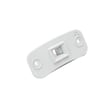
If the door must be slammed to start, or the dryer stops when you wiggle the door, the dryer door switch EBF61496102 is a strong suspect.
| What you notice | Most likely direction | What to do next |
|---|---|---|
| No lights, no response | Power supply issue | Check outlet and breakers |
| Lights on, won’t start | Door circuit or control input | Test door switch, check latch alignment |
| Starts then stops quickly | Door switch, motor issue, control sensing | Inspect door switch, check for binding |
| Error code displayed | Sensor/control detected a fault | Use an LG error code guide |
For code-based problems, we recommend using LG dryer error codes.
A “won’t start” problem is often a fast fix, but it can also be a safety interlock doing its job. Verifying power and the door circuit first helps avoid unnecessary parts replacement and gets your LG DLE8377NM running sooner.
Last updated: January 2026
How to reset LG dryer error code?
For the LG DLE8377NM dryer, we typically clear many temporary error codes by power-cycling the dryer: turn it off, unplug it (or switch the breaker off) for about 30 seconds, then restore power and try a cycle again. If the code returns, the dryer is detecting an ongoing problem that needs troubleshooting.
- Press Power to turn the dryer off.
- Unplug the dryer (or turn the circuit breaker off).
- Wait 30 seconds.
- Restore power.
- Start a cycle and watch for the code to reappear.
For control-panel functions and display behavior specific to this model, we reference the DLE8377NM dryer manual.
Many LG dryer codes are triggered by airflow, heat, or sensor issues. Start with the items that cause the most repeat codes.
- Airflow and venting: Clean the lint screen and confirm the vent to the outside is not crushed, kinked, or blocked.
- Load and cycle selection: Avoid overloading; try a timed cycle to see if the behavior changes.
- Power supply (electric models): A tripped breaker can let the drum run but prevent proper heating.
- Moisture sensing: Dirty sensor bars can cause odd dry-time behavior and some sensor-related alerts.
- Heat monitoring components: If the dryer is overheating or not heating correctly, thermostats or the thermistor may be involved.
If troubleshooting points to a temperature-sensing failure, the compatible replacement for this model is the dryer thermistor AGM30045804.
| What you see | What it usually means | What to do |
|---|---|---|
| Code clears and does not return | Temporary control glitch or brief condition | Keep using; monitor airflow |
| Code returns immediately on start | Active fault detected | Troubleshoot the specific code |
| Code returns mid-cycle | Condition develops during operation (heat/airflow/sensing) | Check venting, load size, heat components |
Resetting only clears the display; it does not fix the condition that triggered the code. On the DLE8377NM, repeat codes often point to restricted airflow (long dry times, overheating) or a failed sensor/thermostat that can affect drying performance.
Last updated: January 2026
Is a 7.4 cubic foot dryer big?
A 7.4 cu. ft. dryer is generally considered large capacity. For the LG DLE8377NM specifically, the capacity listed in the specifications is 7.3 cu. ft. (IEC), which still falls in the large-capacity range for most households (see the DLE8377NM dryer manual).
LG lists this model at IEC 7.3 cu. ft.; some retailers may round or market similar models as 7.4 cu. ft., but the model-specific spec we use for DLE8377NM is 7.3.
- Capacity listed for DLE8377NM: 7.3 cu. ft. (IEC)
- Typical category: large capacity
- Best for: mixed family loads, towels, and many bulky items
- Key benefit: more tumbling room for better airflow and more even drying
| Dryer capacity | Common label | Typical fit |
|---|---|---|
| Under ~7.0 cu. ft. | Standard | Smaller households, lighter weekly laundry |
| ~7.0 to ~7.4 cu. ft. | Large | Most families, regular mixed loads |
| Above ~7.4 cu. ft. | Extra-large | Frequent bulky loads, large households |
Even with a large-capacity LG dryer like the DLE8377NM, airflow and load size matter as much as drum volume.
- Clean the lint screen every load; replace it if torn or warped (see LG dryer lint screen 5231EL1003B)
- Do not pack the drum tight; leave space for items to lift and fall
- Separate heavy fabrics (jeans, towels) from lightweight synthetics
- If dry times increase, check for vent restrictions and lint buildup
- Use Sensor Dry for most loads; use Time Dry for heavy or bulky items
Capacity affects drying performance and fabric care. A large drum (like 7.3 to 7.4 cu. ft.) helps clothes tumble freely, improving airflow, reducing damp spots, and often shortening dry times when the venting is clear.
Last updated: January 2026
Is the LG ThinQ a dryer?
LG ThinQ is not a dryer model; it’s LG’s smart app/platform name. For the LG DLE8377NM specifically, the model’s documentation we have does not describe ThinQ app features; it does describe an optional Remote Laundry Monitor (RLM) display unit for status monitoring (see the DLE8377NM owner’s manual).
In the DLE8377NM manual, the “smart” style feature called out is the RLM (Remote Laundry Monitor), which is a separate display unit you can plug into a power outlet to monitor dryer status.
Key points:
- RLM is mentioned as purchasable separately
- It’s described as a status monitor for the dryer
- The manual does not mention ThinQ by name
Because feature names can vary by model and production run, confirm using what’s on your unit and what’s listed for DLE8377NM.
Check:
- The feature descriptions in the DLE8377NM owner’s manual
- Any “RLM” references on the console or in the packaging
- Whether your dryer came with, or can pair to, a separate monitor display
| Term | What it is | What you can expect |
|---|---|---|
| LG ThinQ | LG’s app/platform branding | App-based remote features only if your specific model supports it |
| RLM (Remote Laundry Monitor) | Optional add-on display mentioned for DLE8377NM | Basic dryer status monitoring via a separate display unit |
| LG DLE8377NM | Your dryer model number | Features confirmed by the DLE8377NM documentation and controls |
Knowing whether you have ThinQ app support versus an RLM monitor helps you choose the right accessories and avoid setup frustration. It also keeps troubleshooting focused on the dryer’s actual controls and sensors.
Last updated: January 2026









