Installation guide
 Owner’s manual
 Error Codes




How to hard reset a Whirlpool oven?
To hard reset a Whirlpool oven on model WFE505W0HZ1, we reset power at the breaker for 1 minute, restore power, then start a Bake cycle and watch the display for about 1 minute to confirm normal operation. See the WFE505W0HZ1 owner's manual for control and display details.
Hard reset steps (WFE505W0HZ1)
- Turn OFF the range circuit breaker(s) (or unplug the range if it is accessible and safe to do so).
- Wait 1 full minute.
- Turn the breaker(s) ON (or plug the range back in).
- Press BAKE, choose a temperature, then press START.
- Monitor the control display for about 1 minute to confirm the oven heats and no message returns.
If the display still shows an error or won’t start
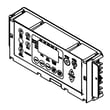
The manual guidance for this style of control is to clear messages with CANCEL; if a code returns, the issue is usually a control, sensor, or wiring problem that needs diagnosis.
- Press CANCEL to clear the display.
- Check Control lock: press and hold CONTROL LOCK for 3 seconds to toggle lockout.
- Check Demo mode: the oven will not heat in demo mode; use the keypad sequence shown in the manual to turn demo mode off.
- If the oven heats inconsistently or shows temperature-related errors, test/inspect the oven temperature sensor and its harness connections.
Helpful parts commonly involved with “won’t heat” symptoms on this model include the range oven temperature sensor WPW10181986 and the bake element W11182108.
Quick symptom guide
| What you see | What it usually means | What to do next |
|---|---|---|
| Flashing time | Power was interrupted | Set the clock; run a Bake test |
| Error code (letter + number) | Control detected a fault | Press CANCEL; if it returns, troubleshoot sensor/wiring |
| Controls don’t respond | Control lock is on | Hold CONTROL LOCK 3 seconds |
| Oven won’t heat but controls work | Demo mode may be on | Turn off demo mode per manual |
Why it matters
A hard reset clears many temporary control glitches after a power interruption. If the same message returns right away, it points to an ongoing issue (sensor, heating circuit, wiring harness, or electronic control) that a reset will not fix.
You can order replacement parts for your Whirlpool WFE505W0HZ1 from the parts list for this model, or search by model number on Sears PartsDirect.
Last updated: February 2026
What does F5E1 mean?
On a Whirlpool WFE505W0HZ1 electric freestanding range, F5E1 points to an oven door lock problem: the control is not sensing the door lock mechanism in the expected position (locked or unlocked). This most often shows up during self-clean or when the control thinks the latch is stuck.
What to do first (safe reset and quick checks)
- Turn the range off, then disconnect power at the breaker for 1 minute and restore power.
- Make sure the oven door is fully closed and nothing is obstructing it.
- If the code appeared during self-clean, let the oven cool completely; the latch can stay engaged until temperatures drop.
- Try a non-clean bake cycle to see if the code returns.
- If the display shows F9 or F9 E0, treat that as a miswired outlet / supply issue and have the electrical supply checked.
For model-specific operating steps and troubleshooting flow, follow the WFE505W0HZ1 owner's manual.
Likely causes on this range
F5E1 is typically triggered by one of these conditions:
- Door lock/latch mechanism binding from heat or debris
- A failed latch switch or lock motor (if equipped)
- Loose or damaged wiring between the latch assembly and control
- A control board input not reading the latch position correctly
Parts that commonly relate to “won’t heat” symptoms (not the latch)
If the complaint is actually “oven not heating” along with an error, these parts are common checks on WFE505W0HZ1:
| Symptom | Common check | Example part for this model |
|---|---|---|
| Oven temperature seems wrong | Temperature sensor | Range oven temperature sensor WPW10181986 |
| No bake heat | Bake circuit | Bake element W11182108 |
Why it matters
During self-clean, the range uses a door lock for safety. If the control cannot confirm the lock position, it may stop the cycle, disable heating, or keep the door locked until the issue is resolved.
You can order replacement parts for Whirlpool WFE505W0HZ1 from the parts list for this model, or search by model number on Sears PartsDirect.
Last updated: February 2026
How do I find the model number on my WFE505W0HZ1?
On your Whirlpool WFE505W0HZ1 electric freestanding range, the model number is printed on the model and serial label on the oven’s front frame. Open the oven door and look at the upper right corner of the front frame for the label.
Where to look on the range
We use the same label location described in the product documentation; check these spots in order:
- Open the oven door and inspect the upper right corner of the front frame (most common)
- Look behind a top corner of the oven door on the frame
- If your range has a storage drawer, check either side of the drawer opening on the frame
- Wipe the area with a damp cloth to remove grease or cleaner residue that can hide the print
For the exact label location illustrations, use the WFE505W0HZ1 owner's manual.
What you should write down
Record both identifiers so we can match the correct Whirlpool parts and diagrams:
- Model number (example format: WFE505W0HZ1)
- Serial number
| Label item | What it’s used for | When you need it |
|---|---|---|
| Model number | Matches the correct parts list and diagrams | Ordering parts like a bake element or surface element |
| Serial number | Identifies production details for your specific unit | When a part changes by manufacturing date |
Why it matters
Whirlpool ranges often have multiple versions that look the same but use different wiring, controls, or cooktop components. Using the exact model number from the label prevents ordering the wrong part and helps ensure proper fit and safe operation.
Last updated: March 2026