Owner’s manual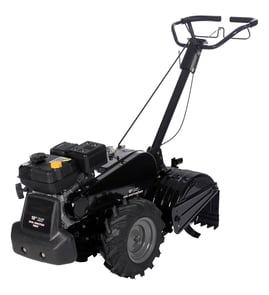



What tiller is made in the USA?
For the Western Auto rear-tine tiller model 3455A89, the owner’s documentation identifies it as an American-built product. For other brands and models, “Made in USA” varies by manufacturer and sometimes by specific model or production run, so we recommend confirming it in the product documentation.
How to confirm a tiller is made in the USA
The most reliable places to check are the manufacturer label and the documentation that shipped with the machine.
- Check the product ID plate or decal on the frame (often near the engine, handle base, or transmission)
- Look for wording such as “Made in U.S.A.” or “American-built”
- Verify the exact model number on the label matches what you are shopping parts for
- Review the first pages of the documentation for origin statements
- If the tiller uses a separate engine brand (for example Briggs & Stratton), remember the engine origin can differ from the tiller origin
For this model, see the 3455A89 owner’s manual for the “American-built product” statement and other identification details.
What “made in the USA” can mean
Manufacturers use different terms, and they are not always interchangeable.
| Label you may see | What it typically indicates | Where to verify |
|---|---|---|
| Made in USA | Manufactured in the U.S. under the maker’s definition | ID plate, manual |
| American-built | Built/assembled in the U.S. (wording varies) | Manual, decals |
| Assembled in USA | Final assembly in the U.S.; parts may be global | ID plate, packaging |
Why it matters
Country-of-origin can affect parts sourcing, hardware standards (inch-based fasteners are common on older U.S.-built equipment), and which diagrams match your machine. Confirming the exact model number first helps ensure you get the right belt, chain, and gearcase parts for your tiller.
Last updated: February 2026
How to grease a tiller?
For the Western 3455A89 rear-tine tiller, we grease the machine at its service points so moving parts stay lubricated and wear stays low. Focus on the tine drive/gearcase area and any pivot points; use the grease type and intervals listed in the 3455A89 owner's manual.
Safety first (before any greasing)
- Shut off the engine and wait for all moving parts to stop.
- Disconnect the spark plug wire and keep it away from the plug.
- Let the engine and muffler cool before working near the drive area.
- Keep guards and protective plates in place when operating.
Where to grease on a rear-tine tiller
Most rear-tine tillers like the Western 3455A89 need lubrication in these common areas:
- Handle and control pivots (clutch/drive control linkage points)
- Depth stake pivot and pin area
- Wheel hubs and axle points (if equipped with greaseable hubs)
- Tine shaft support points and external bushings (where accessible)
- Gearcase or chain drive area (only if your manual specifies a grease fill or service procedure)
Basic greasing steps
- Clean dirt off the fitting or area first so grit does not get pushed inside.
- Apply a small amount of grease, then move the control/part through its range to spread it.
- Wipe off excess grease to reduce dirt buildup.
- Reconnect the spark plug wire only after you are done and guards are back in place.
Grease vs. oil: quick guide
| Area | What to use | What you should see |
|---|---|---|
| Pivot points, pins, linkages | Multi-purpose grease | Smooth movement, no squeaks |
| Chain drive (if serviceable) | Grease per manual | Light coating on chain/sprockets |
| Engine | Engine oil (not grease) | Correct oil level on dipstick |
Why it matters
Proper lubrication reduces vibration and premature wear in the drive system, tines, and controls. It also helps the tiller hold adjustments (like depth stake position) and makes shifting and handling feel more consistent.
Last updated: February 2026
Where is the model number on a tiller?
On the Western 3455A89 rear-tine tiller, the model number is on the model plate attached to the top of the transmission. We recommend confirming the full model and serial information using the 3455A89 owner's manual before ordering parts or service.
What to look for on the label
The plate typically lists several identifiers. Use these when matching parts:
- Model number (for this unit: 3455A89)
- Serial number
- Factory number (often shown near the model number)
- Stock number (may also be listed)
Quick locating checklist
Use this sequence to find it fast:
- Park the tiller on a flat surface and let the engine cool
- Stand behind the tiller at the handlebar area
- Look down toward the transmission housing (gearcase area)
- Check the top surface of the transmission for a metal or durable label
- Wipe off dirt or oil so the characters are readable
Why it matters when ordering parts
Using the exact model number helps us match the correct diagrams and parts for your transmission, tines, belts, and hardware. It also prevents ordering look-alike parts that do not fit.
| You need | Where it’s used | Example for this tiller |
|---|---|---|
| Model number | Identifies the correct parts list | 3455A89 |
| Serial number | Helps confirm production variation | Found on the same plate |
| Factory number | Narrows down exact build | Found on the same plate |
Last updated: February 2026
What are the common problems with power tillers?
Common problems on the Western 3455A89 rear-tine tiller fall into a few buckets: starting and power loss (fuel, air, spark), overheating from overload or low/dirty oil, and drive or tine issues (belt/chain wear, clutch or shift problems). Most are prevented with routine checks and safe operating habits from the 3455A89 owner's manual.
Most common symptoms and likely causes
- Won’t start: empty tank, incorrect choke use, flooded engine, dirty air cleaner, water in fuel, loose spark plug wire, worn spark plug
- Hard to start: throttle not set correctly, stale fuel, dirty air cleaner, spark plug gap issues
- Loss of power: engine overloaded (tilling too deep/fast), low oil level, dirty oil, dirty air cleaner
- Engine overheats: overload, restricted airflow (dirty air cleaner), low/dirty oil
- Tiller won’t move or tines won’t rotate: worn/slipping drive belt, stretched/broken chain, shift linkage out of adjustment
- Excessive vibration or difficult handling: loose fasteners, damaged tines, debris wrapped in rotating parts
Quick checks we recommend (in order)
- Shut the engine off and disconnect the spark plug wire before inspecting moving parts.
- Verify fresh fuel, correct choke use, and throttle set properly.
- Check air cleaner condition and oil level/condition.
- Inspect the drive system for obvious wear: belt glazing/cracks and chain slack.
- If the engine runs but the tiller does not drive, inspect the husqvarna rear-tine tiller drive belt 591372401 first.
- If you notice abnormal vibration, stop immediately and check for the cause.
Common problem-to-part mapping
| Problem you see | What to inspect first | Example part for this model |
|---|---|---|
| Engine runs but tiller won’t move | Drive belt condition and tension | Husqvarna rear-tine tiller drive belt 591372401 |
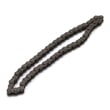
| Tines don’t rotate consistently | Chain wear/slack, engagement controls | Tiller chain, #25-50 532102134 |
| Poor depth control | Depth stake and pins | Depth stake 532102156 |
| Shifting issues | Shift lever/linkage wear | Shifter shaft 532154466 |
Why it matters
A rear-tine tiller can lurch forward if the tines catch hard ground, and abnormal vibration is a warning sign of damage. Catching these issues early helps prevent bigger failures in the belt, chain, gearcase, and tine assemblies.
Last updated: February 2026