Installation guide
 Owner’s manual
 Error Codes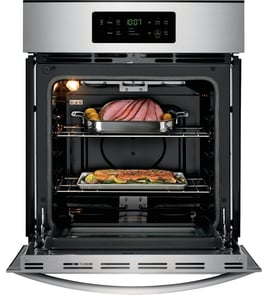

How do I clear the error code on my Frigidaire oven?
On the Frigidaire FEB27S5DBA electric wall oven, you typically clear an error (F-code) by pressing the CLEAR pad to stop the beeping and clear the display, then reprogram the oven. If the fault returns, it points to an issue that needs troubleshooting rather than repeated resets (see the owner's manual).
Quick steps to clear an F-code
- Press CLEAR to stop the alarm and clear the code.
- Set the clock if the display is flashing after a power interruption.
- Re-enter your cooking settings (bake, broil, timer) and test operation.
- If the code reappears, write down the exact code (example: F11) before clearing it again.
- If the oven was set for self-clean and the door was left open, close the door and press CLEAR on the upper and lower oven controls (if your unit has both).
What the code is telling you
An F-code means the electronic control detected a fault condition. Clearing it stops the beeping, but the next step is identifying what triggered it so you can fix the root cause.
Common causes (and what to check first)
| Symptom | Most likely area | What we recommend checking |
|---|---|---|
| Code returns immediately after CLEAR | Control or keypad input issue | Stuck key, moisture, or failing control interface |
| Oven heats poorly or temps swing | Temperature sensing circuit | Sensor connection and wiring; consider the Frigidaire range oven temperature sensor 316217002 |
| Oven dead or intermittent power | Power connection point | Junction box wiring and the terminal block 5304409888 if connections are burned/loose |
Why it matters
Clearing the code gets you back to cooking quickly, but a repeating error code helps prevent bigger failures (like overheating, no-heat, or control damage) by flagging a problem early.
Last updated: February 2026
How to tell model of frigidaire oven?
For your Frigidaire wall oven, the model number is on the serial plate along the interior side trim of the oven; you can see it when you open the oven door. For the FEB27S5DBA, write down the model and serial numbers (and any lot number/letter) before ordering parts or troubleshooting; see the owner's manual.
Where to look on a Frigidaire wall oven
Check these common tag locations in this order:
- Open the oven door and look along the interior side trim (left or right side) for the serial plate
- Use a flashlight and look for a metal or foil label with “Model” and “Serial”
- If you have a double wall oven, check the trim area for the upper and lower cavities
- Take a clear photo of the tag so you can zoom in later
What to write down (and why)
Having the full ID helps us match the correct control board, bake element, temperature sensor, and wiring parts for your exact build.
| On the serial plate | Example of how it’s used |
|---|---|
| Model number | Confirms the exact appliance family (example: FEB27S5DBA) |
| Serial number | Identifies the production run for parts compatibility |
| Lot number/letter (if shown) | Helps narrow down version changes within the same model |
Why it matters for parts and troubleshooting
Many Frigidaire wall ovens share similar-looking parts, but the electrical layout and control style can differ by model and production run. Using the correct model number helps prevent ordering the wrong component and reduces repeat repairs.
Tip for common “no heat” or “wrong temp” complaints
If you’re diagnosing heating issues after confirming the model number, the most commonly checked items are:
- Bake element
- Broil element
- Oven temperature sensor
- Control board
- Wiring connections at the terminal block
Last updated: February 2026
What is the average lifespan of FEB27S5DBA?
A Frigidaire electric wall oven like model FEB27S5DBA typically lasts 15 years with normal household use and basic maintenance. Keeping electrical connections tight, replacing wear items promptly, and avoiding overheating events helps you reach that lifespan.
What affects lifespan the most
- Heat stress: frequent self-clean cycles and high-temperature broiling accelerate wear on wiring and controls.
- Power quality: loose connections or voltage issues can damage the control board and terminal block.
- Door seal and airflow: heat leaking around the door can overwork components.
- Moisture and cleaners: overspray and harsh chemicals can corrode terminals and switches.
- Timely part replacement: replacing failed heating or sensing parts prevents secondary damage.
Common “end-of-life” symptoms (and what they usually point to)
| Symptom | Most common cause | Example part for FEB27S5DBA |
|---|---|---|
| Oven won’t heat or heats unevenly | Failed bake element | Frigidaire range bake element 318255103 |
| Temperature swings, underbakes/overbakes | Weak or drifting sensor | Frigidaire range oven temperature sensor 316217002 |
| Display dead or erratic operation | Control or power connection issue | Wall oven control board 316418520 |
| Lights out but oven works | Bulb or socket failure | Range oven light bulb 316538904 |
Maintenance that adds years
- Use self-clean sparingly; wipe spills once the oven is cool.
- Confirm the door closes squarely and vents are not blocked.
- If you smell hot insulation or see flickering display, stop using the oven and inspect wiring.
- Replace a failing sensor or element early to avoid overheating the control area.
- Follow the electrical and installation requirements in the installation guide.
Why it matters
A wall oven is a high-heat, high-amperage appliance; small issues (like a drifting temperature sensor or loose terminal connection) can cascade into bigger failures. Preventive checks and correct installation are the fastest way to protect expensive components.
Last updated: March 2026