 Installation guide
 Owner’s manual
 Error Codes



How do you deep clean a Maytag dryer?
For a deep clean on your Maytag MDE7500AYQ dryer, we recommend cleaning lint from the lint screen area and internal airflow path, then wiping the drum and exterior; doing this about every 6 months helps prevent long dry times and overheating. Use the maintenance steps in the MDE7500AYQ owner's manual as your baseline.
- Unplug the dryer (and shut off gas if you have a gas model).
- Remove and wash the lint screen: scrub with hot water, a small amount of liquid detergent, and a nylon brush; rinse and dry completely.
- Vacuum the lint screen housing and the area just inside the cabinet opening (use a crevice tool).
- Clean the exhaust duct from the dryer outlet to the wall hood; remove lint buildup and confirm the damper opens freely.
- Wipe the drum with a damp cloth and mild soap; dry the drum before running a load.
- Clean around the dryer (floor and rear area) so lint is not pulled into the cabinet.
- Replace a torn or warped lint screen; a poor seal lets lint bypass filtration.
- Confirm strong airflow at the outside vent while the dryer runs.
- Avoid dryer sheets directly on the lint screen; residue can reduce airflow.
| What you clean | What you are preventing | What you may notice if it is dirty |
|---|---|---|
| Lint screen and housing | Restricted airflow | Longer dry times, hot cabinet |
| Exhaust duct and vent hood | Overheating and shutdowns | Burning smell, weak vent airflow |
| Drum and door area | Odors and residue transfer | Musty smell, marks on clothes |
A dryer dries by moving heated air through the drum and out the vent. Lint and residue restrict airflow, which increases drying time and can cause overheating symptoms that mimic failed parts (thermal fuse, heater, motor).
If your lint screen is damaged or no longer fits tightly, replacing it restores proper filtration and airflow. For this model, use the dryer lint filter WP33001808.
Last updated: February 2026
How to remove front panel of Maytag front load dryer?
To remove the front panel on a Maytag MDE7500AYQ dryer, we first disconnect power, then remove the top and front fasteners so the front panel can lift off the lower retaining clips and swing away from the cabinet. Use the MDE7500AYQ installation guide for access and safety notes.
- Unplug the dryer (or switch off the breaker) before opening any panels.
- If the dryer is gas, shut off the gas supply valve before moving the unit.
- Wear cut-resistant gloves; cabinet edges can be sharp.
- Take a quick photo of wire connections before disconnecting anything.
- Disconnect power at the outlet or breaker.
- Remove the lint filter and any screws found in the lint filter housing opening (if equipped).
- Release the top panel: remove screws at the back edge of the top, then slide the top back and lift it up.
- Remove the control console fasteners (if they block the front panel screws); set the console back without straining wires.
- Remove front panel screws along the top inside edge of the front panel (and any lower corner screws if present).
- Unplug the door switch connector (usually near the upper front panel area).
- Lift the front panel up and off the lower retaining clips, then pull it forward and set it aside.
| Item | What to do | Why it matters |
|---|---|---|
| Door switch wiring | Unplug connector before fully removing panel | Prevents wire damage |
| Drum light wiring (if equipped) | Avoid pulling on the harness | Protects socket and lens area |
| Front bulkhead wiring | Release any clips holding wires to the bulkhead | Keeps wires from snagging |
These are common parts involved once the front is off:
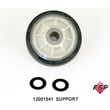
- Worn drum support rollers can cause thumping or squealing; see roller w/bea 12001541.
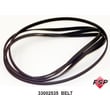
- A broken or slipping belt can stop tumbling; see belt, tumble WP33002535.
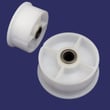
- A seized idler pulley can squeal and shred the belt.
Removing the front panel correctly prevents broken door switch wiring, bent cabinet flanges, and air leaks that can reduce airflow and drying performance.
Last updated: February 2026
What's the life expectancy of a Maytag dryer?
A Maytag dryer typically lasts 10 to 13 years. With consistent lint control, proper venting, and timely replacement of wear items, many Maytag dryers (including model MDE7500AYQ) reach 15 years of service.
Most dryers wear out from heat stress, friction, and airflow restriction. Here are realistic ranges:
| Dryer condition | Typical life | What usually limits it |
|---|---|---|
| Average use, basic upkeep | 10 to 13 years | Heat and airflow issues, normal wear |
| Good upkeep, clean venting | 13 to 15 years | Wear parts (rollers, belt, seals) |
| Excellent upkeep, quick repairs | 15+ years | Motor, heater, control failures |
We recommend these habits because they reduce overheating and mechanical strain:
- Clean the lint screen every load; replace a damaged filter such as the dryer lint filter WP33001808.
- Keep the exhaust duct and outside vent hood clear; lint buildup is a fire hazard and also shortens component life.
- Avoid overloading; heavy loads strain the belt, idler, and drum support.
- Fix squealing or thumping early; worn rollers and bearings can damage the drum.
- Use timed dry occasionally if auto cycles are overdrying and running too hot.
If the dryer still heats and tumbles, replacing a few wear parts often restores quiet, efficient operation:
- Drum support roller(s) such as the roller w/bea 12001541
- Drive belt such as the belt, tumble WP33002535
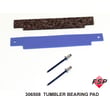
- Drum bearing components such as the dryer drum bearing kit 306508
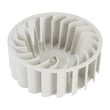
- Air-moving parts such as the blower wheel (symptoms: weak airflow, noise)
A dryer that runs hot or has restricted airflow can blow thermal protection devices and overwork the motor. Following the cleaning and venting guidance in the MDE7500AYQ installation guide and routine care steps in the MDE7500AYQ owner's manual helps you get the full expected lifespan.
Last updated: February 2026





