 Installation guide
 Owner’s manual



How to clear electrolux dishwasher error codes?
To clear an error code on your Electrolux EIDW1805KS1B dishwasher, cancel the cycle and then reset power by turning the breaker off for about 5 minutes, then restore power and restart a cycle. If the code returns, troubleshoot the underlying problem.
Quick reset steps (safe order)
- Press Cancel (or Cancel/Drain) to stop the current cycle.
- Wait about 60 seconds to let the control fully stop.
- Turn OFF power at the breaker for 5 minutes.
- Turn power back ON.
- Start a normal wash cycle and watch for the code to reappear.
If the code comes back: what to check first
Many error codes are triggered by a condition the dishwasher still detects after a reset.
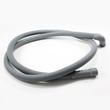
- Drain issues: Check for a clogged air gap (if used), a kinked drain hose, or a disposer connection that still has the knockout plug in place.
- Fill issues: Confirm the water supply valve is open and the unit is getting water.
- Leaks: Look under the unit and around the door for dripping during fill and wash.
- Door/installation fit: A door that rubs adjacent cabinetry can cause sealing problems.
- Electrical connection: Verify the junction box wiring is secure and not pinched.
Common symptoms and likely next step
| What you notice | What it usually points to | What we do next |
|---|---|---|
| Won’t drain, standing water | Drain path restriction or failed pump | Inspect hose/disposer plug; consider dishwasher drain pump 5304483444 |
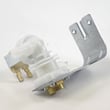
| Won’t fill or fills slowly | Supply issue or inlet valve problem | Check shutoff valve; consider dishwasher water inlet valve 5304482406 |
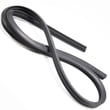
| Water on floor near door | Door seal or alignment issue | Check door fit; consider Electrolux dishwasher tub gasket 5304512895 |
Why it matters
Clearing the code gets the control board out of “fault display,” but the dishwasher will often re-trigger the same code if the original issue (drain, fill, leak, or wiring) is still present. Fixing the root cause prevents repeat shutdowns and protects the kitchen from water damage.
For code meanings and model-specific guidance, use our Electrolux dishwasher error codes reference and your EIDW1805KS1B installation guide.
Last updated: February 2026
What are the main parts of a dishwasher?
For the Electrolux EIDW1805KS1B dishwasher, the main parts include the water fill and drain components, the wash system that sprays and circulates water, the heating and sensing components, and the door and rack hardware that lets the unit run safely and clean effectively. See the EIDW1805KS1B installation guide for enclosure, leveling, and safety requirements that affect how these parts operate.
Main dishwasher parts (what they do)
- Water inlet valve: opens to let hot water into the tub (common fill problems point here).
- Circulation pump: drives water through the spray system for washing.
- Wash arm (spray arm): sprays water through jets to clean dishes.
- Drain pump: pushes used water out through the drain hose.
- Heating and temperature sensing: helps water reach target temperature and supports drying.
- Detergent dispenser: releases detergent at the right time in the cycle.
- Racks and basket: hold dishes and silverware in position for spray coverage.
Model-relevant examples of these parts
| System | Example part for EIDW1805KS1B | What you notice when it fails |
|---|---|---|
| Fill | Dishwasher water inlet valve 5304482406 | Not filling, slow fill, stops early |
| Wash | Electrolux dishwasher circulation pump 5304512880 | Poor cleaning, weak spray sound |
| Spray | Electrolux dishwasher wash arm 5304512884 | Dishes dirty, spray holes clogged |
| Drain | Dishwasher drain pump 5304483444 | Standing water, won’t drain |
| Detergent | Electrolux dishwasher detergent dispenser assembly 5304509278 | Detergent not released, door won’t latch |
Why it matters
When we match symptoms to the correct “system” (fill, wash, heat, drain, or door/rack), troubleshooting gets faster and you avoid replacing the wrong part. Installation details also matter; this dishwasher must be fully enclosed and level for proper rack operation and wash performance.
Quick checks before replacing parts
- Confirm the dishwasher is level so racks roll correctly and the door seals evenly.
- Use 120 °F to 150 °F incoming water temperature for best cleaning.
- Verify water supply pressure is typically 20 to 120 PSI.
- Keep the drain hose run within typical limits (long runs can hurt draining performance).
- Make sure wiring and hoses are not pinched under the unit during installation.
Last updated: February 2026
What does blue light mean on a dishwasher?
On an Electrolux dishwasher like model EIDW1805KS1B, a blue indicator light is used as a status signal (the exact meaning depends on the control style and whether the light is solid or flashing). For the correct definition for your dishwasher, use the status-light section in the EIDW1805KS1B owner's manual.
What a blue light usually indicates
On many modern dishwashers, a blue light is commonly tied to one of these conditions:
- A cycle is running (wash in progress)
- A delay start is active (waiting to begin)
- A “clean” or “complete” status after the cycle ends
- A door or control status prompt (for example, press Start again after opening the door)
How to identify the meaning on your EIDW1805KS1B
Use these quick checks to match the light to what the dishwasher is doing:
- Look at the display or control panel text for “Delay”, time remaining, or a cycle name.
- Listen for operation: fill sound, circulation spray, or drain pump.
- Open and re-close the door; if the cycle was paused, press Start to resume.
- Confirm water is on at the shut-off valve under the sink.
- Reset power at the breaker for 1 minute if the controls are frozen.
Quick guide: what to check first
| What you observe | Most likely situation | Best next step |
|---|---|---|
| Blue light on, dishwasher quiet | Delay start or waiting state | Check delay setting; press Start after closing door |
| Blue light on, you hear spraying | Cycle running | Let it run; avoid opening the door |
| Blue light on after cycle ends | Completion indicator | Unload when cool; run a rinse if needed |
Why it matters
Interpreting the status light correctly prevents unnecessary resets and helps you focus on the right cause, such as a delay start setting, a door-latch pause, or a true “won’t start” problem.
If the dishwasher has power but will not run even after confirming settings, follow the steps in the dishwasher wont start video.
Last updated: February 2026
Why is my Electrolux dishwasher panel not working?
If the control panel on your Electrolux EIDW1805KS1B dishwasher is dead or unresponsive, the most common causes are a power supply problem to the dishwasher, a loose/damaged wiring connection, or a failed control or user interface component. Start with power and wiring checks before replacing parts.
Quick checks we recommend first
- Confirm the dishwasher has power at the breaker; reset the breaker fully OFF then ON.
- If the unit is hardwired, verify the junction box connections are tight and not overheated.
- Check for pinched or damaged wires under the dishwasher; wiring can get trapped during installation or when the unit is pushed back into the cabinet.
- Power-cycle the dishwasher: turn off power for 5 minutes, then restore power.
- If the panel lights but buttons do nothing, look for a control lock setting in the EIDW1805KS1B owner’s manual.
Installation-related causes (very common)
The installation instructions call out that wires must be secured under the dishwasher and not pinched or contacting moving parts (like door springs). If the panel stopped working after a recent install, leveling, or cabinet adjustment, focus here first.
What to inspect
- Wire harness routing under the tub and near the door hinge area
- Any spots where insulation, brackets, or the toekick could press on wiring
- Signs of rubbing near door springs or sharp metal edges
Parts that commonly fix a dead or erratic panel
If power and wiring are good, the failure is usually in the control electronics.
| Symptom | Most likely area | What we do next |
|---|---|---|
| No lights, no response | Power feed, wiring, main control | Verify voltage and connections; then test/replace control if needed |
| Lights on, buttons unresponsive | User interface/console, wiring | Inspect console connections; replace console/UI if failed |
| Random beeping, flashing, intermittent | Control board, moisture, wiring | Check for moisture intrusion; inspect harness and control |
Model-matched parts that may apply include the Electrolux electronic control 5304512887, Electrolux dishwasher display board 5304513818, and the Electrolux console assembly 5304513819.
Why it matters
A non-working panel is often a simple power or pinched-wire issue, especially after the dishwasher has been moved. Catching that early prevents repeat failures and avoids replacing good parts.
Last updated: February 2026





